Agentic workflows: What they are and how they work
blogDetail.updated September 8, 2026




blogDetail.subscribeCard.title
blogDetail.subscribeCard.description
Agentic workflows are a type of AI automation where one or more AI agents take action toward a defined goal. What makes this different from traditional automation is the ability to dynamically adjust the approach as the workflow progresses: Rather than following a fixed set of steps, the AI agents can update their plan based on the outcomes of previous steps.
This developer guide will help you understand how to incorporate more agentic AI into your work. It gives in-depth explanations about what agentic workflows are, how they work, when to use them, and what challenges you need to be aware of when using them. It also covers why structured content is critical for successful outcomes from the AI agents working within agentic workflows.
What are agentic workflows?
An agentic workflow is a process that uses one or more AI agents to coordinate, understand, and execute tasks. As part of this process, AI agents use AI models (most often LLMs) for reasoning and can access systems outside themselves to read data or take action.
While each AI agent has a certain level of autonomy over its own work, an agentic workflow provides structure, acting as a flexible pipeline that guides the agent (or agents) toward a well-defined goal.
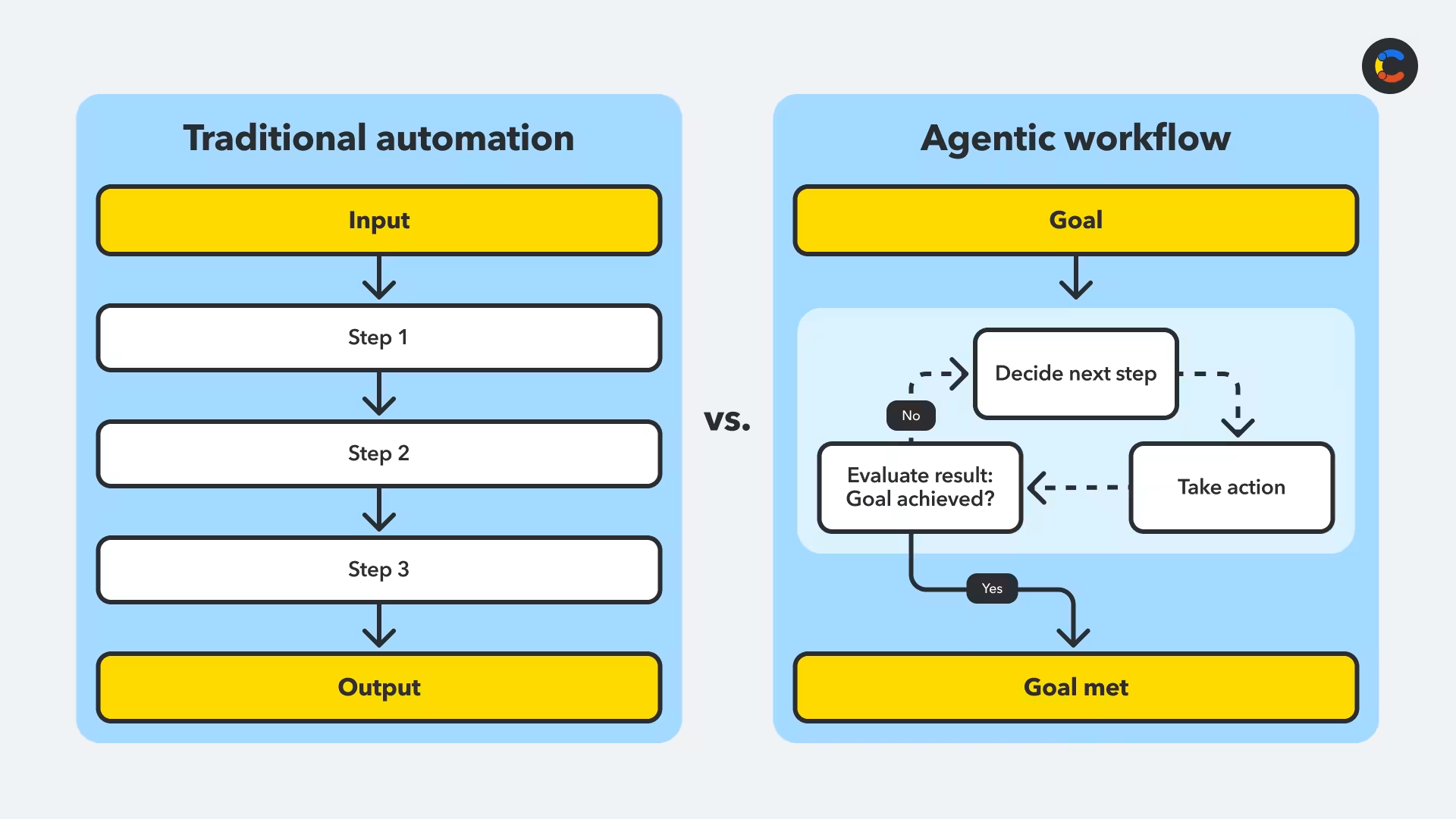
Unlike traditional automation (think Bash scripts and no-code automation tools), which follows predefined steps, agentic workflow automation is goal-driven, and the system itself is aware of the goal at all stages of the process. In an agentic workflow, an autonomous agent continually decides what action to take next, takes that action, and then evaluates the results, until the goal is complete.
The key feature of agentic workflows is that the agents dynamically adapt their autonomous behavior based on the outcomes of previous actions, which are stored in the AI model's context.
The diagram below contrasts traditional automation with a simple agentic workflow. You can see that even an agentic workflow consisting of a single AI agent uses the agentic loop of reasoning, action, and evaluation to adapt to the results of its actions.
How do agentic workflows work?
Agentic workflows usually consist of one or more LLM-powered (large language model) AI agents that handle language and reasoning. If there's more than one agent, one of them typically takes on the role of orchestrator. An orchestrator is an AI agent responsible for coordinating which agent should handle which tasks and in what order, as well as enforcing policies across the system.
For example, in an agentic workflow for hiring a new candidate, the orchestrator would be responsible for delegating work to specialist agents that perform specific tasks, like CV screening, interviewing, running background checks, or sending an offer letter. Although the orchestrator coordinates this process, each agent is responsible for its own internal reasoning, tool use, and data access.
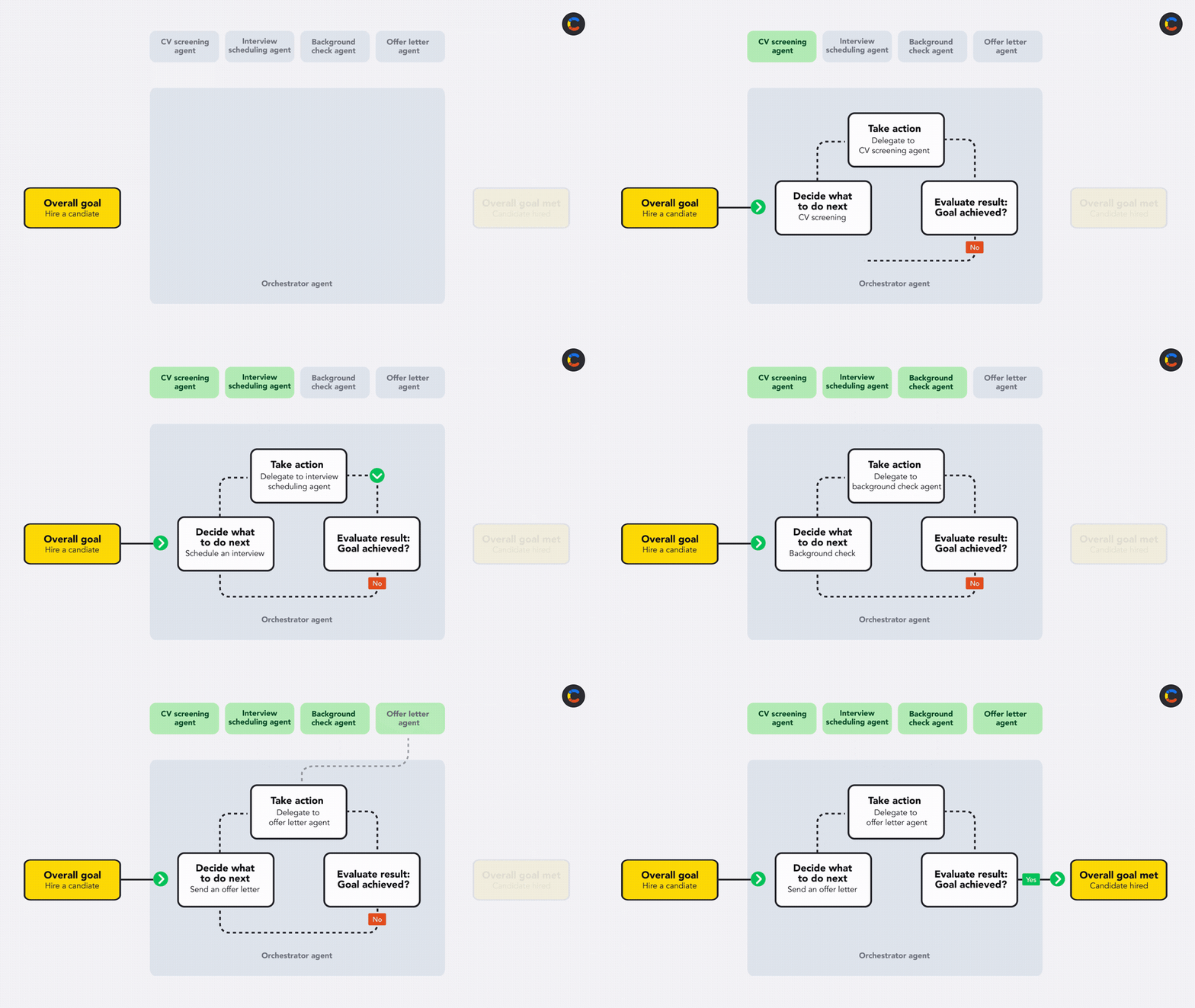
A multi-agent agentic workflow: The orchestrator delegates each action to a different agent
For these types of multi-agent systems, most developers use an agent framework, such as LangChain or CrewAI, or an agent SDK like the OpenAI Agents SDK or the Claude Agent SDK, rather than build their own orchestrator from scratch.
Components of an agentic workflow
Agentic workflows run on an underlying agentic system that consists of a few key components that work together: agents that reason and take action, an orchestrator that coordinates agents if there are several in the same system, tools that connect the agents to external systems, and memory that helps the agents track what has happened. Let's take a look at how they all fit into the agentic architecture that makes agentic workflows possible.
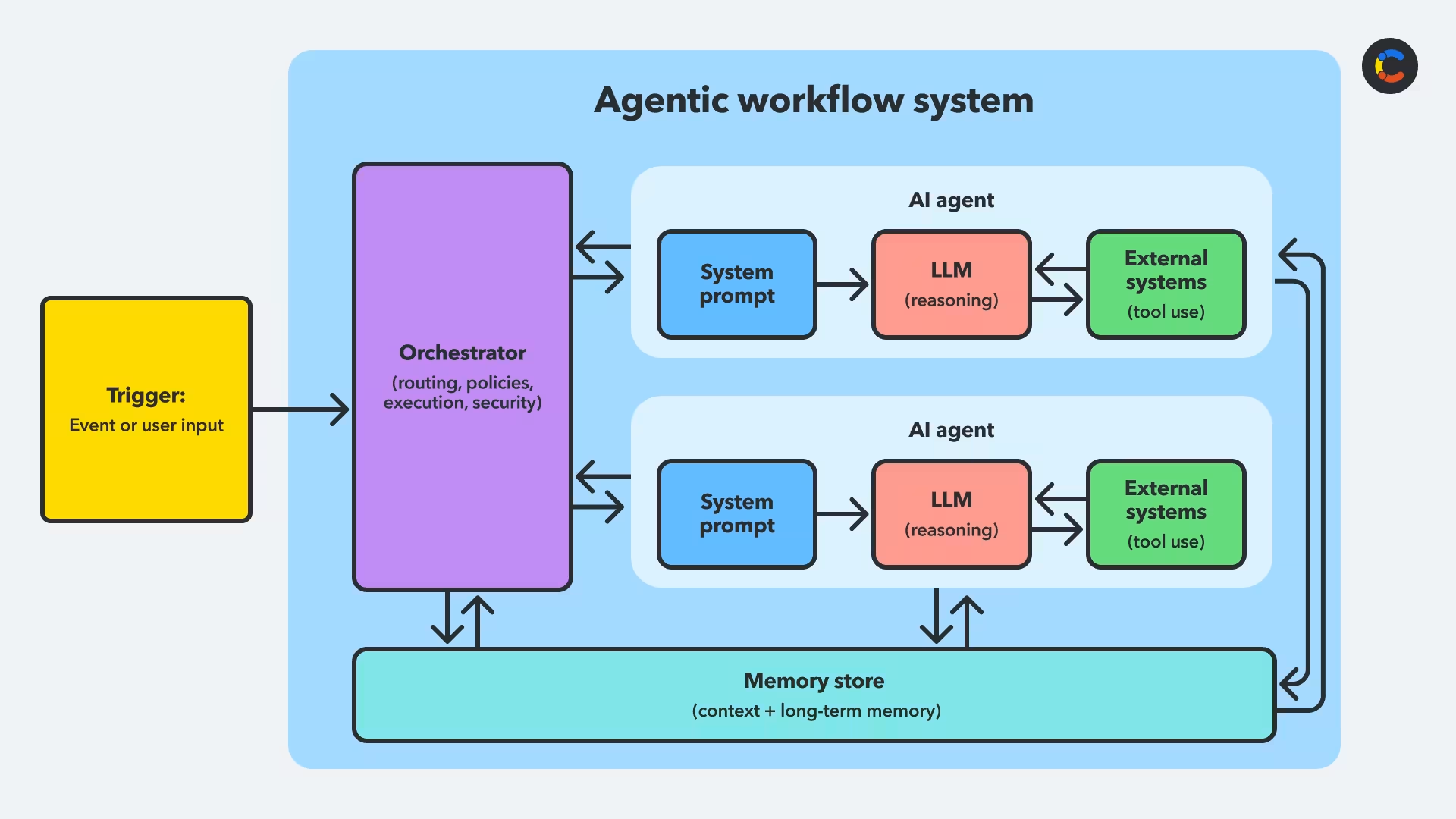
AI agent: An AI agent is responsible for reasoning and decision-making and is usually powered by a large language model (LLM). An agent's system prompt tells it what its goal is, what tools are available to it, what permissions it has, and what policies it must follow. An agentic workflow may use a single agent, or there may be multiple agents coordinated by an orchestrator agent.
Orchestrator agent: An orchestrator agent is a type of AI agent that coordinates other specialist agents within a multi-agent system to achieve a goal. Although an orchestrator is itself an AI agent, it doesn't call tools directly. Instead, it decides which agent should handle each task and delegates the specific tasks at the appropriate time.
Tools: Tools allow AI agents to pull real-time data from external systems or take actions within them. Model Context Protocol (MCP) is the standard used to achieve this. This open standard provides a consistent way for agents to interact with these external systems on behalf of users, making it easy to return data in a predictable, machine-readable structure so that an agent can interpret the results and determine what to do next.
Memory: The LLMs behind AI agents store a limited form of short-term memory in their contexts. However, for more complex workflows where long-term memory is required, memory can be stored in external systems such as key-value stores and databases.
The steps in an agentic workflow
While the exact steps may vary, agentic workflows follow a similar pattern:
Phase 1: The workflow is triggered
Agentic workflows can be triggered by an event from an external system by sending a JSON payload to an agent (this will be the orchestrator agent if there are multiple agents) or by a user prompt written in natural language. Agentic workflows for business automation usually favor event triggers, as they can be run in workflows that don't need human intervention.
Once the workflow has been triggered, the agent needs information in its system prompt telling it how to interpret the goal from the JSON payload it receives.
For example, a trigger in Jira that fires once a task has been blocked for three days could send a JSON payload to your AI agentic workflow.
Phase 2: Interpret the goal
The agent receives a payload and uses the information in its system prompt to help it interpret the payload and figure out what the goal is.
In the Jira payload example above, the prompt might tell the agent that a payload with event_type: "issue_blocked_duration_exceeded" maps to a goal of "unblock the issue" and that it should do this by helping to resolve the issue or by escalating it to the right person.
It would also need to inform the agent what systems it has access to (like Jira, Slack, or Google Calendar) and what it's permitted to do within each system, as well as any policies it needs to follow, like respecting work hours or not sending multiple reminders. Getting this right requires careful prompt engineering. If the agent is an orchestrator, instead of being informed about what systems it has access to, it will be informed about what agents it has access to and what they can do.
An example of a system prompt for this agentic workflow is shown below.
Phase 3: The agentic workflow loop
Once the goal is established, the agent decides what action will be most useful to achieve it. Such actions may include calling external tools like Jira or delegating a task to another agent.
Continuing the example above, the agent needs to try to solve the Jira issue, so it might decide that its first action will be to read the Jira issue to better understand why it's blocked. To execute this action, the agent connects to Jira, an external system. It reads the issue, including the comments, one of which might say that a fix has been implemented but needs to go through testing.
After this action, the agent evaluates whether the goal has been achieved yet. It hasn't been so the issue is still blocked! So the agent needs to decide on the next action, which might be to send a Slack message to the tester to ask if the fix has passed testing yet.
Each time, the agent decides on the next action, takes that action, and then evaluates whether the goal is achieved. It repeats this process until the goal is achieved, at which point it breaks out of the loop. Every action the agent takes brings in new information that the agent has to adapt to. This continuous adaptive loop is one of the key differentiators of agentic AI workflows.
Benefits of agentic workflows
Agentic workflows can make your organization more efficient by automatically handling complex tasks involving a combination of reasoning, decision-making, and action, such as monitoring queues and then chasing people for updates. See more agentic AI examples to find out how organizations are applying this.
This doesn't replace traditional automation; if a task is simple and straightforward enough, there's no need to involve an AI agent. However, for more complex tasks, AI agentic workflows allow you to automate processes that would have previously needed human involvement.
One case in which agentic workflows are particularly useful is when your process has a lot of exceptions and edge cases. Because an agent can dynamically update its reasoning after each action has been performed, it's often good at handling unusual or unexpected situations sensibly, with minimal human intervention, and without the need for a developer to have anticipated every possibility in advance.
In this way, agents are able to do some of the work that humans previously had to do. This is especially useful for freeing people from dull, repetitive tasks and constant low-value decisions, allowing them to focus on more important tasks.
Challenges of agentic workflows
Reliability is a key challenge that agentic workflows face: Agents can hallucinate information, struggle with ambiguous instructions, or get stuck in unhelpful loops. It's important to have robust error handling, clear guardrails, and fallback options in place.
Prompt engineering and behavior design are also important to get right. Because LLM agents are non-deterministic, the same prompt can lead to different action paths, which makes testing and observability harder. Additionally, the different ways prompts, guardrails, and policies are expressed can affect how agents perform. Allowing time to iterate, test, and support continuous improvement is important.
Deciding how much autonomy to give your agents is also a challenge — the more freedom you give agents, the more useful they can potentially be to you. However, you don't want to give your agents more privileges than they need (such as giving an agent permission to delete records when it only needs read access), as this leads to an increased risk that they'll behave in unpredictable and problematic ways.
Finally, practical considerations such as latency, cost, and security controls still apply, especially when agents are acting across live systems. Agents may also require memory management, which includes deciding what context to retain and where to store it.
When should you use an agentic workflow?
If your task... | Simple LLM or fixed workflow | Agentic workflow |
|---|---|---|
Follows the same steps in a predefined, predictable sequence | ✅ | ❌ |
Only extracts, summarizes, or transforms data without taking any actions | ✅ | ❌ |
Needs to dynamically adapt based on what just happened | ❌ | ✅ |
Works toward an open-ended goal rather than a fixed output | ❌ | ✅ |
It's usually clear early on whether a problem is too complex for rules-based traditional workflows. But there are other AI-related options to consider before jumping straight to an agentic workflow. In many cases, a simple LLM, or an LLM with tool access, will suffice — as long as the sequence of steps is fixed and repeatable. For example, the automation might search for some information, summarize it, format it, and send it to someone. This still counts as using AI, but at no point does the order need to change.
Agentic workflows are useful when the system needs to dynamically change steps as it progresses, choosing what to do next based on what has happened previously.
If you choose an agentic workflow, it's worth considering what happens if the agent makes an incorrect decision. It's often a good idea to keep a human in the loop, incorporating human feedback at key stages in the workflow.
Contentful is the content platform for agentic workflows
Agentic workflows need structured, machine-readable data to work reliably. When agents take action across different systems, they use APIs that expect content in a predictable format, such as JSON. If your content is unstructured and lacks context — for example, presented as a single long page of text — it's hard for AI agents to extract the information they need. Content that's broken down into small, well-defined pieces is much easier for an agent to interpret consistently and results in better outcomes from your AI agentic workflows.
Contentful stores content in a structure that you define, so it makes sense for your data. It makes that content available through its REST and GraphQL APIs — including the Content Delivery API and Content Management API — so agents can query the exact fields they need and update or publish changes directly. It also provides validation and governance, keeping data and messaging consistent across workflows and digital channels.
Contentful provides an MCP server that allows AI agents to connect directly to your Contentful space and act on your content, like drafting a new blog post from an ecommerce listing, running SEO checks, or creating translated articles for different languages.
Customers are already using this to increase operational efficiency. They're removing internal bottlenecks and saving time and money by letting agents work directly with their content. They're also reducing unnecessary manual work, enabling their engineers and creatives to work on projects that create real value.

blogDetail.subscribeCard.title
blogDetail.subscribeCard.description
blogDetail.authors

Florian is a Solutions Engineer at Contentful, focusing on turning complex content and integrations issues into solutions that stick and bring value to customers. He brings 10+ years in the SaaS market to the table, translating that experience into hands-on solutions customers can see and trust.

Stephen is a Senior Product Manager for Core Agents. Stephen has been building data, machine learning and AI products customers love. Outside of work he is a data nerd, enjoys sport and reading but he is mainly trying to figure out parenthood with two young kids.

Rafaela is a Product Marketing Manager at Contentful, focusing on AI and automations. She spent 10+ years as a product researcher asking customers all the questions and now enjoys turning the answers into product stories.
blogDetail.relatedArticles

The shift from SEO to GEO: What marketers need to know about AI and search
August 6, 2025

Contentful vs. Sitecore: Helpful points to consider
September 16, 2024
40 personalization statistics: The state of personalization today
January 22, 2025

Ready to start building?
Put everything you learned into action. Create and publish your content with Contentful — no credit card required.