Forma 36 v4 is in GA and ready for building
Publié le January 11, 2022



Inspiration pour votre boîte mail
Abonnez-vous et restez au courant des meilleures pratiques pour offrir des expériences numériques modernes.
We have been working hard on the next major version of our Forma 36 design system, and today we are happy to announce the full release of Forma 36 v4! We’re very excited about it, and hope it will bring a lot of value to everyone using our React components library. So what is Forma 36, what’s new and how can it help you build better?
Forma 36 is Contentful’s open-source design system, created to help you easily extend the Contentful UI as you build apps and customize your content platform. Forma 36 shows our commitment to extensibility and the builder ethos, giving you the tools you need to build the content platform that perfectly suits your needs. With Forma 36, we provide you with the React components library, so you can create your interface in no time and focus on building the core functionality of your apps.
What’s new in Forma 36 v4?
Our focus for this release was to bring crucial accessibility improvements to our React components. We believe that the web should be for everyone, so v4 brings WCAG level AAA compliance in all of our React components.
A clear example of this is in the Menu component, which replaces the Dropdown component in v3. You can now use arrow keys to navigate through menu items. Use ArrowUp and ArrowDown to navigate within items, useArrowLeft and ArrowRight to navigate within submenus, and use Esc key to close the Menu. What’s more, we automatically focus on the first item in the menu when the component is open. We’ve also made sure to include all ARIA roles on the components.
The next major change is the approach to how we have built the library. In v4, we have split components into separate packages. This means that now you can use just the components you need, without adding the full suite of components to your bundle. This change will make your bundle size much smaller and improve the performance of your apps — particularly for apps that only use a few components from the library. You can see below that when we compare versions of an app that only imports one component below, v4 makes the bundle around 85% smaller than v3! That will make Contentful even smoother for your content teams.
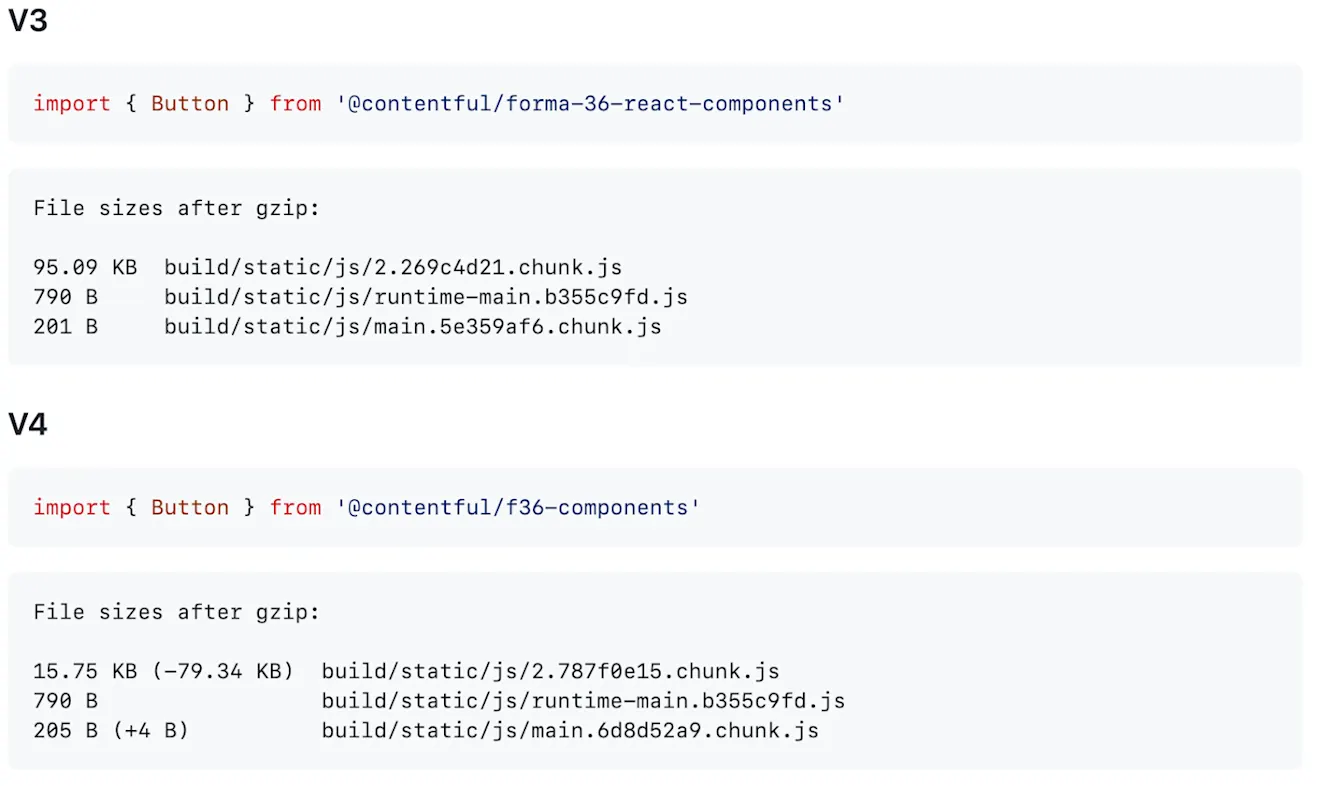

We've also improved the developer experience when working with Forma 36 components. In v4 we've introduced Emotion, so now all the styles are encapsulated in the component. This means that when you add Forma 36 to your project you don’t have to import additional CSS file anymore - making it faster and easier than ever.
How to migrate your project to use Forma 36 v4
We worked hard on the developer experience of Forma 36, and so we provide you with all the tools you need to migrate your project as quickly as possible.
To make it easier for developers to use Forma 36 in their apps, the API for v4 is now consistent with our code style, making it easier for anyone who already works with our APIs to utilize our components.
Codemods are available for most of the components, and you can migrate your components with just one command. For those few components that cannot be migrated automatically, we’ve provided you with detailed migration guides. Have a look at the detailed documentation in GitHub.
To update your Forma 36 components, run:
This will kick off the codemod prompt in your terminal. Follow the instructions to choose which component(s) you would like to migrate, and watch the updates happen! Check out the video below to see how easy it is to automatically migrate all of your Button components with a single command — including changing the names of the affected properties. No work from your side is required at all!
For more information, you can check out the migration FAQs on the Forma 36 website. There you can also learn more about our timelines for supporting v3, which will help you to plan when to update.
It’s time to build!
We’d love for you to start building with Forma 36 v4 and share your feedback with us! To share your feedback, you can create a GitHub issue using one of the issue templates, submit your feedback using this anonymous form or join the community Slack channel to share directly with the team.
Whether you’re upgrading from v3 or starting out with your first project in Contentful, we can’t wait to see what you create! Happy building!

Inspiration pour votre boîte mail
Abonnez-vous et restez au courant des meilleures pratiques pour offrir des expériences numériques modernes.
À la rencontre des auteurs

Front-end engineer, passionate about building design systems. In love with technology that makes life easier, art, books and music. Enthusiast of road trips with my old VW T4.
Articles connexes

What is vibe coding? Moving fast (and not breaking things) with AI assistance
February 3, 2026

Ultimate starter guide to A/B testing with best practices
May 13, 2025
Building an app? These are the best JavaScript frameworks in 2025
January 30, 2025