Markdown format explained: From basics to best practices
Mis à jour le March 24, 2026


Inspiration pour votre boîte mail
Abonnez-vous et restez au courant des meilleures pratiques pour offrir des expériences numériques modernes.
Markdown is a lightweight markup language designed to make plain text documents easy to read and write, while also allowing them to be converted into structured HTML. It was created in 2004 by John Gruber, with contributions from Aaron Swartz. The goal of Markdown is simplicity: a document should be readable as is, without visible markup cluttering the text.
Most people write using rich text editors such as Google Docs or Microsoft Word, which let you format text visually. Markdown takes a different approach by using symbols to represent formatting directly within the text. This is ideal for developers and technical writers, as content is readable as plain text while also supporting semantic HTML output.
This post explains what Markdown is, how it works, when to use it, and how it compares to rich text formatting in Contentful.
What is Markdown?
At its core, Markdown is a plain text formatting syntax. Unlike rich text editors that hide formatting behind a visual interface – What You See Is What You Get (WYSIWYG) – Markdown uses simple symbols to indicate structure. For example, adding asterisks around a word makes it bold, and starting a line with a hash symbol creates a heading.
The philosophy behind Markdown is that a document should be readable as is, without looking like it has been marked up with tags or formatting instructions. This makes it distinct from HTML, which uses verbose tags like <strong> or <h1> that can clutter the writing experience.
You have likely seen Markdown in developer-focused tools like GitHub and Stack Overflow, as well as in messaging apps like Discord and Slack. Many of these platforms use their own Markdown flavors, adding options beyond the original syntax. It persists because it separates the content (the words you write) from the visual presentation (what you see on a webpage or after a message is sent), allowing the text to be portable across different platforms and devices.
Why use Markdown?
Markdown remains a standard for technical writing and content management because it solves specific problems related to portability and version control:
Simplicity and readability: The syntax uses plain text characters, so the document remains readable to humans even before it is rendered.
Clean HTML output: Markdown processors generate semantic, well-structured HTML compared with the complex markup sometimes produced by visual editors.
Platform independence: Markdown files use standard text encoding, meaning you can open and edit them on any operating system (macOS, Windows, Linux, Android, iOS) using any text editor.
Future-proof format: Because the files are plain text, your content remains accessible even if the specific application you used to create it becomes obsolete.
Version control friendly: Plain text works seamlessly with Git and other version control systems, allowing teams to track changes line by line.
How Markdown works
Technically, Markdown refers to a plain text formatting syntax. It is paired with a processor, which is a software tool that converts that text into HTML.
When you create a Markdown file, you typically save it with the .md or .markdown extension. This file contains only plain text using Markdown syntax. To display this text on a web page, a Markdown processor (also called a parser) reads the file and converts the syntax into HTML tags.
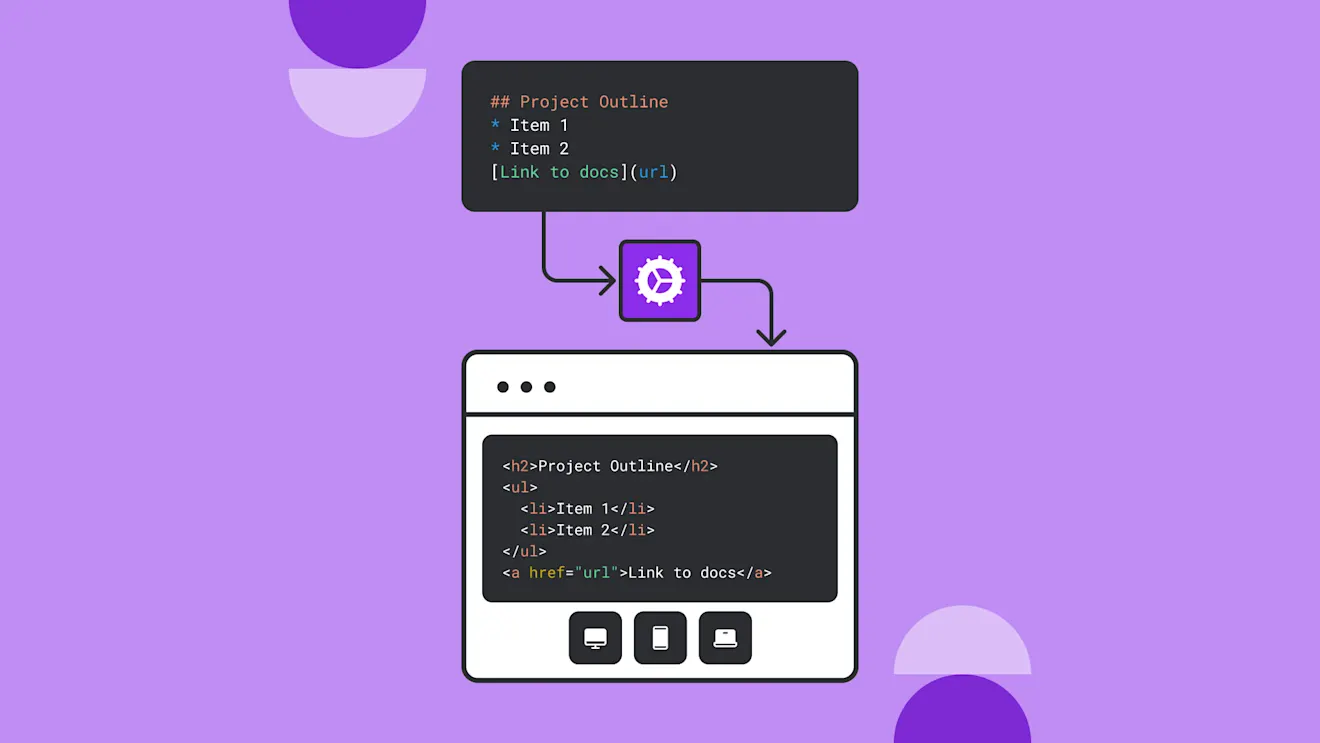
For example, the processor converts the text #Heading into <h1>Heading</h1>. This conversion process is commonly used in content management systems (CMS) and static site generators, as it allows authors to write in a simple format while the system automatically generates the structurally valid HTML required for web browsers.
Markdown formatting syntax
Markdown covers the most common formatting needs for web writing. Many elements in standard Markdown have more than one syntax. Below are the forms you will use most often.
Basic text formatting
You can apply emphasis using asterisks or underscores:
Italic: Surround text with single asterisks or underscores:
*italic*or_italic_.Bold: Use double asterisks or underscores:
**bold**or__bold__Bold and italic: Use three asterisks:
***bold italic***
Headings and structure
Headings are created using the hash symbol (#). The number of hashes corresponds to the heading level (H1 through H6). Always include a space after the hash.
#Heading 1(main title)##Heading 2(major section)###Heading 3(subsection)
To create a horizontal rule (a dividing line), use three or more dashes (---) or asterisks (***) on a new line.
Lists
Unordered lists use dashes, asterisks, or plus signs:
- Item 1
- Item 2
  - Indented sub-item
Ordered lists use numbers followed by a period:
1. First step
2. Second step
3. Third step
Links and images
Links and images use similar syntax, but images start with an exclamation mark.
Link:
[Link text](https://www.example.com)Image:

Code blocks
For developers, Markdown allows you to display code without formatting it. Use backticks for inline code (code) and triple backticks for multiline code blocks.
Blockquotes
To quote text, start the line with a greater-than sign (>).
This is how a blockquote renders in most editors.
When to use Markdown
Markdown is not a universal replacement for all word processing, but it is a good fit for specific use cases:
Technical documentation
Software documentation, API guides, and internal wikis rely on Markdown because it handles code snippets easily and integrates with version control systems.
Content management systems
A digital experience platform like Contentful can use Markdown to store content that needs to be delivered to multiple channels (web, mobile, app) without carrying over rigid HTML styling, making it ideal for static websites and other publishing workflows.
Notes and knowledge bases
Tools like Obsidian, Notion, and Bear use Markdown for personal knowledge management, allowing users to create structured links between notes efficiently.
README files
The standard README.md file found in GitHub repositories is written in Markdown to provide instructions and project details in a format that renders cleanly in the browser.
Markdown flavors and variants
Because the original Markdown specification had some ambiguities, different platforms developed their own variants, known as "flavors."
Most platforms where you encounter Markdown today use a flavor that extends the original syntax to add additional features. While the fundamentals remain the same, these flavors can add elements such as tables and task lists.
CommonMark was a standardization effort launched in 2014 to ensure that Markdown renders consistently across different parsers. Most modern flavors are now compliant with this standard.
GitHub Flavored Markdown (GFM) is one of the most widely adopted variants. It adds features useful for developers, such as tables, task lists, and strikethrough. Contentful uses GFM, which you can read about in our Markdown editor documentation.
Why Markdown matters for AI and large language models
Markdown is one of many structured text formats found in training data for artificial intelligence (AI) and large language model (LLM) development.
Training data structure: LLMs are trained on massive text corpora where Markdown represents structured content from sources like GitHub, Stack Overflow, and technical documentation. The format's semantic structure helps models understand document hierarchy and relationships.
Structured AI outputs: When AI assistants generate documentation, tutorials, or code explanations, Markdown provides a structure that is both human-readable and machine-parseable. This helps ensure consistency across AI-generated content.
Prompt engineering: Developers can use Markdown syntax in prompts to help structure complex instructions. For example, when a prompt contains multiple sections or steps, using Markdown can help the AI better understand the organization of your instructions and generate a more accurate output.
Markdown vs. rich text: Choosing the right format
When building content models, choosing between Markdown and rich text depends on your team's workflow and technical requirements. While Markdown offers simplicity and clean code, rich text provides a familiar editing experience.
Rich text editors are often called WYSIWYG (What You See Is What You Get) editors. They allow authors to style text visually, similar to Microsoft Word or Google Docs, without interacting with syntax code.
Here is how the two formats compare:
Feature | Markdown | Rich text |
|---|---|---|
Learning curve | Minimal — uses plain text symbols | None — familiar visual interface |
Output format | Semantic HTML | JSON (in Contentful) or HTML |
Version control | Excellent — plain text diffs are easy to read | Difficult — binary or complex formats |
Portability | Universal — works in any text editor | Application-dependent |
Best for | Developers, technical docs, simple posts | Marketing teams, complex layouts, embedded media |
Rich text in Contentful offers capabilities beyond standard formatting, such as embedding assets dynamically and linking to other content entries. It returns data as JSON, which allows developers to render the content natively on any device without parsing HTML strings.
Implementing Markdown in Contentful
When setting up content models in Contentful, you can select between two primary field types for text content:
Text (Markdown): This field stores content as a plain string. You can choose "Short text" for titles and metadata, or "Long text" for body copy. The long text option provides a Markdown-compatible editor.
Rich text: This field provides a WYSIWYG toolbar and stores content as a JSON object, allowing for embedded entries and assets.
For teams prioritizing developer portability and simple workflows, the Text field with Markdown is often the preferred choice. For teams requiring complex layouts and embedded media, the Rich text field offers greater flexibility.
Getting started with Markdown editors and tools
You don't need specialized software to write Markdown; any plain text editor works. However, dedicated tools offer features like instant preview and syntax highlighting.
Plain text editors: Visual Studio Code, Sublime Text, and Notepad++ are popular among developers.
Markdown-specific editors: Typora, Obsidian, and iA Writer provide a focused writing experience with instant rendering. For developers building web applications, rendering Markdown in React offers similar flexibility programmatically.
Integration with Contentful: You can write directly in the Contentful web interface or compose in your preferred local editor and paste the formatted text into a Text field. For advanced workflows, the Contentful CLI allows you to import Markdown files programmatically.
For more on these formats, check out these resources:

Inspiration pour votre boîte mail
Abonnez-vous et restez au courant des meilleures pratiques pour offrir des expériences numériques modernes.
À la rencontre des auteurs

Brittany is a Senior Learning Experience Designer at Contentful, creating developer content for the Learning Center. With a background in software engineering and developer advocacy, she is passionate about hands-on, interactive learning. She’s also a devoted musical theater fan.
Articles connexes

Use content taxonomy to increase conversions
November 24, 2025
The best LLM for translation: Quality, speed, and coverage compared
November 21, 2025
MCP vs. RAG: How AI models access and act on external data
December 3, 2025