Model Context Protocol: The new AI connection standard
Publié le August 7, 2025



Inspiration pour votre boîte mail
Abonnez-vous et restez au courant des meilleures pratiques pour offrir des expériences numériques modernes.
The Model Context Protocol (MCP) is an open standard for AI agents and LLMs to securely connect to external tools, data sources, and workflows.
Contentful exposes functionality through its AI Actions, which are growing in popularity due to their ability to act on behalf of users across a wide range of external systems, including apps and SaaS products. Before MCP, allowing AI agents to connect to a service required developers to build multiple custom integrations — one for Claude, one for Gemini, one for ChatGPT, and so on.
MCP solves this issue by providing a standardized way for AI to interact with your apps. Now, all you need to do is implement the protocol on your server.
This post explains what MCP is, how it works, and how you can leverage it in your digital products to add new AI functionality to your existing apps, broaden your use cases, and reach a wider user base.
What is the Model Context Protocol?
Anthropic introduced MCP in November 2024 as an open standard for how AI systems interact with external tools, systems, and data sources. It facilitates communication between your software and the external AI (like ChatGPT calling your CMS or an AI agent triggering a Jira workflow), allowing you to launch AI-powered features faster.
Although MCP was invented by Anthropic, it has become the de facto standard for AI agents that need to interact with external systems due to all the major AI platforms integrating it, including Gemini, Microsoft Copilot Studio, and ChatGPT. ChatGPT added MCP integration – previously known as connectors – in September 2025, enabling it to connect to MCP servers to access external servers, private data sources, and automated workflows for advanced tasks such as deep research and using company knowledge.
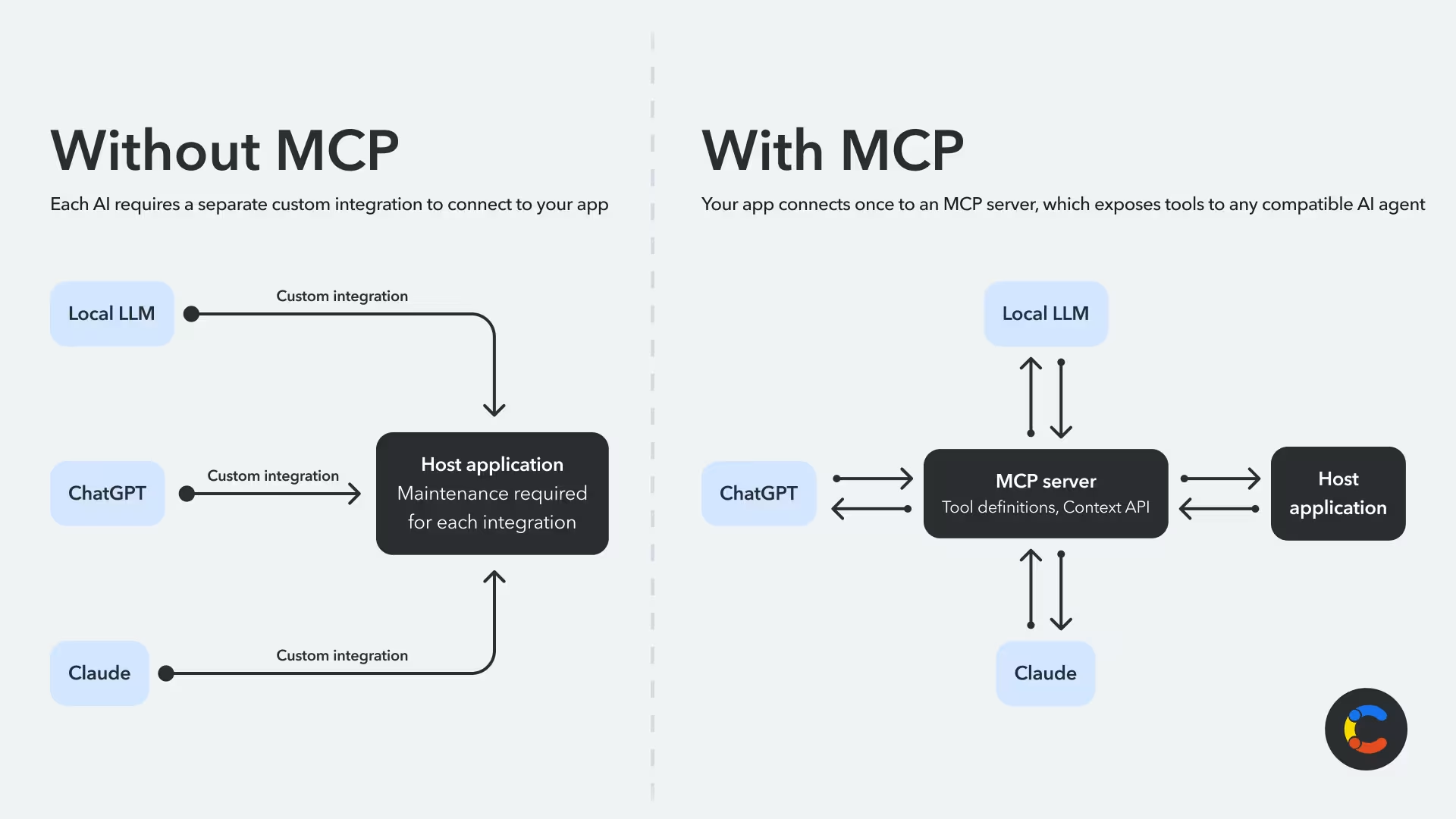
MCP is a scalable alternative to custom plugins or brittle integrations for each AI product you want to allow users to connect with. It's pitched as being "the USB-C of AI" due to its universal nature, which allows any AI that implements the protocol to connect to your tools, data, and systems.
This universal functionality is enabled by the following:
Context awareness: MCP servers hand over relevant context like content schemas, analytics, or user history without needing developers to pass raw documents or engineer prompts. This makes the responses more accurate and specific.
Autonomy and automation: Instead of just answering questions, MCP allows AI agents to take action. They can invoke operations such as publishing content, updating records, or triggering workflows, all based on natural language instructions. This can enable automation across teams with less manual human work.
Integration flexibility: MCP decouples AI capabilities from custom integrations. With an MCP server in place, any AI agent can discover and use tools exposed through the protocol without needing a custom integration built for each use case. It connects your app to the growing, standardized AI ecosystem.
MCP is great for tasks where you normally spend two minutes thinking about what to do and then thirty minutes executing it manually. For example, MCP works well in project management tools, where describing a task is easy but actually creating it, representing it correctly on a board, and ensuring that fields are filled with information that is usually easy to infer from the context of the story can be time-consuming.
Atlassian is a great example of using AI and MCP for workflows like this. Jira allows you to use AI agents to describe tasks and automate complex workflows, freeing you up to focus on other things. Its in-app AI agent is already pretty good, but it goes a step further by providing an MCP server that allows you to bypass the UI entirely while retrieving and changing relevant data. For more examples of when to use MCP, see our article on MCP use cases.
In addition to simplifying integration and reducing development burdens, MCP can lead to growth. By implementing MCP, developers of tools and platforms can expand their product's use cases and enable automation and scalability. This not only attracts more users but means they get faster, more intelligent workflows by setting their AI assistants to perform tasks using your product, giving you a leg up over competition that doesn't support MCP.
How does MCP work?
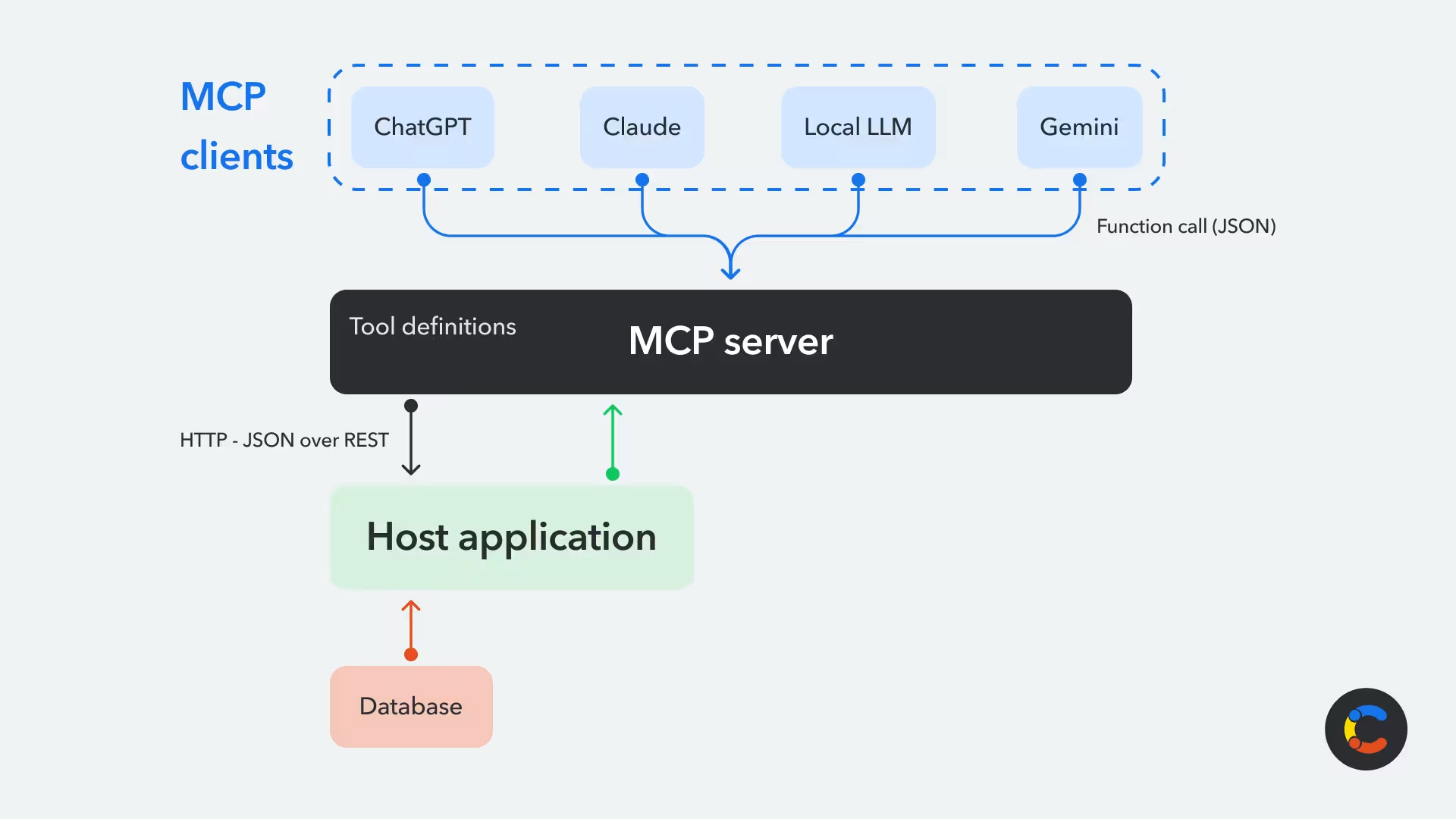
At a high level, MCP defines how AI agents can "discover" and interface with tools or information in external systems. The MCP server acts as an interpreter between the AI client and your services, telling the client what services are available and how to use them.
It starts with discovery: The AI agent connects to an MCP server, which provides a list of available tools (functions that the service can perform) and their context through machine-readable definitions. The definitions will describe what tools are available (for instance, “publish content,” “query database”) and how to call them.
When the agent decides to use a tool, it makes a function call by sending a JSON request (usually via HTTP, but MCP also supports STDIO). In turn, the MCP server processes the request, performs the action in the external system, and returns a structured response.
For example, the agent might request the action function getBlogArticles(), and the MCP server might respond with { blogArticles: [{title: "My Super Blog Post"...}]}.
The main components of an MCP server include:
Host application: The external system being exposed (for instance, a CMS or CRM).
MCP server: The server that exposes the host application’s functions, tools, and context.
MCP client: The AI model/agent that wishes to interact with the host application.
Transport layer: Typically HTTP, which serves as the protocol for sending and receiving structured requests and responses.
What problems does the Model Context Protocol solve?
Adding AI features to your app usually produces unsatisfying results. Most teams don't have the resources to develop AI features powerful enough to be useful and fit their use case. Similarly, adding AI integrations that grant broad access without context can lead to unexpected results (for both you and your users). Instead, developers can implement MCP to advertise and support specific, extensively tested actions their apps allow AI to take. This ensures those actions provide value to customers without wasting time and effort.
The N×M problem
N×M is a significant integration problem for developers, and MCP is the solution. N represents the number of LLMs, and M represents external tools or apps they might want to connect them to, of which there is a great number. Each LLM needs a separate integration for each external tool, rapidly multiplying the number of integration points required.
This problem causes repetition of code and redundant development time, as developers have to solve the same integration problem for different models. For example, developers might finish integrating ChatGPT for summaries but want to use another AI product for transcription. This would require them to start from scratch with the integration, and maintenance would be required for each custom integration to make sure they don't break. Additionally, since different AI models handle things in different ways, the code will be fragmented, which could make the codebase confusing and cause the application to behave in unexpected ways.
Standardization solves all of this by providing a consistent interface for services to interact.
Uncontrolled AI access
Allowing AI agents to have full, unscoped access to every possible action within your system can lead to agents taking actions beyond what a user intended. MCP helps address this by allowing dynamic scoping, which controls tool access by environment and credentials. This allows enterprises to limit what AI can access or modify, keeping within the bounds of what the user intended.
LLM isolation
LLMs are inherently isolated from external systems, which makes it difficult for them to connect to private systems, enterprise databases, or internal apps. Even those that appear to offer web search capabilities aren't doing this from within the LLM itself — there is an AI platform built around it that offers this capability, either via custom integrations or, increasingly, MCP. MCP servers are a way to plug your AI tools into these private systems to read data or take action.
For example, you might want to set your AI to help update information in an internal business app. This would involve connecting the AI to your app's REST API, giving it broad access that may result in accidental data changes or security issues if the AI doesn't have full context of what it can and can't (or shouldn't) do.
The rise of AI agents
AI agents build on LLM chatbots with three elements: autonomous reasoning, memory, and tool use.
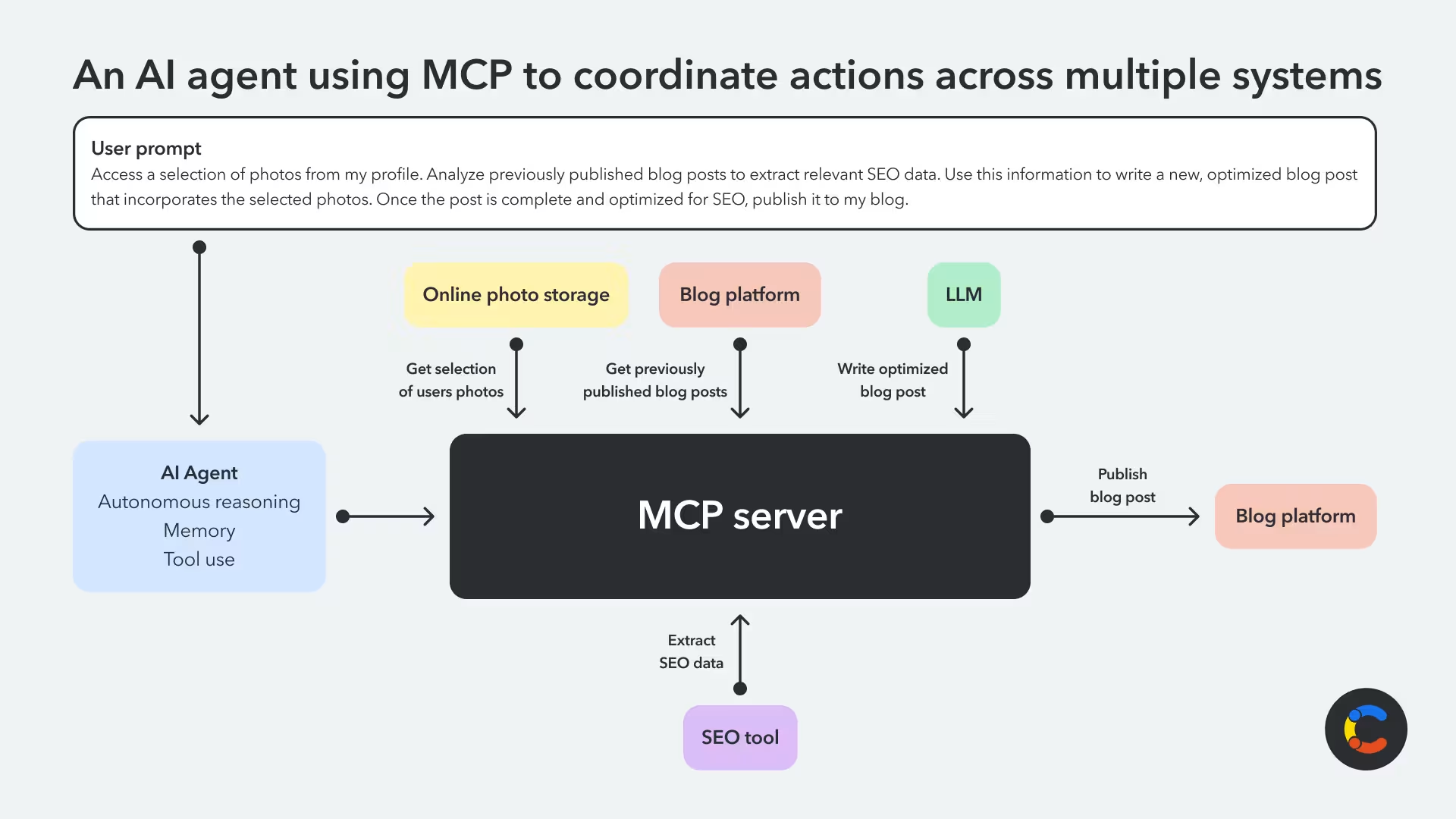
AI agents don't just generate text; they can act on behalf of the user and take actions. MCP allows those agents to do this with external systems like content platforms, analytics tools, or CRMs, and even combine tools together through a natural language interface. For instance, Contentful exposes functionality through its AI Actions that an AI agent can use.
You might ask an LLM to take some photos from your online photo storage, write a bit about them, and then publish a blog post for you. The LLM could then pull data about previous posts from an SEO tool and make suggestions about what you could add to make your next one more popular. You simply describe what you want in natural language, and the agent can autonomously pull together data from all of these different tools and take action in seconds.
A scalable alternative to custom LLM plugins
MCP servers offer a scalable alternative to custom ChatGPT plugins and one-off integrations that may break due to a software update. Rather than having to spin up a custom integration for each AI model, MCP exposes your system's functionality through a standardized interface, enabling any compatible LLM to interact with your system and allowing you to swap out different AI models as you please. This takes the pressure out of having to pick the "right one" to integrate with and frees you up to be flexible around compliance.
MCP reduces complexity, lightens the burden of having to maintain integrations, and helps teams make their apps smarter and deliver a better user experience.
How to make your app AI agent accessible via MCP
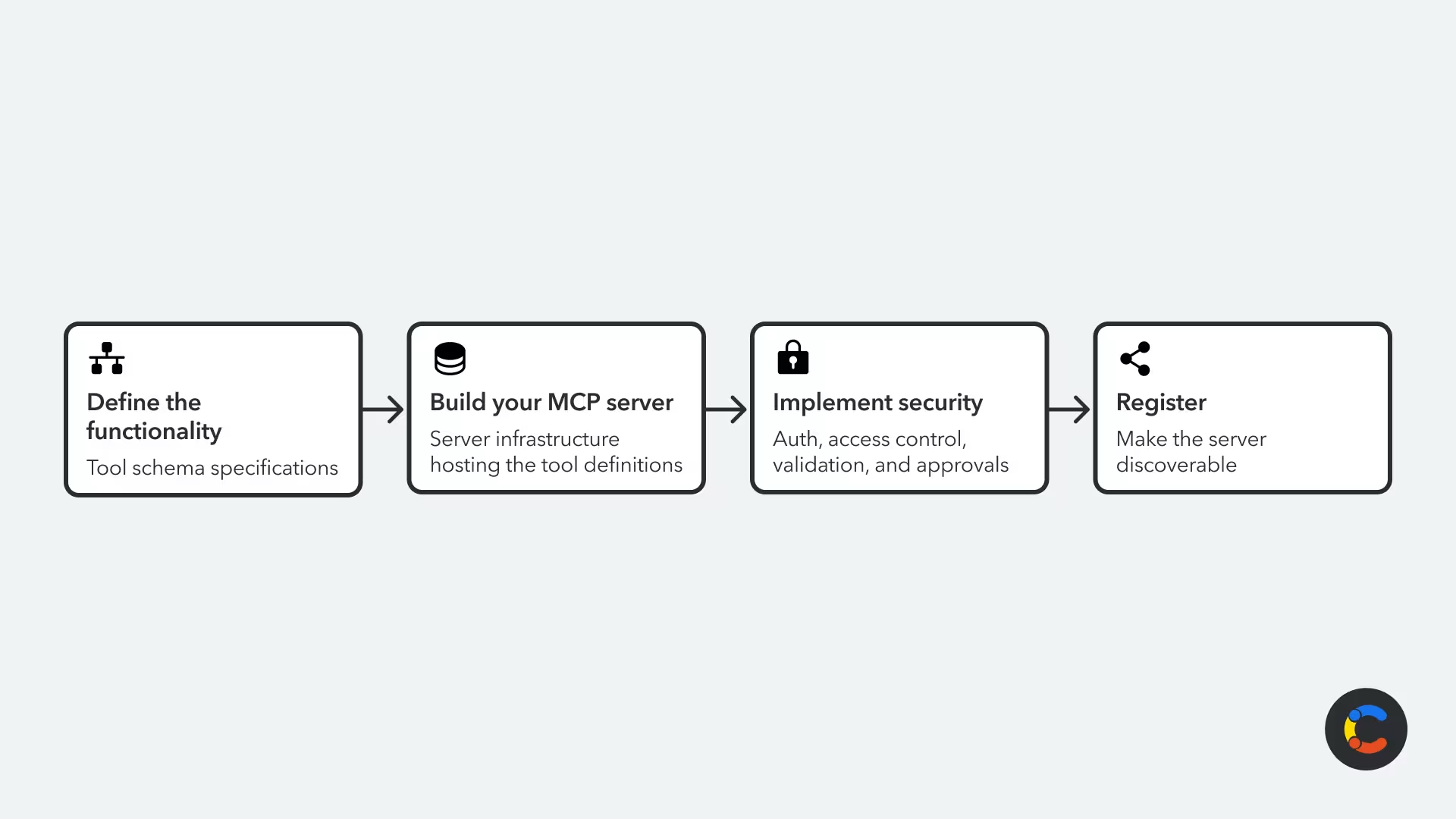
To connect AI agents to your app through MCP, you will need to expose the functionality and data of your internal system through a machine-readable interface. The following is a high-level overview of how to achieve this:
Define the exposed functionality: Decide on what functionality you want to make available to AI agents (fetching analytics, transcribing audio). Then write the tool definitions that describe these actions in a structured way.
Build your MCP server: Deploy a server that can host all of your tool definitions, and provide endpoints that AI agents can access.
Implement security: Set up authentication, access controls, and input validation, and flag high-risk actions using MCP tool annotations so that clients can prompt users for approval.
Register or share your MCP server: Make your server discoverable by agents. You can do this by sharing the URL directly or by registering it with an MCP registry.
Security implications for MCP servers and clients
Security is paramount when building any connected tool, both for the protection of your own data and infrastructure and to ensure that your service doesn't become an attack vector for your users.
Security considerations when building an MCP server
MCP servers and agentic applications are relatively new and still rapidly evolving, and so is the security landscape around them. Developers who build these systems must carefully consider how their services interact with MCP: how their MCP server will allow AI to interact, how they will establish trust and consent, and how they can audit interactions so that they can fully understand what users' AI agents are actually doing.
There are some practical things that developers can do to make sure the systems they're building are as secure as possible. It's important to set up things like authentication and authorization from an early stage. You should also strengthen the security of your MCP implementation and the backend services it accesses. The services should only allow trusted agents to access the platform to perform approved actions. You should also put access controls in place, which can scope the tools and context aligned with the principle of least privilege.
To guard your system against injection attacks, configure your MCP server to validate and sanitize all inputs from AI agents. Disable all operations by default unless the user explicitly grants permission. In critical scenarios, like authorizing a payment or permanently deleting data, seek human-in-the-loop (HITL) approval.
Other essential security considerations include rate limiting and open-sourcing your MCP implementation if possible. Exposing the inner workings of your system by showing the code and logic builds trust with your community, enabling users to audit, customize, and, if necessary, extend the server for their own specific use cases.
Security considerations when connecting to an MCP server
Just as you need to take care when building an MCP server, you should take equal care when connecting your own AI tools to one. A poorly designed MCP server may malfunction or take actions you did not permit or intend, and there is a real concern of malicious MCP servers.
Malicious MCP servers may have poisoned tool definitions that hide potentially malicious actions, such as deleting data, trying to access private data, or using MCP as a vector to access other connected MCP servers and the tools behind them. They usually do this by providing misleading function names or changing what a function does after trust has been established. This tricks AI agents into calling dangerous actions under false pretenses.
Ensure that any MCP servers you connect to give you the power to grant granular permissions and that you're aware of what a tool will actually do. This way, you can be confident that your AI agent will take the right actions, and you'll reduce the risk of it unintentionally doing something wrong or being exploited by a remote MCP server.
The future of the Model Context Protocol
There are echoes of the API revolution that happened over the last two decades in the explosion of interest in MCP servers. Companies gave access to their APIs to developers, and those developers ended up building things nobody expected using those APIs and finding new ways to get value from existing products. The same thing is set to happen with MCP: People will build things we don't expect.
Imagine marketers and content strategists who would like a simpler interface to holistically understand all the content currently published on a platform. With quick and easy access to this information, they could identify gaps, spot trends, and brainstorm ideas and outlines for new content. MCP could also be useful to content architects who would like a higher-level language that they can use to describe the shape of content and then leave it to the LLM to interpret that into individual elements in the content schema.
Build a future-proof, composable, extensible architecture with AI, MCP, and Contentful
AI-enhanced architecture is the next evolutionary stepping stone in the digital experience. MCP enables this shift by providing a standardized interface that makes connecting external systems to AI tools easier. Your digital products need to start using this technology now to ensure you are positioned to best meet your current and future customers' expectations.
Content-driven experiences are no exception to this: AI agents need to be able to connect to, understand, and interact with your online products and the text, images, video, and other media that support them. This may range from asking an AI assistant to rewrite content and optimize keywords for better search rankings to asking an AI to automate content translation. You can do all of this and more with Contentful AI Actions.
The Contentful MCP server allows you to give your own AI assistants the ability to work with Contentful or to build agentic applications that use it. If you or your AI team is interested in having AI work with Contentful, take a look at the Contentful Remote MCP on our Marketplace.

Inspiration pour votre boîte mail
Abonnez-vous et restez au courant des meilleures pratiques pour offrir des expériences numériques modernes.
À la rencontre des auteurs

Niko is a product manager of developer experience at Contentful. Also, an MCP enthusiast.

Marco is a B2B content creator and product marketer blending technical with creative skills. From the early stages of product ideation to a successful market launch, all the way through to sales enablement, he loves to take products and translate them into clear, relatable messages.
Articles connexes
What is backend as a service? A guide to developing better apps faster
September 2, 2025
Remix vs. Next.js: Which is the best React framework?
April 22, 2025
How to render and edit Markdown in React with react-markdown
July 3, 2025

Ready to start building?
Put everything you learned into action. Create and publish your content with Contentful — no credit card required.