Personalizations
Übersicht
Personalizations sind eine Kernkomponente, mit der Sie basierend auf definierten Regeln gezielt Content für bestimmte Zielgruppen bereitstellen können. Personalizations bilden das Herzstück Ihrer Marketingkampagnen, sodass Sie maßgeschneiderte Erlebnisse schaffen können, die bei Ihren Nutzer*innen ankommen und den richtigen Nutzer*innen den richtigen Content zeigen.
Erstellen einer Personalisierung
So erstellen Sie eine Personalization:
Melden Sie sich bei der Contentful Web-App an.
Navigieren Sie zur Registerkarte „Content“ und erstellen Sie einen neuen Eintrag vom Typ
Ninetailed Experience.Geben Sie einen Namen für Ihre Personalization ein.
Optional: Geben Sie eine relevante Beschreibung ein.
Setzen Sie das Feld Typ auf nt_personalization.
Klicken Sie im Konfigurationsfeld auf Neues Erlebnis erstellenund wählen Sie Personalization erstellen.
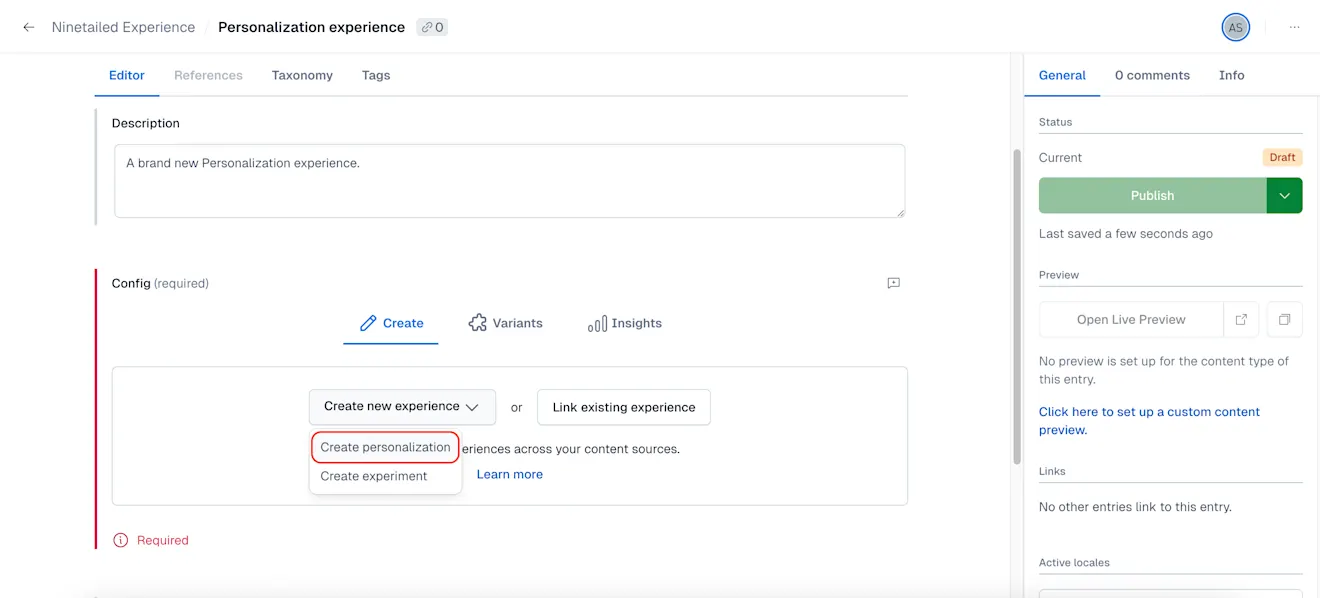
Wählen Sie unter „Zielgruppe“ die Option Neue Zielgruppe erstellen aus, wenn Sie eine brandneue Zielgruppe für Ihre Personalization erstellen möchten, oder Verknüpfen Sie eine vorhandene Zielgruppe, um Ihre Personalization mit einer bereits konfigurierten Zielgruppe zu verbinden.
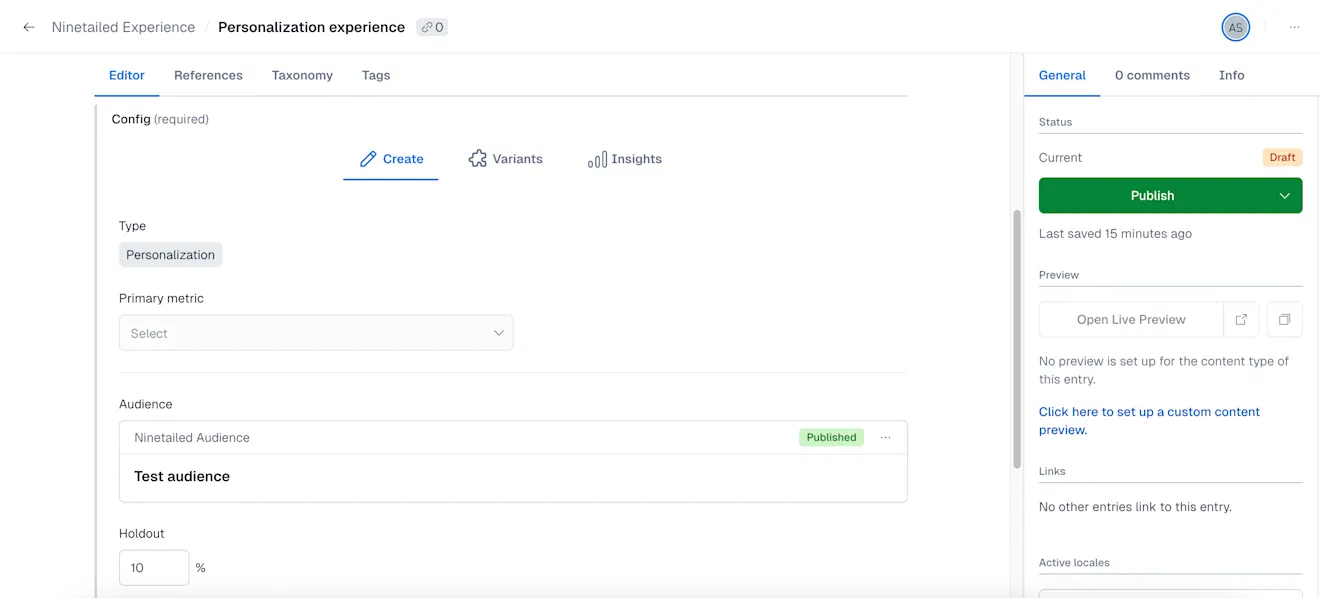
Zielgruppen definieren die Zulassungsvoraussetzungen für die Personalization. Sie können Bedingungen, Regeln und Kriterien angeben, die Nutzer*innen erfüllen müssen, um in die Zielgruppe für die Personalization aufgenommen zu werden. So wird der richtigen Zielgruppe der richtige Content angezeigt, wodurch die Wirkung Ihrer Marketingbemühungen optimiert wird.Legen Sie unter „Kontrollgruppe“ den Prozentsatz der Nutzer*innen fest, die den Content der Basisversion sehen werden. Wenn Sie sich Ihrer Personalization noch nicht sicher sind und sie nicht sofort allen Ihren Besucher*innen zeigen möchten, können Sie den Kontrollgruppen-Prozentsatz verwenden, um das Risiko zu minimieren.
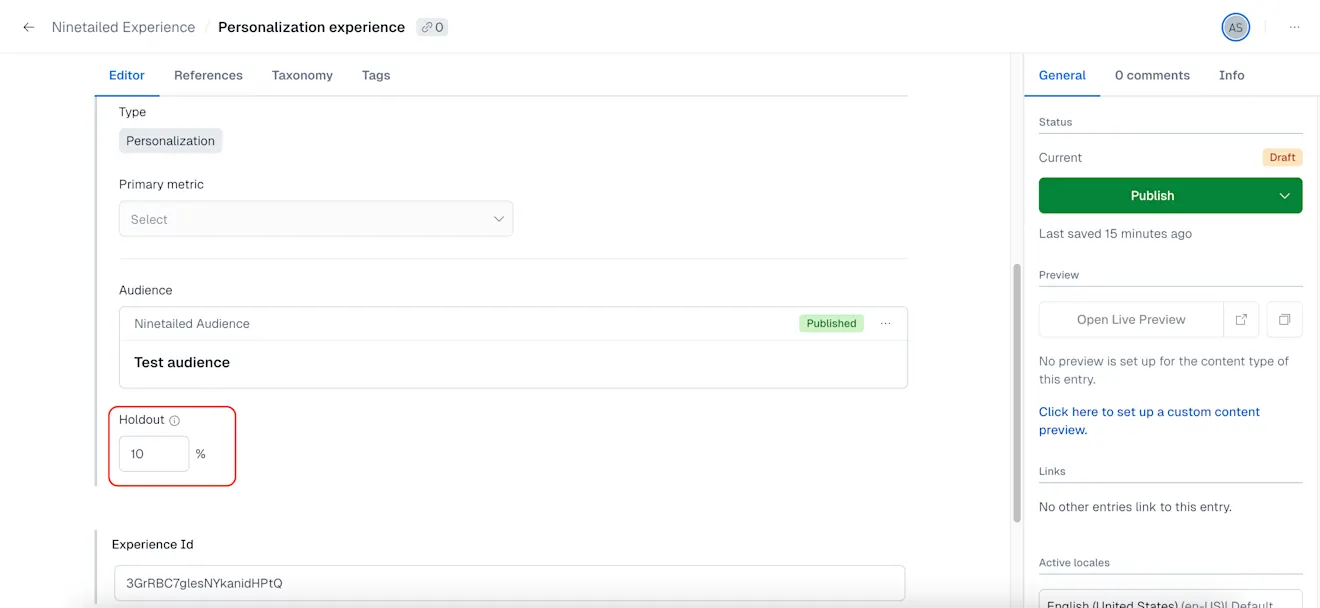
HINWEIS: Standardmäßig ist die Kontrollgruppe auf 10 % eingestellt.
Der Prozentsatz der Kontrollgruppe bestimmt den Anteil der Nutzer*innen, denen der Baseline-Content anstelle der personalisierten Variante angezeigt wird. Dies ist wichtig, um die Leistung und Effektivität Ihrer Personalization zu messen. Durch den Vergleich der Leistung der Basisversion und der Variante können Sie die Auswirkungen Ihrer Personalization auf das Nutzerverhalten und die Konversionsraten bewerten.
HINWEIS: Um die Leistung Ihrer Personalizations mit Experience Insights kontinuierlich zu messen, empfehlen wir, die Kontrollgruppe je nach Traffic auf ein Minimum von 1 % bis 10 % zu beschränken.
Klicken Sie auf Veröffentlichen.