Default values for entry fields
Default values allows users to build more consistency into their content model and helps editors to work faster by setting predefined values for fields in a content type. They are now available to all Contentful users.
Starting today, content modellers can define values for content type fields that will automatically be applied when an entry is created. This means they will be prefilled for the editor no matter if that entry is created via the Web app, Compose, the API or any of our developer tools.
- Boolean
- Plain text
- List
- Number
- Date
You are able to change the default value for a field when you create a new one or edit an existing one. Simply click on the "Default value" tab in the modal and put in your predefined value.
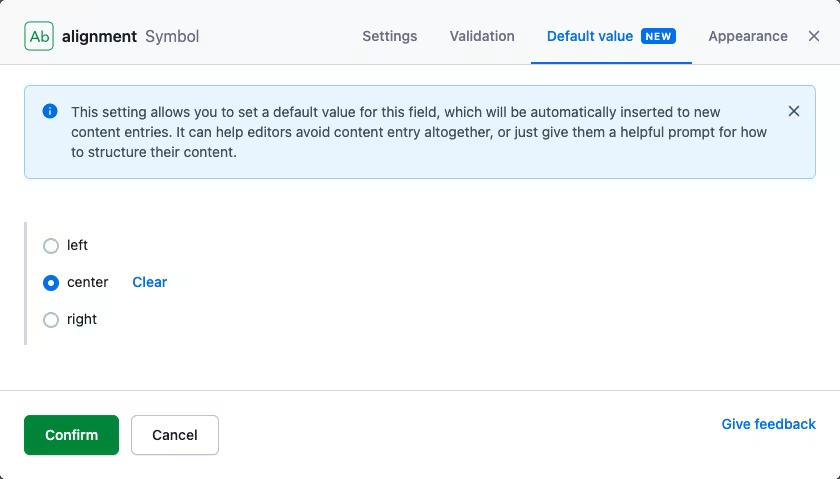
This video walkthrough shows how to create a new content type with default values and how to add them to existing content types.
<div class="wistia_responsive_padding" style="padding:56.25% 0 0 0;position:relative;"><div class="wistia_responsive_wrapper" style="height:100%;left:0;position:absolute;top:0;width:100%;"><iframe src="https://fast.wistia.net/embed/iframe/0lhz91q908?videoFoam=true" title="Default Values Walkthrough Video" allow="autoplay; fullscreen" allowtransparency="true" frameborder="0" scrolling="no" class="wistia_embed" name="wistia_embed" allowfullscreen msallowfullscreen width="100%" height="100%"></iframe></div></div> <script src="https://fast.wistia.net/assets/external/E-v1.js" async></script>If you want to learn more about how this can be used, head over to our help center or take a look at the developer documentation about content types.