Improvements To Managing Spaces During Contract Renewals
The new improvements to managing spaces during contract renewals and space archiving are now available for admins and owners who manage spaces in their organizations of all plans.
-
Email notification and in-app banner at the top of the page will appear for admins and owners of an organization that goes through a contract renewal after Contentful provisions an order. The email informs about a 15-day period to manage spaces (usually takes a few minutes only). An additional reminder is sent a week later and one day before automatic archiving of spaces without a renewed license assigned.
-
Space action menu in the "Spaces" page now holds all important management actions like Upgrade, Downgrade, Archive, Detailed usage, Delete. The menu shows only options that are applicable for each space considering available licenses and usage in each space.
Note: Archiving a space is only available after a renewal or downgrade to the Free plan. There will be a 15-day period to manage your spaces. Free and Basic organizations have a Modify button near the license type to perform Upgrade, Downgrade, Archive (if available).
-
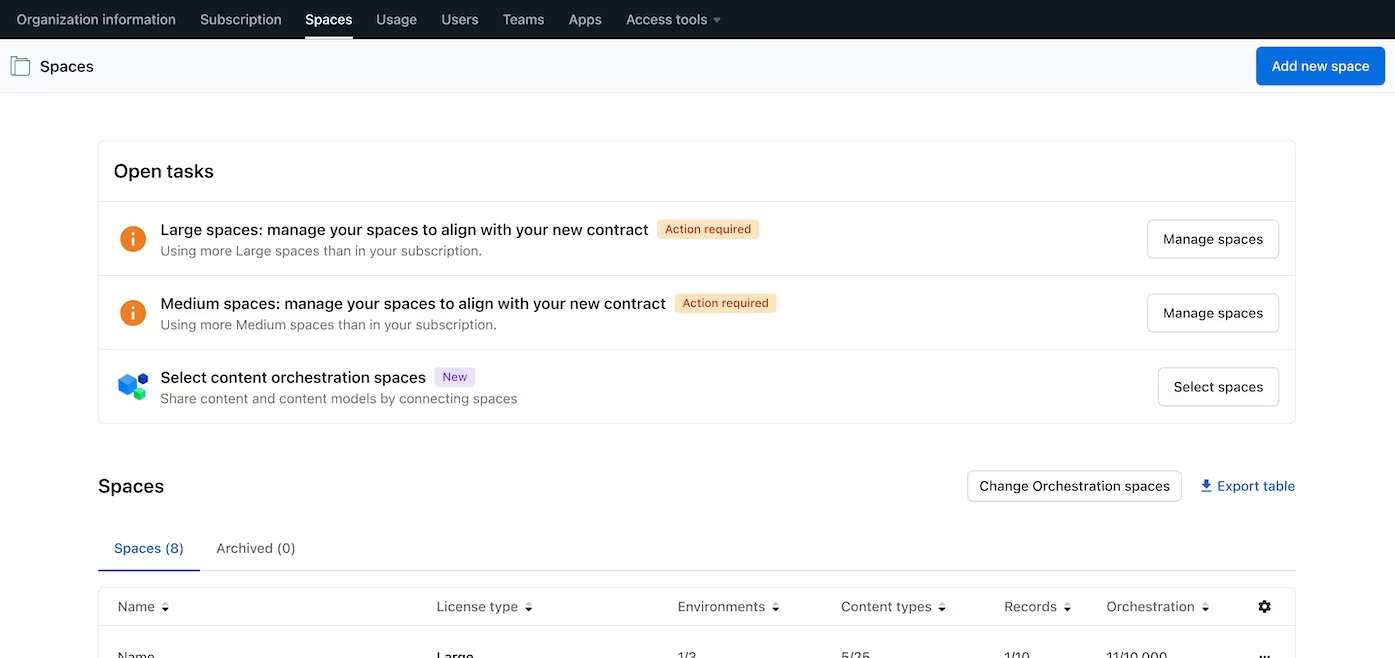
The "Open tasks" section at the top of the “Spaces” page now also holds renewal tasks. Renewal tasks appear once for each type of a space and communicate how many spaces require an action (upgrade, downgrade, archive, delete) based on the license changes you made during contract renewal. When an admin or owner finishes with managing spaces of a particular type, the task is resolved.
-
The archived spaces tab in the “Spaces” page will show your organization’s expired trial spaces and other inactive spaces stored with your account. To archive a space is to make a space inactive. This does not mean the space is deleted. Archiving a space means:
- Your content is safe. We keep it archived in your account.
- You can restore archived spaces.
- Content delivery for archived spaces remains in operation for 30 days after archiving a space.
- You can not create, edit, or publish the content in archived spaces. To view your archived spaces, select the tab “Archived” at the top of the "Spaces" table.
For more information, see the Manage spaces article in the Help Center.