

App Actions
App Action is an entity that allows communication between apps. An app can expose actions that the other apps can call to trigger specific behaviors.
Actions are asynchronous and don’t return a payload directly to the caller. The execution outcome (status, structured result, or error) is persisted on an App Action Call and can be retrieved via the App Action Call endpoints. One can think about an AppAction as an asynchronous function whose result is recorded and can later be retrieved.
Notes
ActionConsumeris a user or an app that triggers behaviours in other apps.ActionProvideris an app that exposes actions that other users or apps can trigger.
The diagram below displays an interaction between ActionProvider, ActionConsumer and CMA when an App Action is called.
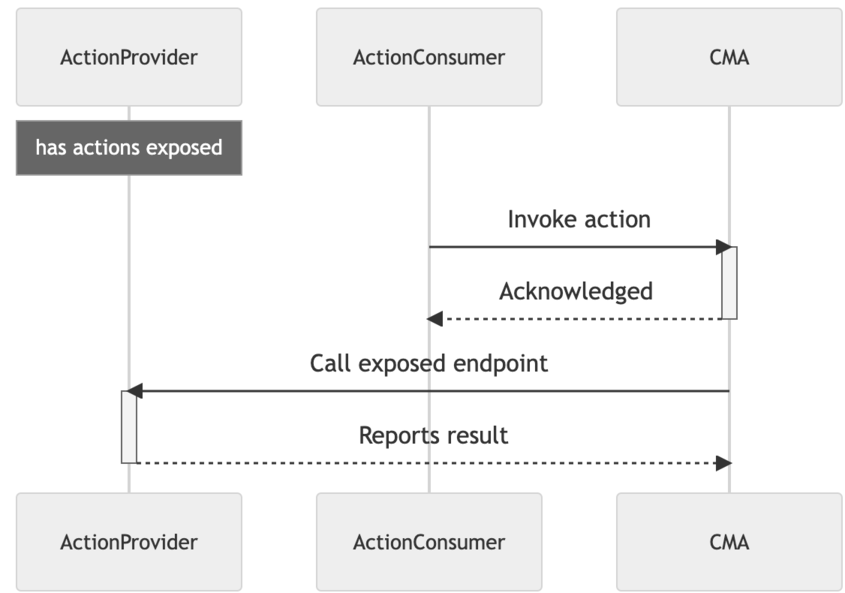
To trigger an action on your app, an ActionConsumer needs to make a call to the CMA. Contentful then sends a signed request to your application. This comes with the following out-of-the-box features:
- Apps exposing actions are secured by request verification.
- Action parameters are pre-validated (with a provided schema) by Contentful.
- Actions can be triggered if and only if both
ActionConsumerandActionProviderhave access to the same space-environment.
See an example implementation of an App Action in the code example below:
Notes
When working with App Actions, consider the following:
- Actions can only be triggered by apps with app identities.
- Actions are asynchronous and don’t yield a response.
- Only apps with signing secret can expose actions.
Errors
409 - Forbidden- This error is returned if signing secret is invalid or missing.
App Actions collection
Action consumers rely heavily on the schemas exposed by your app. Introduce changes to the schema with care, or consider creating different actions for versioning.
App Actions of Environment
Get all actions of an environment