

Profiles
Endpoints
You can use this endpoint to push data from your own existing customer data systems into Contentful Personalization profiles in real-time, in periodic batches, or in bulk, as part of a first-time migration.
This endpoint upserts profiles, meaning that when events are passed for profile IDs that do not yet exist, profiles at those IDs will be created. This ensures that you do not have to check whether profiles at specific IDs exist prior to migration.
NOTE: This endpoint is intended to be used server-side. Because of that, it does not accept options related to resolving location or IP address. You may, however, still specify location data on events.
This endpoint accepts up to 200 events, with a maximum of 50 identify events, across a maximum of 50 unique profiles.
NOTE:
Unlike the single-profile endpoints (Create, Update, Get), the batch endpoint returns profiles only — it does not return experiences or changes. If you need variant selections, use the single-profile endpoints instead.
This endpoint accepts the same request body as Batch upsert profiles (sync) but processes events asynchronously. It returns immediately with a confirmation message and processes events in the background.
This is a fire-and-forget endpoint suited for server-side integrations that do not need to render personalized content in the response.
Note: Because processing is deferred, this endpoint returns 200 even if the organization or environment does not exist. Errors are handled internally during background processing.
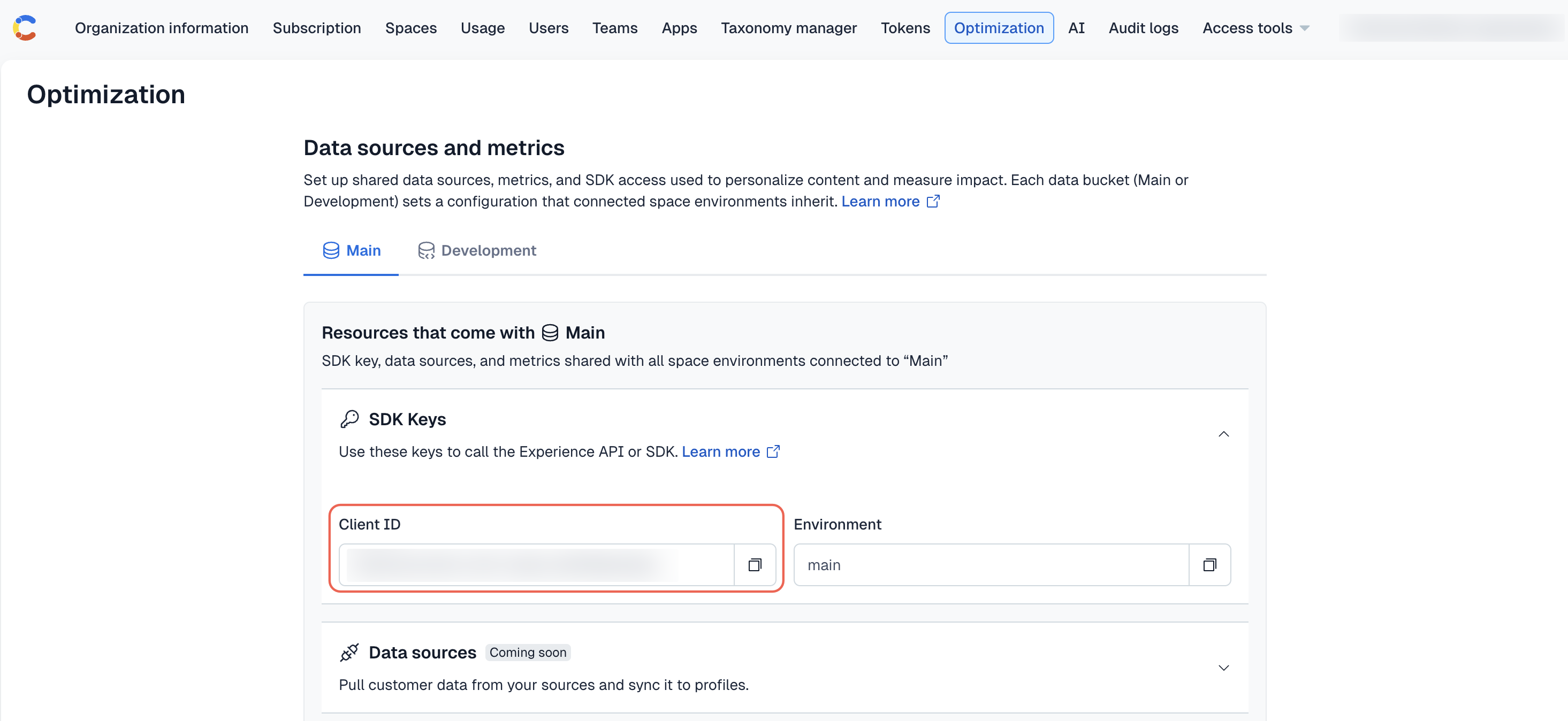
Important: The organization ID (or API key) is the Client ID field value displayed under the “SDK Keys” section, on the Optimization tab.
FAQ
What happens to any aliases that a profile uses?
- In case the profile is being aliased, the original profile is removed. As such, all aliases will also return
404.
Can I batch-delete profiles?
- No, you cannot batch-delete profiles because the batch endpoints only work for events. You have to make one request per the profile that should be deleted. There is no limit on the number of requests you can send at a time.
Tips
- We highly recommend that you use the
profileIDthat is returned by the Contentful Personalization profile once you have identified the user. Retrieving and updating profiles with this returned ID is more performant than using an ID you have supplied when creating or aliasing a profile. - The payload you supply to these endpoints can be sent with the
content-typeheader set as eitherapplication/jsonortext/plain. We recommend that you usetext/plainwhenever possible to minimize request roundtrip time by avoiding triggering a CORS preflight request. Our SDKs automatically send requests astext/plain. - If you want to ensure that a user’s location is not resolved as part of a create profile or update profile endpoint request, you can either:
- Set an empty string or object, whichever is applicable, to each
context.locationargument, OR - Not set
locationor supplylocation: undefinedorlocation: {}, do not supplylocationas an option, and setcontext.library.versionto a string that represents a semver of3.14or greater.
- Set an empty string or object, whichever is applicable, to each
Types
Response
The returned response of each API endpoint is a data structure indicating the complete representation of the profile(s) and the Experiences & variants that the Experience API has selected for the profile(s). The single-profile endpoints (Create, Update, and Get) return a single profile with experience variant selections and changes. The Batch upsert endpoint returns an array of profiles without variant selections or changes.
Profile
A profile is a holistic representation of a single user. The Contentful Personalization Experience API computes and returns a visitor’s profile in response to page, track, identify, screen, and component events. The profile is also used within Experience SDKs to determine the appropriate experience variants and Merge Tag values to render.
Experience
Each response from the Experience API also returns an array of experiences assigned to the profile. You may see this typed in the SDKs as SelectedVariantInfo. Experiences must be published in the content source to be returned on the Experience API. Each experience indicates the variant index (0 = control, 1 = variant 1, etc.) and the content source IDs of content to show.
The key of each variants Record is the content source’s ID of the baseline or control content. The value of each variant Record is the content source’s ID of the applicable variant content. When the variant index is 0, the key and value are the same, otherwise they will be different.
When sticky is true, the variant selection has been locked in for this profile and will not change even if the experience’s distribution configuration is modified.
Change
The changes array contains inline variable personalizations — where a single keyed value is changed rather than an entire CMS entry being replaced. Each change tells the SDK: for this key, use this value.
Event
Each POST endpoint accepts arrays of events as part of requests. Events are the building blocks of profiles; they indicate the actions taken and attributes of individual profiles so those profiles can be segmented into Audiences.
The API accepts five event types: page, track, identify, screen, and component.
Screen events
Screen events (type: "screen") are the mobile equivalent of page events. They require properties.name to be set:
Component view events
Component view events (type: "component") are used primarily to persist sticky variant selections. When both experienceId and variantIndex are set on a component event, the server stores the mapping so the visitor continues seeing the same variant on subsequent requests.
Options
The API endpoints also accept options to modify the behaviour of the request. These are available only on the create profile and update profile endpoints (not the batch endpoints).
- Specifying
locationinoptionsprovides client-side geo-location data that supplements or overrides server-side location resolution. - Including
"location"in thefeaturesarray will attempt to resolve the location of the user based on request headers (Cloudflare’s location data).- If you do not want location to be resolved when sending events, do not add
locationas a feature option and ensure thatcontext.library.versionis set on any accompanying event as a string representing a semver greater than3.14.
- If you do not want location to be resolved when sending events, do not add
- Including
"ip-enrichment"in thefeaturesarray will attempt to resolve firmographic data with a connected Albacross API Key. See Albacross for more information.
Traits
traits are arbitrary JSON data set by identify events. Traits are shallow merged together; the most recent value of a given trait key overwrites the prior value.
Traits are useful for custom segmentation using has trait rules. Additionally, traits can serve as snippets for dynamic inline personalizations.
Example for an inline Personalization:
const headline = `Hey ${profile.traits.firstname}`.