

Getting Started with Contentful and .NET
The Content Delivery API (CDA) is a read-only API for retrieving content from Contentful. All content, both JSON and binary, is fetched from the server closest to a user’s location by using our global CDN.
To make development easier for our users, we publish client libraries for various languages which make the task easier. This article details how to use the .NET CDA client library.
Pre-requisites
This tutorial assumes you understand the basic Contentful data model as described in the developer center.
Contentful.net is built on .NET Core and targets .NET Standard 2.0. The client library is cross-platform and runs on Linux, macOS and Windows.
Installation
Add the package to your .NET solution using the NuGet package manager by running the following command in your NuGet package manager console.
Or running the following with the .NET CLI.
Installation via the package manager dialog
Right click your solution in Visual Studio and select Manage NuGet Packages for Solution….
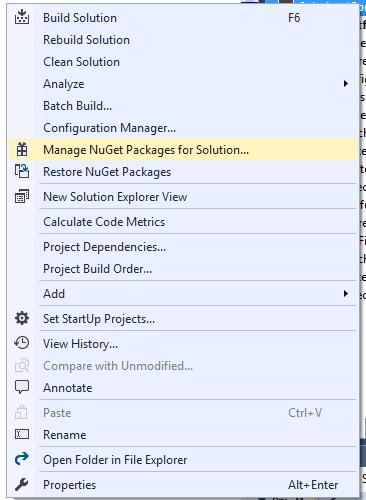
Search in the package manager for “Contentful”, select the “Contentful.csharp” package, check the projects you want to add the package to, and click install. The package will now download and install to your selected projects.
Your first request
To communicate with the CDA you use the ContentfulClient class that requires four parameters:
- An
HttpClientthat makes the HTTP requests to the CDA. - An access token. You can create access tokens in the APIs tab of each space in the Contentful web app.
- An access token. This is the preview token used when communicating with the Contentful Preview API.
- A space id. This is the unique identifier of your space that you can find in the Contentful web app.
HttpClient in .NET is special. It implements IDisposable but is generally not supposed to be disposed for the lifetime of your application. This is because whenever you make a request with the HttpClient and immediately dispose it you leave the connection open in a TIME_WAIT state. It will remain in this state for 240 seconds by default. This means that if you make a lot of requests in a short period of time you might end up exhausting the connection pool, which would result in a SocketException. To avoid this you should share a single instance of HttpClient for the entire application, and exposing the underlying HttpClient of the ContentfulClient allows you to do this.Once you have a ContentfulClient, you can start querying content. For example, to get a single entry:
The GetEntry method is generic and you can pass it any POCO class. It will then deserialize the JSON response from the API into that class. The example above passed it a Product class as a generic type parameter.
If you pass this class to the GetEntry method you will get a response as a strongly typed Product.
If you need the system meta data, add a SystemProperties property to your class.
Querying for content
There are a couple of methods on ContentfulClient that allow you to query for content. Every example below assumes you have a ContentfulClient named client initialized.
Get a single Entry
To get a single entry use the GetEntry<T> method.
This calls the CDA and returns JSON in the following format:
Which you can then map to your POCO object.
Get multiple entries
There are several methods to retrieve multiple entries available in the client library.
Get all entries of a space
Will return all entries in a space in an IEnumerable<dynamic>. As with GetEntry<T> you can choose to provide GetEntries<T> with another implementation of T, for example Product.
Every collection returned by the CDA has this JSON structure:
This is useful if the response returns a large number of entries and you need to paginate the result. The maximum number of entries ever returned for a single result set is 1000 items, the default 100 items.
The ContentfulCollection<T> response above corresponds to this structure. You can use the Skip, Total and Limit properties directly on the returned collection.
ContentfulCollection implements IEnumerable<T> and thus you can write normal LINQ syntax directly against the collection instead of against collection.Items, e.g. entries.First() as opposed to entries.Items.First() which also works.Get and filter entries
Frequently you’re not interested in every entry in a space but would like to filter the entries returned. The CDA exposes powerful filtering options that you can read more about in our api documentation.
When using the GetEntries methods you can filter the query by using the QueryBuilder<T> class.
This would filter the entries returned to be of content type <content_type_id> and the fields.slug property equal to ‘soso-wall-clock’.
Passing a string like fields.slug can be hard to read, provides no IntelliSense and could easily be misspelled or faulty. The QueryBuilder<T> class therefore provides a way to pass the fields as a strongly typed parameter.
As filtering by content type id is a common scenario, the ContentfulClient exposes a helpful method.
This method can take an optional QueryBuilder<T> for further filtering.
This would filter the entries returned to be of content type <content_type_id> and that have been updated in the last week.
You can pass the query string directly to the GetEntries methods.
While this is possible, the recommended approach is to use the QueryBuilder<T> as it will make sure your query string is correctly formatted.
Get entries of multiple types or by interface
Sometimes you want to fetch entries of several different content types. This can make it difficult to know what generic argument to use for your GetEntries<T> call. You could always use dynamic but a cleaner approach would be using an interface or base class.
Consider if we had the following types.
If we would like to fetch all the persons and products from Contentful it would be nice to be able to do this:
Unfortunately this does not work as we can’t deserialize into an abstract type or an interface. We need concrete implementations and the deserializer has no way to know what to deserialize each entry into.
There is a way to specify how we want each content type deserialized. By implementing an IContentTypeResolver we can give the client information how to deserialize into a specific type.
And then setting this resolver on the client before we call GetEntriesAsync.
This now works and each entity will be of the expected type.
Setting an IContentTypeResolver works for sub-properties as well. Consider the following class.
The Product property is of the interface type IProduct and we therefore must use an IContentTypeResolver to instruct the serialization engine how to resolve this interface into concrete implementations.
Get a single asset
To get a single asset use the GetAsset method.
This would return an asset as JSON:
That is then serialized into a strongly typed Asset.
Get multiple assets
Getting multiple assets is similar to getting multiple entries, but the methods are not generic but all return a variation of an IEnumerable<Asset>.
Get all assets of a space
Every collection returned by the Contentful API has this JSON structure:
This is useful if the response returns a large number of entries and you need to paginate the result. The maximum number of entries ever returned for a single result set is 1000 items, the default 100 items.
The IEnumerable<Asset> response above corresponds to this structure. It returns a ContentfulCollection<Asset> which includes Skip, Total and Limit properties.
ContentfulCollection implements IEnumerable<T> and thus you can write normal LINQ syntax directly against the collection instead of against collection.Items, e.g. assets.First() as opposed to assets.Items.First() which also works.Get and filter assets
As with entries, you can filter assets by using your own query string or a QueryBuilder<T>.
This returns all assets that are images, ordered by their creation date and would be equivalent to using the following query string.
Including referenced assets and entries
When querying for entries it’s common that the returned entries reference other assets and entries. For example, a blog post entry referencing its author entry and vice versa.
The CDA allows you to do this by specifying how many levels of references you wish to resolve and include in the API response.
Consider the following classes has two different properties that contain references to other assets and entries.
Specifying the number of levels to include
To specify the number of levels to include in a call add an include query string parameter, manually or by using the QueryBuilder<T>.
This queries for entries of a specific content type id and tells the CDA to resolve up to three levels of referenced entries and assets. The default setting for the include parameter is 1. This means that omitting the query string parameter still resolves up to 1 level of referenced content. If you specifically do not want any referenced content included you need to set the include parameter to 0.
Including referenced content is only supported for the methods that return collections. Using GetEntry will not resolve your references. Instead, you could query for a single entry using GetEntries, but add a restriction to get an entry by a specific id.
This fetches an entry with id “123” and includes up to two levels of referenced entries and assets.
Resolving included assets
To resolve assets when querying for content, add a property of type Asset or IEnumerable<Asset> and the deserialization will automatically fill up any referenced assets.
Resolving included entries
Entries are simple to resolve.
You can now deserialize the referenced categories and included them in the Product.
Space and content types
You can retrieve information about your space and content types, useful for when you are working with your content model.
Get the space
Get a content type
Get all content types
Synchronization
They synchronization endpoints allow you to sync all your content to local storage. You can choose to sync everything, just assets, certain content types or deleted entries.
The initial sync
To start syncing content, call the SyncInitial method. Calling it without any parameters will sync all content types and assets, but you can specify that you wish to sync specific content types, assets or deletions.
Handling the result of a synchronization
All sync operations return a SyncResult. This class contains all assets, entries, and deletions that the synchronization call resulted in and contains two URL properties, NextSyncUrl and NextPageUrl. NextPageUrl is only present if there is more content for the current sync operation to receive, NextSyncUrl will be null in this case. If there is no more content for the current sync, only NextSyncUrl will be present.
The synced entries are of the Entry<dynamic> type. This is because the JSON returned by a sync must contain every locale of a space. The JSON structure of an entry looks something like this.
This poses a problem when deserializing as you cannot have C# members that include hyphens (-) in their name, or classes that have a structure like this, i.e. a property ProductName which is an object with two more properties, one for each language. To work around this for sync operations the Entry<dynamic> is used. This means that you can access any property in any language using an indexer value.
This is also why you don’t use the Asset class directly for synced assets, but instead the SyncedAsset class.
Syncing the next page or result
After a sync completes and you receive a SyncResult you store the NextSyncUrl value and call it when it’s time to fetch changes by passing the full URL or the sync token to the SyncNextResult method.
Contentful makes no assumption on the interval of your sync operations, which is up to the individual application to decide. The sync result will contain all changes in your space since the last sync operation.
Recursively syncing all pages
If you want to ensure the initial sync retrieves all pages, you can use the SyncInitialRecursive method.
This potentially results in multiple calls to the sync endpoint. If you have a large number of pages the initial collection of entries can be large and it might be better to manually process each page using the SyncInitial and SyncNextResult methods.