Structure your creativity with Visual Modeler
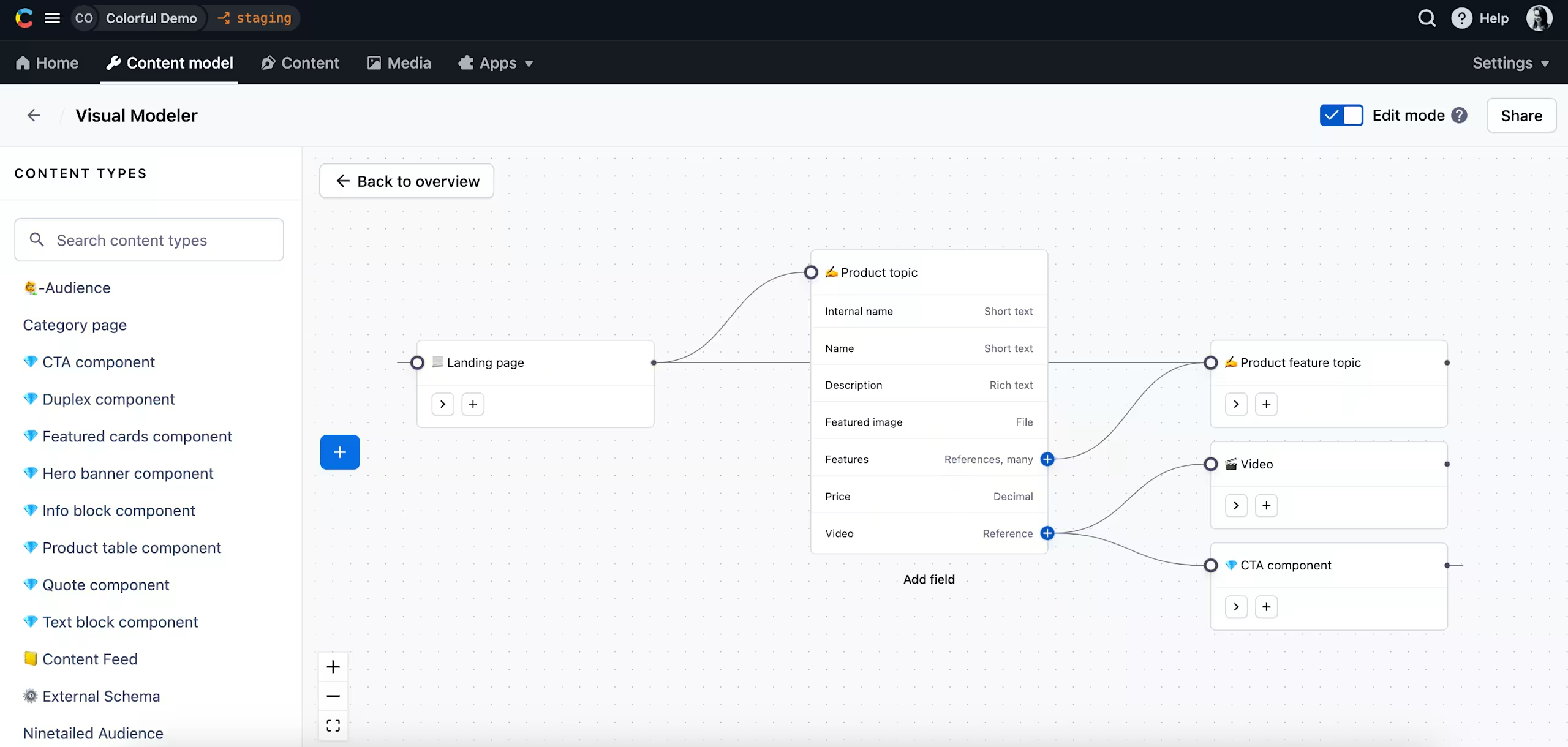
Visual Modeler is an interactive functionality that allows you to visually build a content model and easily collaborate on changes with your team members. This capability not only streamlines the entire content modeling process by bringing planning, building, testing, and iterating into a single workflow but also shortens the overall modeling cycle.
Who can use Visual Modeler?
Technical users can leverage the Visual Modeler to construct content types, establish connections between them, and visualize these connections through a graph-based interface. They can effortlessly create or edit fields and gather valuable feedback from the editorial team. This synergy results in a validated and scalable content model that paves the way for efficient content creation.
For non-technical users, Visual Modeler offers a user-friendly and intuitive environment to provide feedback on content models. It also facilitates deeper understanding of content connections and helps editorial teams to ensure their content architecture is simple and easy to use.
Key capabilities
- Build your content models by creating content types and fields directly on the visual board. Easily link content types using reference fields.
- Share specific content types or a full model with your colleagues to help them onboard to the platform, understand the content architecture and share feedback.
- Audit your content model. Browse your content types and easily identify missing connections.
To try out this capability, navigate to your content model tab and click Visual Modeler. To learn more please visit our documentation. Help us further improve this capability - share feedback.