Import design system overview

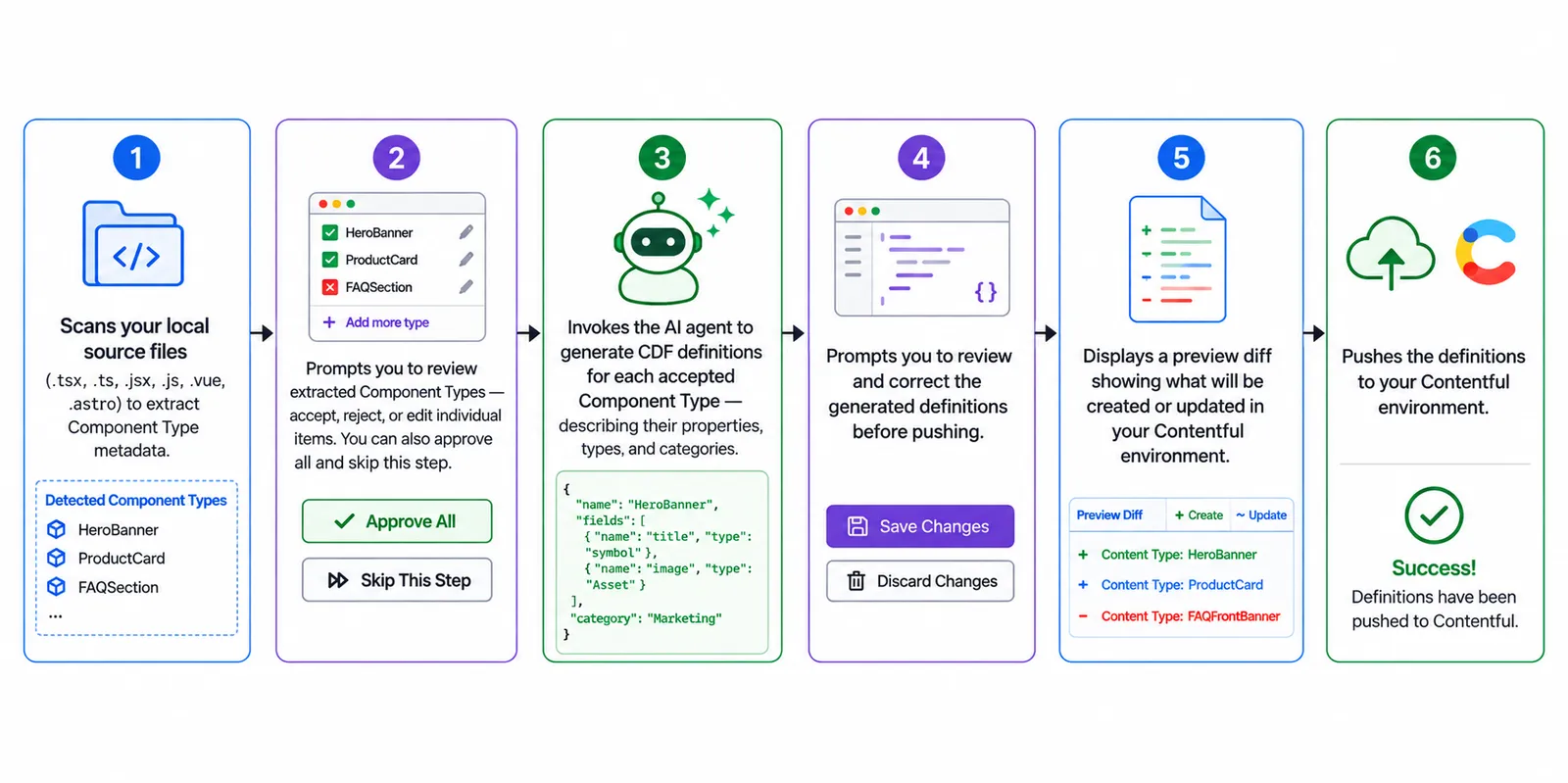
Import your design system components and tokens directly from your codebase into Contentful. The @contentful/experience-design-system-cli analyzes your source files, uses an AI agent to generate Component Definition Format (CDF) definitions, and pushes them to your space — your codebase remains the single source of truth.

Import pipeline

The CLI offers two modes: an interactive TUI that runs the full pipeline in one command, and individual CLI commands for granular control over each step.

Interactive TUI

Run experiences import to walk through the full pipeline in a single terminal session. The wizard extracts your components, pre-filters them with an AI agent, prompts you for scope decisions and credentials, generates component definitions, previews the diff, and pushes to Contentful — all in one flow. When prior runs exist, the wizard opens on a run picker so you can push or modify a previous run without re-running extraction or generation.

Individual CLI commands

Run each step of the pipeline as a separate command for granular control. Use this when you need to re-run a specific stage, inspect intermediate results, or integrate steps into a custom pipeline. See Run the pipeline step by step.

Imported artifacts

The CLI imports the following artifacts:

ArtifactDescription
ComponentsVisual UI building blocks (buttons, cards, layouts) with their properties, types, and categories
Design tokensColors, spacing, typography, borders, and other styling values in W3C DTCG format

Coded components

By default, the CLI imports every component as a flat, standalone definition. When your components embed other components through typed slots, you can import them together with that nesting preserved using composite mode. These embedded-component hierarchies are called coded components.

Opt in with --composite (or any composition flag, which implies it):

$experiences import --project ./my-design-system --composite

Reach for composite mode when your components nest other components and you want them imported together rather than flattened. See Coded components for the slots model, where the hierarchy comes from, and how the wizard surfaces it.

Run history and replay

Every successful run is recorded to ~/.config/experiences/runs.json. Use experiences runs to list prior runs, then push or modify them without re-generating:

  • experiences import --push-from-run <id> — push a recorded run to Contentful.
  • experiences import --modify <id> — re-open the wizard at final-review with the recorded run pre-populated.

Design tokens are first-class in run history — --push-from-run pushes both components and tokens from a recorded run when both were included. See Run history and replay.

Debug logging

Pass --debug on any subcommand (or set EDSI_DEBUG=1) to write a redacted JSONL trace of every decision to ~/.contentful/experience-design-system-cli/debug/. See Debug logging.

Next steps

Continue with these guides:

  • Getting started — End-to-end walkthrough of a full import, from setup to seeing your components in Contentful.
  • Installation — Install the CLI and configure your environment.
  • Import components — Run the component import pipeline.
  • Import design tokens — Import design tokens from your codebase.
  • Coded components — Preserve embedded-component hierarchies with composite mode.
  • Run history and replay — List, push, or edit prior runs.
  • Command reference — Full flag reference for experiences import and the individual pipeline commands.
  • Debug logging — Capture a trace of a run for troubleshooting.
  • FAQ — Common questions and behaviors that surprise operators the first time through.