

Run history and replay
Every successful experiences import run is recorded to ~/.config/experiences/runs.json. Alongside each run, the CLI stores short hashes — called fingerprints — of the source files at extraction time and the saved artifact files at save time. Fingerprints are used to detect when a recorded run has drifted from what is on disk. You can list past runs, push a recorded run to Contentful without regenerating, or re-open one for edits.
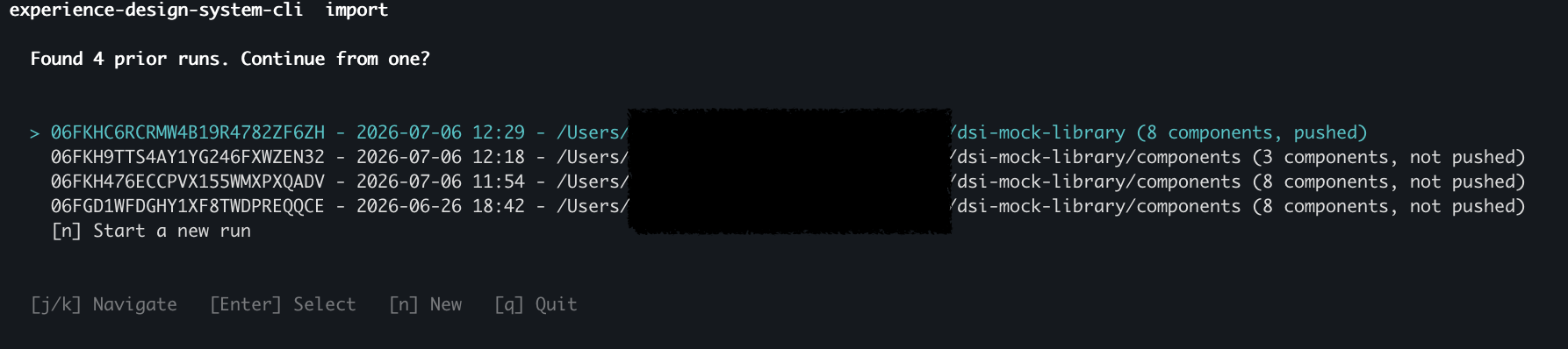
When runs.json has entries, experiences import opens on a run picker so you can resume a prior run. The picker is skipped in non-interactive shells and when a routing flag (--push-from-run, --modify, --project, --auto-accept-scope) is passed.
List runs
Prints a table of prior runs with ID, creation time, project path, save path, component count, push target, and staleness. Show details for a single run by passing its ID or a filesystem path that matches a recorded save path:
Additional options:
--json— Emit theRunRecordas JSON (array without a target, single object with one).--pushed/--not-pushed— Filter by push state.--project <path>— Filter by source project path.--limit <n>— Limit the number of rows.
The runs subcommand also has the alias experiences ls.
Push a recorded run
Push a prior run to Contentful without re-generating:
Credentials resolve in this order: command flags → the run’s recorded push target → saved experiences setup values → (in a TTY) an interactive prompt. Design tokens ride along automatically when they were part of the original run.
Re-open a run for edits
Re-open the wizard at the final review step with a recorded run pre-populated:
--overwrite— save back to the run’s recorded path.--save-as-new— always save to a new path (prompts for one).
The modify entry skips extract and generate, so you can tweak a field or its metadata and push again without a full re-run.
Stale-run detection
The fingerprints described above are compared on every replay. When you replay a run whose source has changed on disk, the CLI refuses with a stale notice. Pass --force to bypass the check:
The STALE column in experiences runs shows a short summary per run.