What is TypeScript and why should you use it?
Updated on August 4, 2026



Inspiration for your inbox
Subscribe and stay up-to-date on best practices for delivering modern digital experiences.
The TypeScript programming language has many advantages over JavaScript for developers. The additional functionality TypeScript provides makes it possible for you to build more complex interactive applications and websites with fewer bugs.
TypeScript also has a big ecosystem of developer tools that provide inline documentation and live code checking, making it easier to catch coding mistakes while you're working.
This article explains what TypeScript is and its relation to JavaScript. It also provides resources to help you get started building frontend and backend applications.
What is TypeScript?
TypeScript is a programming language, created by Microsoft and first released in 2012, that adds extra functionality to JavaScript.
JavaScript was never intended to drive complex frontend and backend applications. It was initially designed to add simple interactivity to websites — for example, to make clickable buttons and animate drop-down menus.
Despite this, JavaScript became popular with developers who found ways to use it way beyond this use case, which led to problems. The language was too forgiving and made it easy to make programming mistakes or misuse features that would later break an application. JavaScript also lacked many features of other languages. TypeScript was developed specifically to address these issues while remaining compatible with existing JavaScript environments.
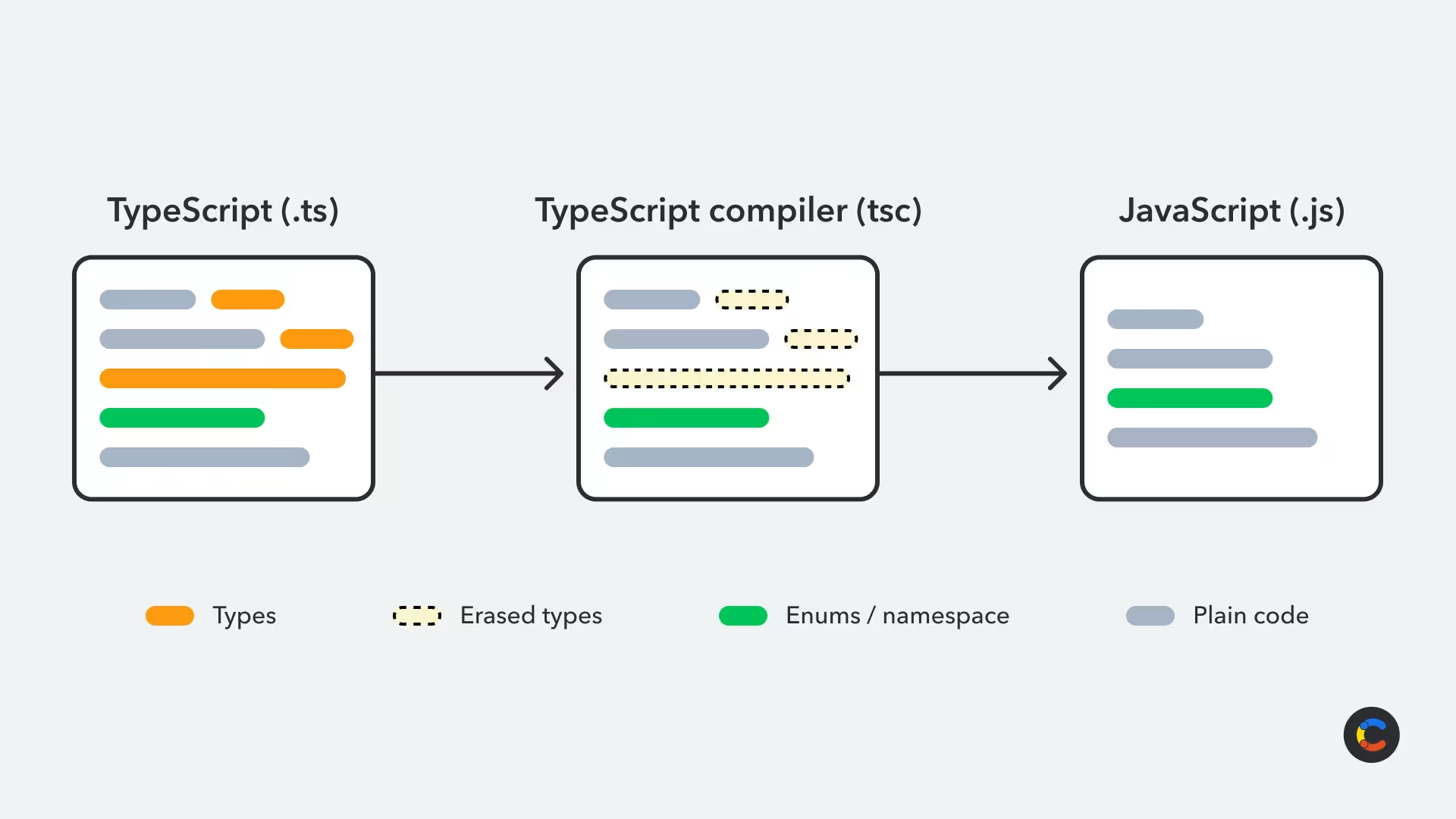
So are JavaScript and TypeScript the same thing? No — TypeScript is a statically typed language and a superset of JavaScript that builds on top of JavaScript's existing syntax and functionality. Any valid JavaScript works in TypeScript, but TypeScript adds syntax (like type annotations) that plain JavaScript doesn't understand. Once you're done writing TypeScript code, it compiles down into plain JavaScript, stripping the extra syntax for production. This is because, above all, TypeScript is a development tool.
TypeScript compilation and workflow
TypeScript must be compiled (or, more precisely, transpiled, as it isn't converted to a low-level language) to JavaScript to run in web browsers. Once TypeScript code is compiled to JavaScript, the resulting JavaScript code isn't supposed to be edited directly.
As of July 2026, that compile step got a lot faster: TypeScript 7 ships a native port of the compiler written in Go, which delivers builds that are roughly eight to twelve times faster and near-instant editor feedback compared with previous versions.
Node.js also used to require you to compile to run TypeScript code. However, newer versions of Node (22.18 and up) can now run .ts files directly, without a separate compilation step first. Node strips out type-related syntax on the fly and runs what's left as JavaScript. For most straightforward type syntax, this is fine. However, features like enums and namespaces still need to be compiled first because, unlike type annotations, they produce real JavaScript code that your program needs at runtime.
The workflow for building TypeScript apps is to write them in TypeScript, compile them to JavaScript, and then deploy them. While this extra step may seem like unnecessary added complexity, it's what makes TypeScript practical in the first place. If the solution to the type problem in JavaScript was a completely new language, it would have required developers to relearn everything and wouldn't have run on any existing JavaScript infrastructure. Instead, TypeScript meets developers where they are — it's a bolt-on layer of improvements over JavaScript rather than a replacement for it. The compilation step converts your code back into plain JavaScript, which runs anywhere JavaScript runs, elegantly solving a problem for both developers and systems.
The file extension for TypeScript is .ts. Below is an example file named index.ts with some basic TypeScript code:
Notice that while the syntax is similar to JavaScript, there's something different visible in this example. The message variable is followed by a colon (:), and its type — in this case, string — is letting us specify that the message must be a string and cannot take a value of a different type.
Top features and advantages of TypeScript for developers
TypeScript is named for its primary feature: introducing type safety to JavaScript. In the above example, a string type is enforced for the message variable, so no numerical or other type of value can be used there. This may seem limiting, but it's actually a benefit to developers.
Type safety and compile-time checks reduce the ways you can make programming mistakes
Consider this scenario: You are taking the values from two HTML text inputs and want to add them. JavaScript reads these values as strings (since they come from a text box). What you wind up with is this:
The code will run without any warnings or errors, with the values from the text boxes treated as strings. This means they are concatenated instead of being added using arithmetic operations, leading to the unintended result of "25" instead of the number 7. This could be bad if you're building a commerce tool and want to add some monetary values together — you'd overcharge your customer!
This demonstrates why type safety is important. Below, the type of the variables being added is enforced by adding a type to them:
If you try to compile and run this code, it won't work — you'll get an error instead:
Type 'string' is not assignable to type 'number'.
This tells you that you've mistakenly tried to assign a string value to a numerical variable so that you can fix it — for example, by explicitly converting the string to a number. By preventing you from even compiling and running your code if there are type errors in it, TypeScript makes your app easier to debug and more reliable for your users.
You don't have to specify a variable's type when working in TypeScript (though you generally should): Type inference lets you declare and use variables without a specified type, and TypeScript will infer the type based on the value and usage. This is useful when bringing in untyped JavaScript code for use in TypeScript projects.
For any third-party packages that weren't written in TypeScript, you can often install a matching @types package. These come from DefinitelyTyped, a community-maintained repository of type definitions, giving TypeScript the information it needs to type-check libraries it can't infer.
If you want to play around with this for yourself, the TypeScript Playground lets you write and test TypeScript code right in your browser, without needing to compile.
Custom types, classes, and interfaces keep your data consistent
TypeScript isn't purely object-oriented — like JavaScript, it's multi-paradigm (accommodates functional, object-oriented, and imperative styles of programming). But it significantly extends JavaScript's support for object-oriented programming with support for your own custom types, as well as improvements to classes, interfaces, and inheritance.
Building your own object types and interfaces lets you model your data in TypeScript to ensure that your data is processed and stored properly.
Classes and inheritance enable clean code and DRY principles, keeping your codebase much more organized than traditional JavaScript allows.
Generics and utility types make your types reusable
Without generics, you'd need a different interface for every data shape a function or class handles. Generics let you write one reusable type instead:
In the above example, T is a placeholder that allows ApiResponse<User> and ApiResponse<Product> to use the same interface but pass different types.
TypeScript also has built-in utility types that are built on generics. They're used for common jobs, like making every property optional with Partial<T>, pulling out some fields with Pick<T, Keys>, or removing them with Omit<T, Keys>. This saves you from redefining nearly identical types by hand.
type SafeUser = Omit<User, "password">;
Enums and literal types make your code easier to understand
Enums make your code more readable and easier to understand by giving names to values that may otherwise be ambiguous.
Suppose you're storing the status of an order in your database as a numerical value to save space and make it faster to search. Instead of pending, paid, and shipped, you might store those values as numbers 0, 1, and 2, respectively.
The side effect of this is that your code would become confusing, as the numbers don't describe much on their own. You might forget which number corresponds to which status and use the wrong one. Enums offer a convenient solution:
In the above enum, pending has the value 0 (enums, like other indexes in programming, start counting the position of items at zero), paid has the value 1, and shipped has the value 2. When using the enum, you refer to its values by name, and the index value will be returned:
console.log(OrderStatus.paid); // Will output 1
Literal types and unions enforce specific values for variables. For example, you may have a function that only expects to receive the value "cat" or "dog":
If your code passes values other than "cat" or "dog" to this function, an error will be raised. This helps catch more problems during development: You can write functions that expect certain input, knowing that if a bug is introduced that passes them an unexpected value, your application will not compile.
How to install TypeScript and use the TypeScript compiler
TypeScript code needs to be compiled into JavaScript so that it can be run in web browsers and Node.js. To do that, you need to install the TypeScript compiler.
You can install TypeScript globally using the following npm command.
npm install -g typescript
Once it's installed, you can run the tsc TypeScript compile command from anywhere in your terminal using npx:
tsc index.ts
The above command will compile the TypeScript file index.ts and output a compiled JavaScript file named index.js.
For larger projects, running tsc --init creates a tsconfig.json file, where you can set options like your target JavaScript version, output folder, and whether to enable strict mode for full type-checking. Once it exists, running tsc compiles your whole project using those settings.
How to write apps in TypeScript
TypeScript shines when building complex, multi-page applications and websites. Most developers don't use it for basic things like adding interactivity to individual web pages, but they do use it to build large applications with React or Angular.
Better editor tooling
Many developers use code editors that support TypeScript integration so that they can take advantage of code completion, inline documentation, and error highlighting to streamline their development and debugging processes.
Because TypeScript understands your code's actual types, editor features like go-to-definition, find-all-references, and autocomplete become far more accurate and reliable than what you get with plain JavaScript. This means you can jump straight to a function's source, see everywhere it's used, and get accurate suggestions as you type.
Can I use my existing JavaScript code?
Yes. TypeScript is backward-compatible with JavaScript. You can bring in your old JavaScript code, continue using it in your TypeScript projects, and refactor it over time to leverage new TypeScript functionality.
Building front ends with TypeScript for the browser
React is a library that assists you in building user interfaces for your front ends. It provides the foundations for you to build reusable components, modularizing and streamlining your app development. It also lets you create dynamic pages that the user can interact with by showing, hiding, moving, and changing the appearance of on-screen content. React apps can be written in TypeScript: This combination is a popular and powerful toolchain for frontend developers.
Angular is a full framework that uses TypeScript to build its components. It takes things further than React: In addition to providing tools for building user interfaces, it provides the framework for a whole application. Angular's opinionated approach allows developers to build faster, provided that their application's concept fits within Angular's architecture.
Both React and Angular can be used to build TypeScript apps for Ionic and Electron. Ionic lets you build mobile apps for iOS and Android using TypeScript, and Electron lets you embed your web apps in desktop applications for Windows, Linux, and macOS.
Deploying TypeScript back ends to the server
TypeScript isn't limited to building frontend applications. It can also be used with Node.js to develop backend services and command-line applications.
Using TypeScript on the back end brings the same benefits as it does on the front end: the ability to catch any bugs before they reach production and the ability to create self-documenting code. When you type your API routes, request bodies, and database models, other developers (including the future you) can understand the shape of data a function expects and returns quickly, without needing to cross-reference API documentation. This is a great perk for teams building APIs, where the mismatch or drift in data models between the front end and back end can cause bugs. The Contentful TypeScript SDK is a good example of this in practice: It lets you generate types directly from your content models, so any changes to your content structure are immediately reflected as type errors anywhere in your codebase where the types don't match.
You can also use TypeScript with the Fastify web framework or use a TypeScript-specific framework like Nest to build type-safe APIs. These frameworks handle routing, structure, and boilerplate for you so that you can build in a fraction of the time it takes to start from scratch. And with the added benefit of TypeScript, your routes and functions will be type safe.
Is Python better than TypeScript?
TypeScript isn't the only popular statically typed option for backend development. Python can also be written with strict typing despite being dynamically typed by design, although TypeScript and Python aren't competing for the same job. TypeScript is generally the better fit for large-scale web and app development, while Python is better suited for data-centric work and scripting.
TypeScript and GraphQL
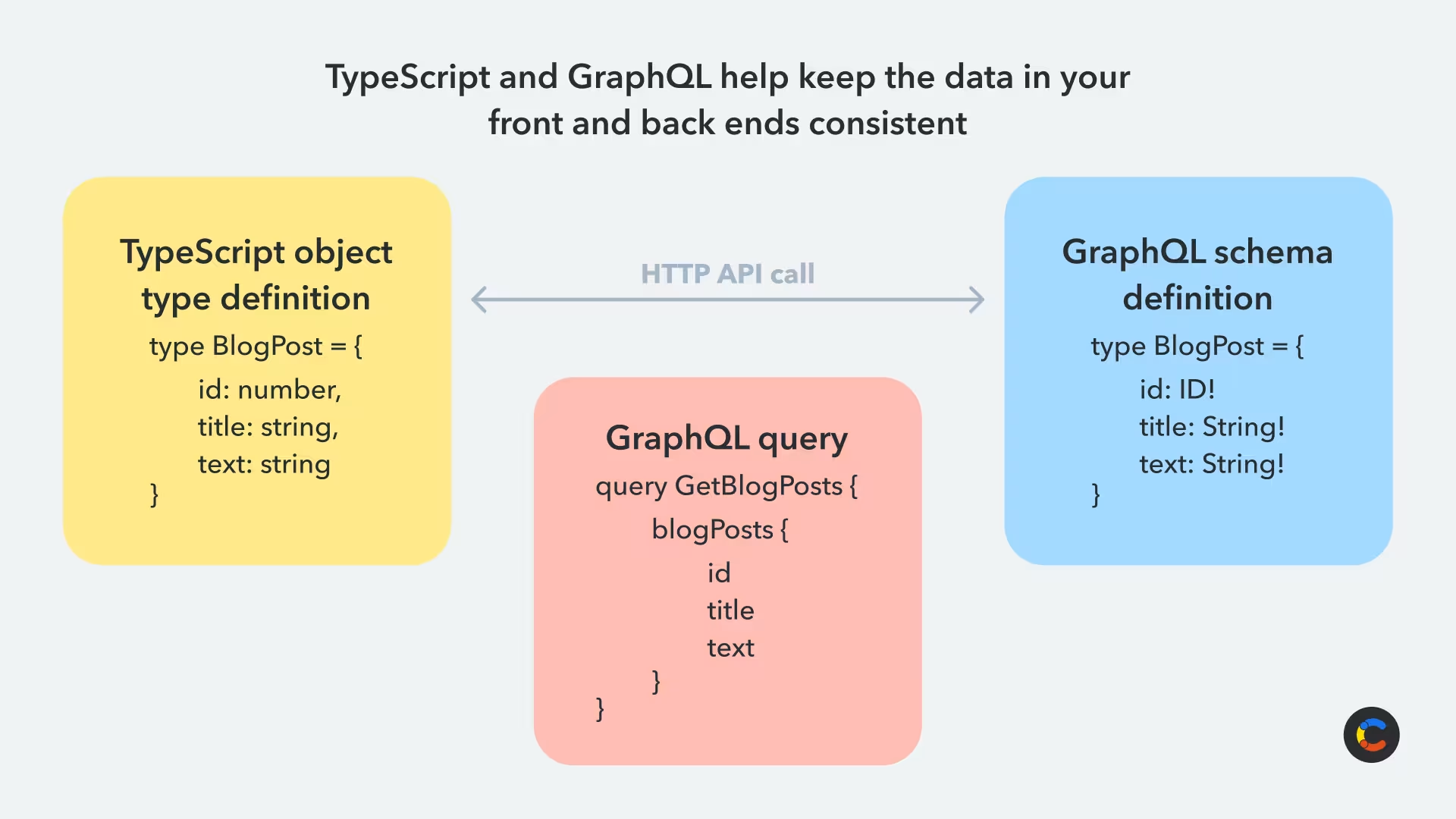
GraphQL is a query language for searching and retrieving data from APIs. Like TypeScript, it is typed, so it provides structured and consistent data. By utilizing services that support GraphQL, implementing it in your own back ends, and matching its types with those in your TypeScript code, you can greatly improve the quality of your applications. This helps ensure that all data modeled on your backend services is correctly reflected in your frontend interfaces and that all data collected on your front ends is correctly stored when it is uploaded.
If you are using Contentful to manage your composable content, our community members have created apps and tools that help generate type declarations for your content types and sync TypeScript with your content model.
What's the best way to learn TypeScript?
TypeScript comes with tons of useful features for developers, and learning and implementing them all at once might seem overwhelming. But thanks to its support for existing JavaScript code, you don't have to implement every TypeScript feature in one shot.
One approach is to learn about a few TypeScript features and then apply them to your JavaScript code, function by function. Once that's done, pick another set of TypeScript concepts to implement and repeat. This helps you migrate your codebase to TypeScript with minimal effort and dive deeper into the concepts.
The TypeScript Handbook is a great place to learn about building apps in TypeScript. It explains the concepts well and contains relevant examples. The handbook is also regularly updated with new information about what TypeScript is and does.
There are also tutorials that will help you migrate your JavaScript project to TypeScript or learn about DOM manipulation in TypeScript.
If you're looking for your next TypeScript project, why don't you create an app for your Contentful space with the Contentful App Framework? Happy type-checking!

Inspiration for your inbox
Subscribe and stay up-to-date on best practices for delivering modern digital experiences.
Meet the authors

David Fateh is a software engineer with a penchant for web development. He helped build the Contentful App Framework and now works with developers that want to take advantage of it.

Bulent collaborates with Contentful's customers, partners and users to publish articles that support and elevate the community.
Related articles
How to build a product page with Commerce Layer, Cloudinary and Contentful
November 22, 2024

React localization/ internationalization with i18n
November 27, 2024

How to use Yup validation for HTML forms in React
May 2, 2024

Ready to start building?
Put everything you learned into action. Create and publish your content with Contentful — no credit card required.