Asana
The Asana app connects Contentful entries to Asana tasks, so editors can create, track, and update work items without leaving the entry they’re working on.
About the Asana app
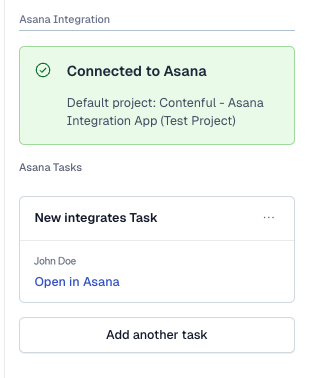
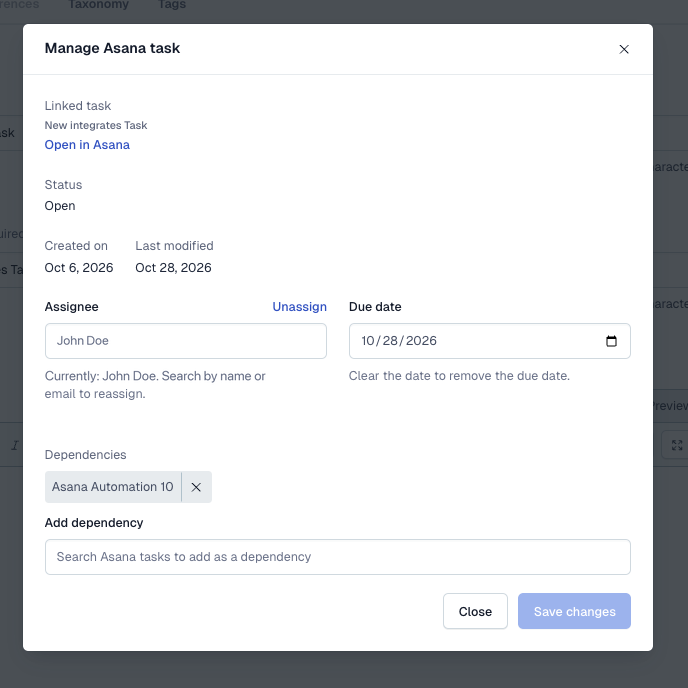
The Asana app gives editors a direct line between a Contentful entry and the Asana task tracking the work behind it. From the entry sidebar, editors can create a new task, search for and link an existing one, or open a full task editor to review and update status, assignee, due date, description, dependencies, section, and supported custom fields — all without switching tools. One task can also be linked to multiple entries, and a task’s comment thread is visible right in Contentful so reviewers can follow the conversation.
For admins, the app installs with a guided Asana OAuth connection, a default workspace and project, and the option to limit the sidebar to specific content types. Every linked task also gets a lightweight activity comment whenever its entry is saved, and the app’s Automations actions let teams build their own publish- or update-triggered workflows to create, update, or sync Asana tasks for any content type.
Features
- Create or link tasks from any entry: Start a new Asana task from an entry, or search and link to an existing one — including linking the same task to several entries at once, with duplicate-task detection when creating.
- Manage the full task in Contentful: Edit assignee, due date, description, dependencies, section, and supported custom field types (text, number, single/multi-select, date, people), and read or post comments, without leaving the entry editor.
- Automatic activity comments: When an editor saves changes to a linked entry, the app posts a lightweight comment to the Asana task, so the task’s activity feed reflects Contentful edits without any manual syncing.
- Automations-ready: Use the app’s App Actions inside Contentful Automations to create, update, or sync Asana tasks and custom fields as part of your own publish or update workflows.
- Flexible connection: Connect via Asana OAuth for everyday use, with an optional API key fallback so Automations keep working even without a logged-in user.
Use Cases
Editorial, marketing, and content operations teams that already track content work as Asana tasks and want task status, assignee, and comments visible alongside the Contentful entry — without asking editors to keep two tools in sync by hand.
Requirements
To use this app you will need:
- An Asana account with access to the workspace and project you want to connect.
- Space Admin access in Contentful to install and configure the app.
- A few minutes to connect Asana via OAuth and choose a default workspace/project during setup.
Limitations
- Custom fields of type rich text, formula, lookup, template, and portfolio are shown read-only; task-level custom fields of type text, number, single-select, multi-select, date, and people can be edited.
- Subtasks can be marked complete/incomplete but not created or renamed from Contentful.
- Comments can be read and posted, but not edited or deleted, from Contentful.
Screenshots