Salesforce Marketing Cloud Next
Sync Contentful content into Salesforce Marketing Cloud Next Marketing Objects.
About the Salesforce Marketing Cloud Next app
The Marketing Cloud Next app connects your Contentful space to Salesforce Marketing Cloud Next. Marketing teams can then use structured content, such as offers, product spotlights, events, and promotions, as data in their campaigns. Instead of exporting entries or re-keying content into Salesforce, admins pick a content type in Contentful and either create a new Marketing Object from it or link it to an existing one. The app then copies every published entry into that Marketing Object.
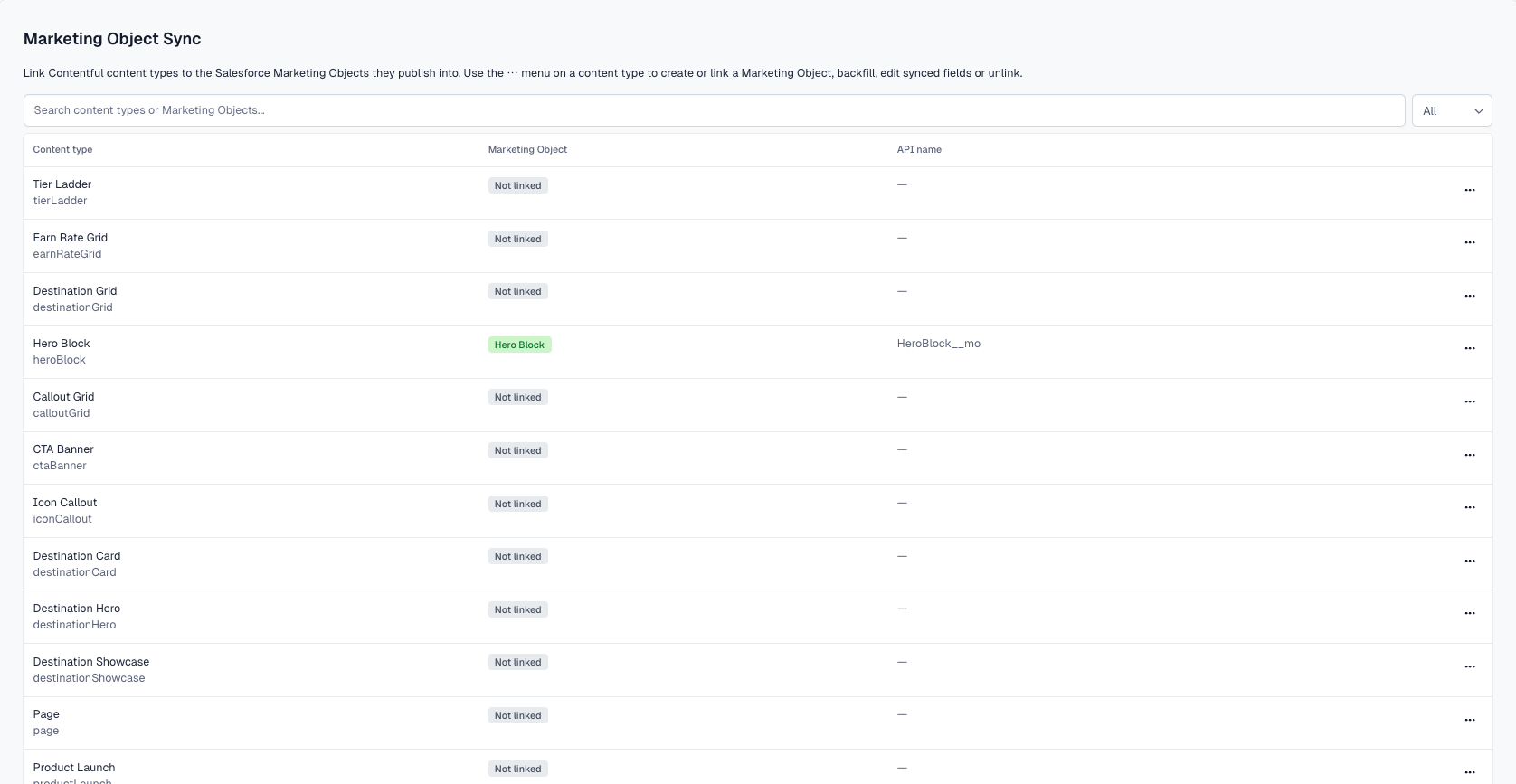
From the app's page, admins see every content type in the space and its sync status. Each row's menu offers only the actions that apply, such as creating a Marketing Object, linking or changing one, choosing which fields sync, running a backfill, or unlinking. Editors get a Sync to Salesforce button in the entry sidebar, so they can push the latest version of a single entry the moment it changes. The app connects to Salesforce through a secure OAuth connection, so no API keys or passwords are stored in Contentful.
Features
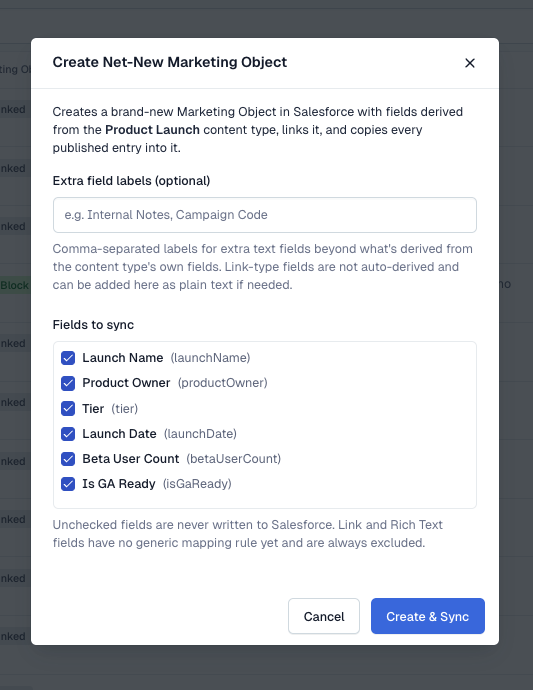
- Create Marketing Objects from content types: Generate a new Marketing Object in Salesforce directly from a Contentful content type. The app builds the schema from the fields you choose, so nothing has to be defined in Salesforce first.
- Link to existing Marketing Objects: Connect a content type to a Marketing Object that already exists. The app warns you when the object's fields don't match the content type.
- One-click backfill: When you link a content type, every published entry is copied into the Marketing Object. You can run the backfill again at any time.
- Choose what syncs: Pick exactly which fields sync for each content type, and change the selection later. The app re-syncs automatically after you save.
- On-demand entry sync: Editors can push a single entry's current values to Salesforce from the entry sidebar with Sync to Salesforce.
- Localized content: Each locale of an entry is written as its own record, so localized campaigns get the right language.
- Clear sync results: Every sync and backfill reports how many records were processed and how many failed, so problems are visible right away.
- Secure OAuth connection: Admins connect once with Salesforce's own sign-in. Access follows that Salesforce user's permissions.
Use Cases
Built for marketing and content operations teams running campaigns in Salesforce Marketing Cloud Next who want Contentful to stay the source of truth for campaign content.
- Offers and promotions: Keep promotional copy, terms, and dates in Contentful and make them available to Marketing Cloud Next for personalized campaigns.
- Product and catalog content: Sync product spotlights or catalog details so campaign content matches what's on the website.
- Events and announcements: Publish event listings once in Contentful and reuse them in Marketing Cloud Next.
- Localized campaigns: Sync every locale of an entry so regional teams can target the right language.
Requirements
To use this app you will need:
- Space Admin access to the Contentful space where you are installing the app.
- A Salesforce org with Marketing Cloud Next and Marketing Objects enabled.
- The Contentful External Client App package installed in your Salesforce org.
- Install the package using this URL: https://login.salesforce.com/packaging/installPackage.apexp?p0=04ti8000002OjXVAA0
- A Salesforce user who can create Marketing Objects and write records to them.
- Your Salesforce org's My Domain URL (for example, https://yourcompany.my.salesforce.com).
Limitations
- Sync runs when someone triggers it. Linking, backfills, field changes, and the sidebar Sync to Salesforce button all start a sync. Publishing or unpublishing an entry does not sync it automatically.
- Reference fields, media fields, and Rich Text fields aren't synced yet. Short text, long text, number, integer, date, and boolean fields are supported.
- Unlinking a content type stops future syncs. It doesn't delete the Marketing Object or its records in Salesforce.
- The app connects to one Salesforce org per Contentful space installation.
- Very large content types (thousands of entries) can take several minutes to backfill.
Screenshots