Agentic AI tools
Summary
The appearance and subsequent rise of agentic AI is already starting to change the way we work. Knowing which AI tools to use, and how, is rapidly becoming the ultimate productivity boost.
An agentic AI tool is any software tool that uses or enables agentic AI. Agentic AI systems are given goals to pursue with limited supervision and under the hood, most agentic AI is built on top of large language models (LLMs).
Which agentic AI tools are best for you?
The appearance and subsequent rise of agentic AI is already starting to change the way we work. Knowing which AI tools to use, and how, is rapidly becoming the ultimate productivity boost. For many, the challenge is no longer whether to adopt it but working out which tools fit your stack, team, and problem.
There's such an overload of information and tools out there that it's easy to feel swamped in decision paralysis. This guide helps technical decision-makers navigate the landscape and map their situation to the right category of tool.
What makes a tool "agentic"?
An agentic AI tool is any software tool that uses or enables agentic AI. That's a rather broad definition, covering everything from no-code automation to full-on agentic platforms or even developer frameworks, so it helps to break them down into categories.
Agentic AI systems are given goals to pursue with limited supervision. You often describe the outcome that you would like to achieve — "refactor this codebase," "research these competitors," "create these work tickets" — and the tool works out the steps to successfully complete the goal prescribed. It then takes action, adjusting the plan as it goes.
Under the hood, most agentic AI is built on top of large language models (LLMs). The LLM is wrapped in a harness, which gives it the ability to take action, such as calling external APIs, reading and writing files, or triggering workflows.
Which tool is right for you?
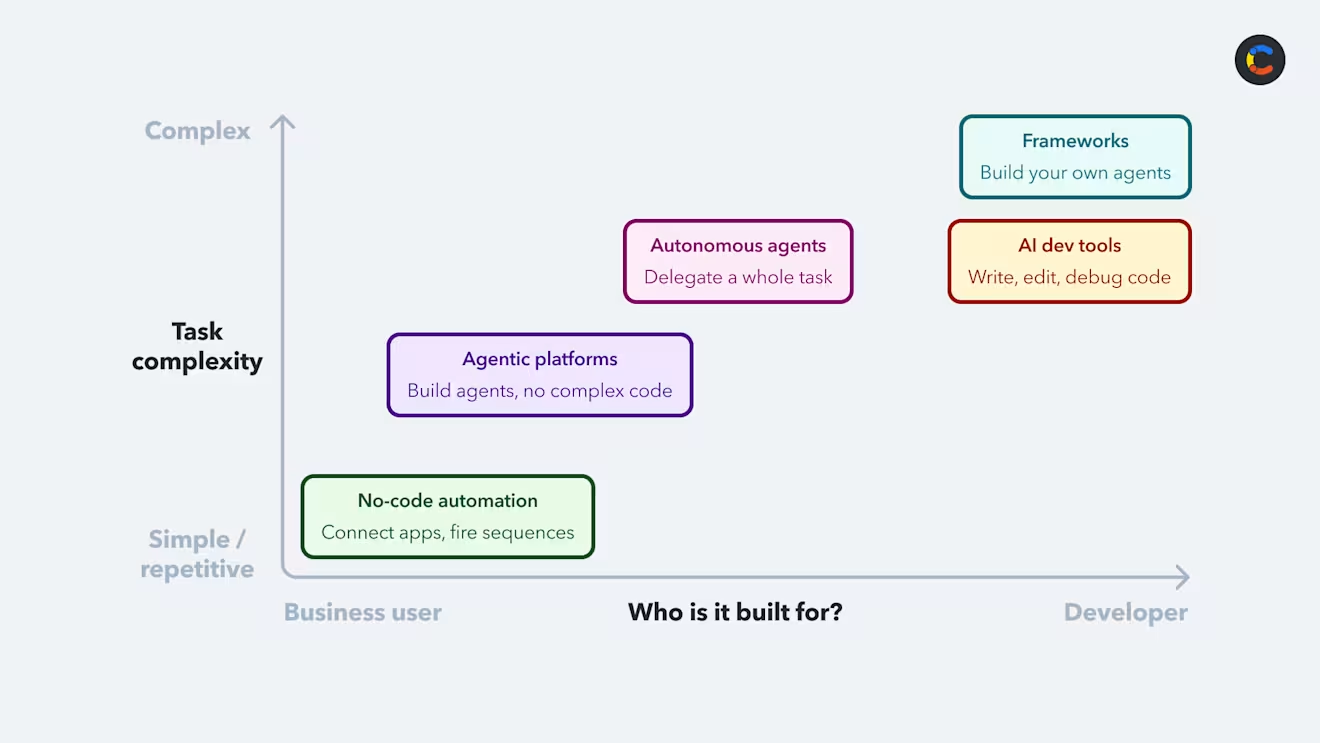
The agentic AI tool space is quite saturated. If you're trying to decide which tool to use, they tend to fall along two axes: who they're built for and how complex a task they're built to handle.
The first axis runs from business user to developer: Is it built for developers that write code, or for business users who don’t? The second runs from simple and repetitive to complex and reasoning heavy: Is it designed to automate repetitive rules-based tasks, or is it designed for open-ended work that requires planning and judgment?
Most agentic AI tools align with one of the following five categories:
No-code automation: The entry point for business users automating simple, repetitive work by connecting apps and firing off predefined sequences without anyone having to touch code. Many of these tools existed before agentic AI, so typical workflows follow fixed rules-based tasks. Many of these platforms have now added agentic AI features to keep their products relevant (Zapier agents, Make AI agents).
Agentic platforms: These platforms are natively agentic and a little more complex while staying accessible to non-developers (Lindy, Gumloop). They let business users build and configure agents that handle more open-ended work.
General-purpose autonomous agents: These are the non-developer counterparts to AI dev tools (Claude Cowork, OpenAI Operator), aimed at knowledge work rather than coding. They are designed to take individual high-level goals and run the task from end to end.
AI dev tools: These tools target developers (Claude Code, Cursor), allowing them to use agents to write, refactor, and debug their code inside their project.
Frameworks: These are arguably the most complex tools, aimed at developers building their own agentic systems in code. They are code libraries that give developers control over orchestration, memory, and multi-step logic.
Automating workflows with agentic AI tools
Automating business workflows with agentic AI tools
For a non-technical business team, you'll most likely use tools in three of the previously mentioned categories (no-code, agentic platforms, and autonomous agents). Which ones you choose depends on a couple of questions: How much are you willing to spend and scale? And how much building does the tool expect of you?
At the lightweight end are no-code automation tools like Zapier. They are affordable, easy to set up, and aimed at small teams automating distinct tasks. At the other end are enterprise agentic platforms like Microsoft Copilot Studio and Salesforce Agentforce; these are more expensive and are built to integrate agents across large corporate systems.
You’ll need to research how much the tool expects you to build on a case-by-case basis, weighing each tool against the skills on your team. Some tools offer guided, low-code builders, while others expect more technical experience. A good example of this is the platform n8n. It's visual and no-code, but it does lean toward the more technical end of the spectrum, expecting comfort with APIs and data flows that a marketing team might not have.
Once you've weighed up the different tools, the next question is: What will you use them for? For a broad overview of the different business use cases available, see our guide to agentic AI examples. Here, we'll focus on one example, automating content workflows using Contentful, as this is an area where agentic AI tools can deliver immediate value for non-technical teams. AI handles repetitive, high-volume content-related work well, including tasks like rewriting or editing content, translating it into multiple languages, or generating image alt text or SEO meta descriptions.
Contentful is a headless content platform with a variety of useful agentic AI tools built in. This starts with AI Actions, which are embedded directly into the platform, so you'll see these actions built into the editing workflow, available inline as you write.
AI Actions are the simplest and most intuitive way to add agentic AI tools to your work processes. However, once you're familiar with the basics of how it works, you can begin to add even more automation, using AI automations and workflows. These allow you to chain actions together in a sequence, each of which may use agentic AI to perform a task, building in points for human review when necessary. All of these actions take place before the content is published live, meaning a human reviewer will always check the output before it goes live.
Automating technical workflows with agentic AI tools
Just as with business users, the benefit is clear for developers. AI dev tools are designed to take away most of the mechanical work from building software: understanding a large codebase, wiring up boilerplate, refactoring across files, writing tests, and tracing bugs through a complex project. Automating these tasks frees up developers to spend time on architecture design and judgment.
Opening your codebase up to AI does raise some alarm bells and prompts the question: How can you make it more reliable? The answer is "agentic engineering," a deliberate, tested, architected approach to building agent workflows, as opposed to ad hoc "vibe coding." Agentic engineering is about creating a repeatable, structured process that works within your codebase, organizational structure, rules, and processes. Rather than just giving the agent a "goal" and telling it to go figure out the steps, you may want to flesh out the steps that need following in a certain place and point the agent to that as context or a "skill" that you want it to follow.
AI development tools
AI development tools like Cursor, Codex, and Claude Code help developers build and ship software faster. The most capable of these can plan, call external tools, and make multi-file edits across a codebase, rather than just autocompleting code.
They come in two broad flavors. The first type, which includes tools like Cursor, Devin Desktop, and GitHub Copilot, runs inside your IDE. The agent sits inside your code editor, so you get its reasoning, codebase awareness, and multi-file edits as close to the code as possible in a familiar environment. This close integration makes these tools the more approachable starting point for most developers.
Conversely, Claude Code and OpenAI's Codex run in the terminal. You give them access to a directory that contains your code repositories and give them a goal to complete. You can customize these tools to carry out work at varying degrees of autonomy. Additionally, you can point them to special files (SKILL.md or CLAUDE.md) in your codebase that contain information and rules about how to approach certain tasks and how to behave. This style suits broader, multi-repo work and longer agentic tasks. Claude Code currently has the largest context window, allowing it to reason across the largest codebases.
Agentic frameworks
Agentic frameworks are libraries or toolkits that help agentic engineers build and orchestrate AI agents in code. These are tools like LangChain, LangGraph, CrewAI, and AutoGen. They handle the internal wiring up of agentic systems, chaining steps together, managing state (memory) across those steps, connecting external systems, and coordinating multiple agents in tandem. Some of the agentic no-code or business tools may have been built by engineers with one of these agentic frameworks, for instance.
Risks of agentic AI tools
Many agentic AI tools share a few common problems. One of the most obvious things to note is that the more autonomy a system has, the greater the consequences are when it gets things wrong. That's why it's advised to give AI agents least privilege. Any irreversible actions should be checked by a human reviewer in the loop. There have already been multiple cases of whole databases being deleted or autonomous agents sending thousands of damaging emails to clients.
Another common problem when you let an agent run autonomously is that it can make certain calls to perform actions in external systems with Model Context Protocol (MCP). But you need to make sure it doesn't work with systems you haven't vetted. Sometimes these servers have poisoned tool definitions, which means the agent can be tricked into calling a function that does something different from what the agent is expecting, often for nefarious purposes. On managed platforms like Copilot Studio or Zapier, that vetting is largely handled for you.
There is also the problem of token optimization/management. How can you ensure that the agents are using tokens efficiently? Token costs are going up, especially for more advanced models. If you're not optimizing token usage, then you could be wasting money.
Agentic framework risks
With a framework, you're wiring up tool access and orchestration yourself in code, so the burden of safety rests with you. There are fewer guardrails than a managed platform provides by default, so it's easy to over-grant permissions or connect to an unvetted tool/MCP server. The fix is the same one that applies everywhere: Grant least privilege and vet every tool definition before you connect it.
Agentic platform risks
A managed platform usually provides guardrails, permissioning, and observability by default, but you have to trust the vendor's controls and inherit their defaults, which may not match your risk tolerance. There's also a risk of lock-in, as all of your agents, data, and governance sit with one provider. Before committing, check what the platform offers in the way of audit logging, access controls, and human approval steps.
Agentic dev tool risks
These agents run directly on your codebase and local machine, so the risks are quite concrete: An agent could potentially delete data or perform other destructive actions. To avoid this, give your agents minimal permissions. For example, don't let them run anything as root, and don't give them write permissions beyond the directories they need.
A more subtle threat is "slopsquatting." This is when attackers take advantage of the fact that LLMs sometimes hallucinate plausible-sounding but non-existent package names. The attackers pre-register packages with the non-existent names and fill them with malware, which an AI dev tool may then try to install. You can mitigate this by disabling the agent from installing any new packages autonomously, sandboxing the agent's environment, or by validating with the registry's API to check if it exists and validating it with trust signals.
You can reduce some of these risks with an agent instruction file (agents.md) in the project. This file holds instructions for how the agent should behave, including safety steps like checking before downloading a package. But it's worth noting that this isn't a complete guardrail — it's more of an instruction, which the agent could ignore — so treat it as a guided prompt, not foolproof enforcement.
If an agent has access to your repos containing .env files with all of your credentials, it can leak these secrets in various ways. It's best not to use a .env file when using agentic dev tools. Don't store secrets in your repositories; opt for the safer approach of using a secrets manager.
Deciding whether to build or buy agentic AI tools
One choice you may be weighing is whether to build your own agentic AI tools or buy them. Do you adopt an off-the-shelf tool or have your developers build your own agents? If you build, you trade the security, observability, and governance of managed infrastructure (that you don't have to maintain) for more flexibility and customization. Building gives you complete control and customization, leaving maintenance, security, and upkeep to you.
Several factors could determine which way you lean. Does an off-the-shelf tool actually cover your core needs? What is your in-house development capacity? How much customization do you actually need? How fast you need value, vendor lock-in, and governance/compliance needs also play a part.
For many teams, the right answer sits toward the buy end: You could go with a platform like Copilot Studio and build custom agents on top of it. This way, you get managed infrastructure and governance underneath and reserve your development effort for the places you actually differentiate.
Looking to add agentic AI to your content workflows? Contentful provides built-in AI actions, automations, and workflows while still leaving space for you to build custom agents and connect them to the Contentful MCP server for any workflows specific to your business.