Contentful Personalization now has an Optimization Agent, full analytics, and native mobile support
Published on August 13, 2026


Inspiration for your inbox
Subscribe and stay up-to-date on best practices for delivering modern digital experiences.
Your team spots a conversion drop-off on a landing page in one analytics tool, then has to open a completely different tool to build an audience or launch a personalized experience around it.
By the time the personalized experience ships, the moment — and often the traffic that revealed the opportunity — has already passed.
Today, we're closing that gap with three new capabilities in GA. Optimization Agent is now generally available, all analytics features are now included in every Contentful Personalization plan, and Personalization is now available natively on mobile.

Optimization Agent is now generally available
Measurement and action have lived in separate tools for too long. You see a problem in a dashboard, then have to manually go build the fix somewhere else — a rule builder, a personalization setup flow, a separate query.
That handoff is where most optimization opportunities are lost: by the time someone gets around to acting on an insight, it's often weeks later, against a completely different set of visitors than the ones who surfaced the finding in the first place.
Optimization Agent closes that gap. It's a conversational AI agent that lives inside Contentful Personalization, answers questions about your data in plain language, and turns what it finds directly into audiences and experiments — no separate tool, no handoff.
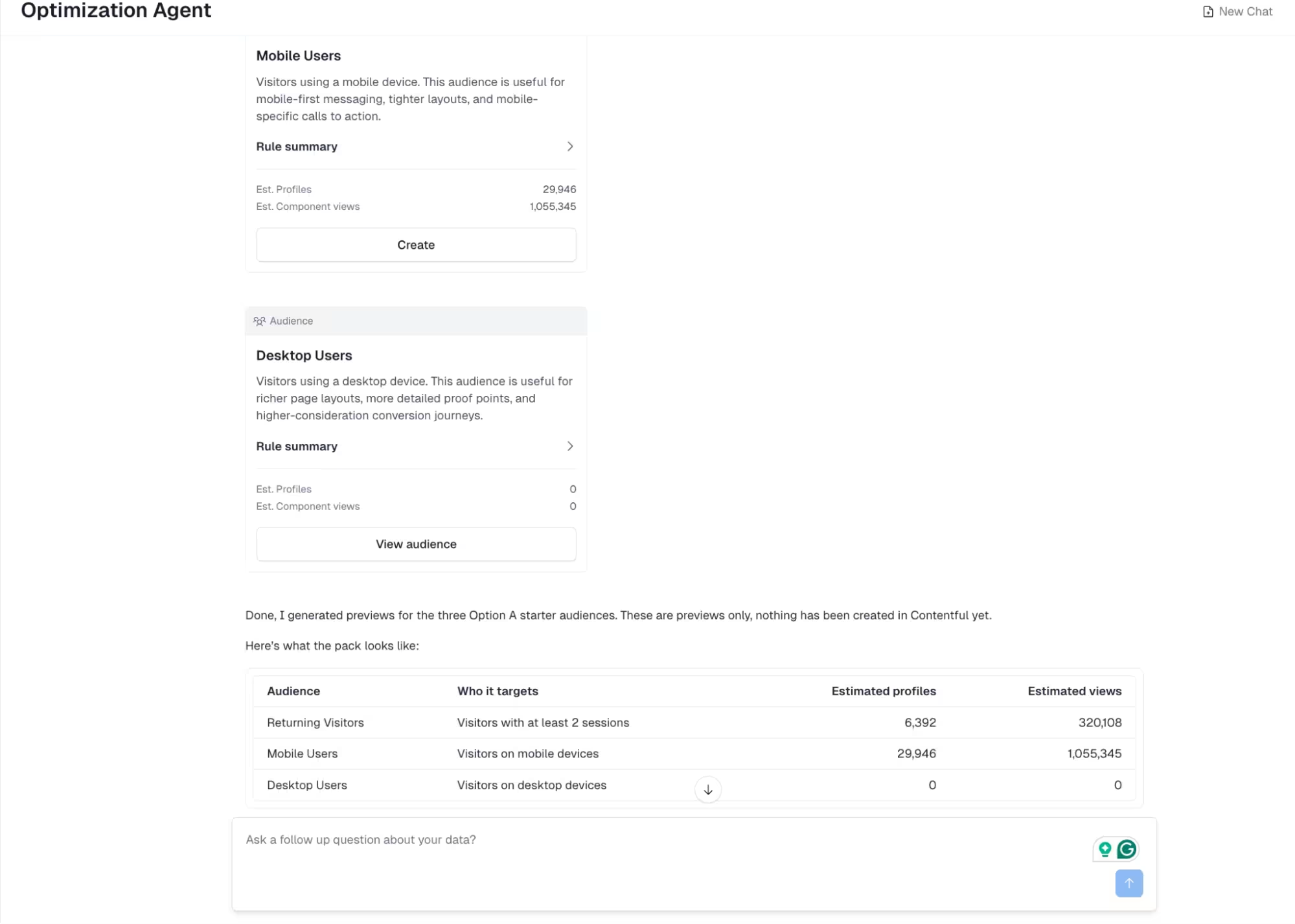
Optimization Agent means less time spent context-switching between tools. It also means less delay between spotting an opportunity and shipping it, and less dependency on technical teams to build a segment or pull a chart. Anyone on a marketing or growth team can go from question to answer to action in one conversation.
Build an audience without a rule builder. Instead of manually configuring filters and conditions, describe who you want to reach: "visitors in Turkiye," "high-intent demo clickers," "returning users who haven't converted." The agent builds the audience, shows estimated profile counts, and gives you a rule summary to review before you create it.
Understand an audience, not just define it. Building the segment is only half the job. In the same conversation, keep asking: What device are they on? What's their average session length? What's driving engagement in this group? The agent answers directly, using the same data that defined the audience — no separate report, no second tool.
Report on content performance. Ask which entries, headlines, or CTAs are driving the most engagement or conversions this month, and get a direct answer instead of building a dashboard. The agent reports at the component level — the specific headline or image, not just the page — so you know exactly what to replicate or fix.
Inspect your setup and integration. Ask the agent to check whether tracking, SDKs, or experiences are configured correctly, and it reviews your setup and flags likely issues before they show up as a support ticket. This is useful for confirming a new integration is actually capturing data as expected, without digging through logs yourself.
Run and refine experiments. Ask the agent to check how a running experiment is performing, whether it's reached significance, or which variant is winning — and get a direct read instead of manually pulling test results. It can also recommend when to end a test or launch a new one based on what it's seeing.
Personalize with a prompt. Beyond building the audience, ask the agent to help shape the experience itself — which variant to serve a segment, or what messaging is likely to resonate based on past performance for similar audiences.
Catch a problem before it costs you conversions. Rather than waiting for someone to notice a drop-off in a dashboard, the agent surfaces it directly: a checkout CTA underperforming on mobile, a high-intent segment with no personalized experience assigned, a winning variant that's gone stale against new traffic. Each finding comes with a draft experiment ready.
Optimization Agent is available on all Contentful Personalization plans. Just toggle on Built-In AI Features in your org settings to start using it.
Analytics features are now part of every Contentful Personalization plan
Analytics has always been the missing half of personalization. You can't optimize what you can't measure. Today, that gap closes for every Contentful Personalization customer. Contentful Analytics is now part of Contentful Personalization.
Entry-level Content Insights, Audience Insights, and Benchmarking are no longer a separate purchase or a higher tier. They're included in every Personalization plan, at no additional cost, starting today.
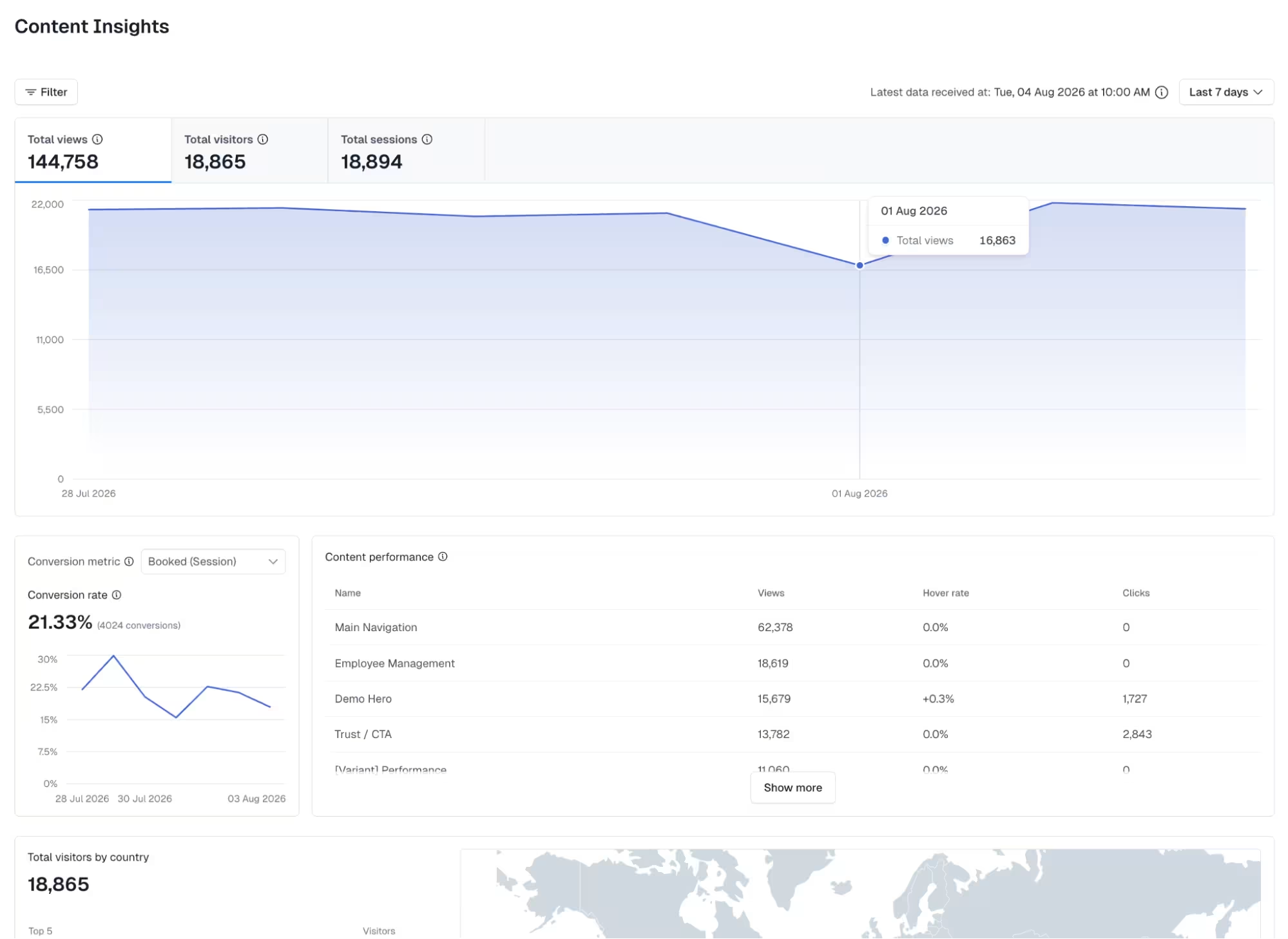
Content Insights
Entry-level performance data down to the headline, CTA, or hero image, not just the page.
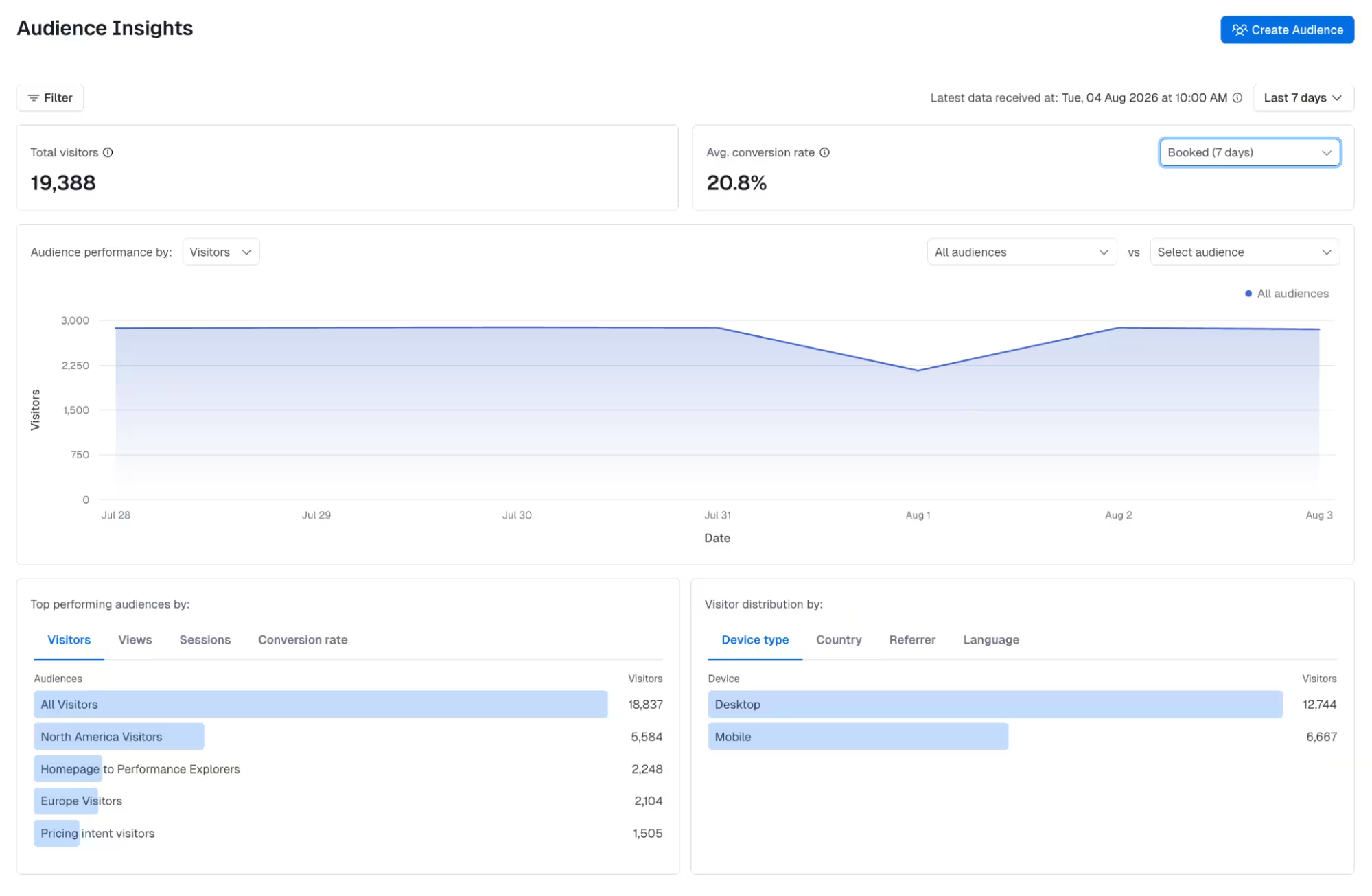
Audience Insights
Understand who's in an audience and how they behave, not just how many people are in it.
Benchmarking
Compare an entry, or a group of entries, against a baseline to see how it's really performing — a single banner against every banner in a campaign, or all content on one topic against another — instead of judging performance in isolation.
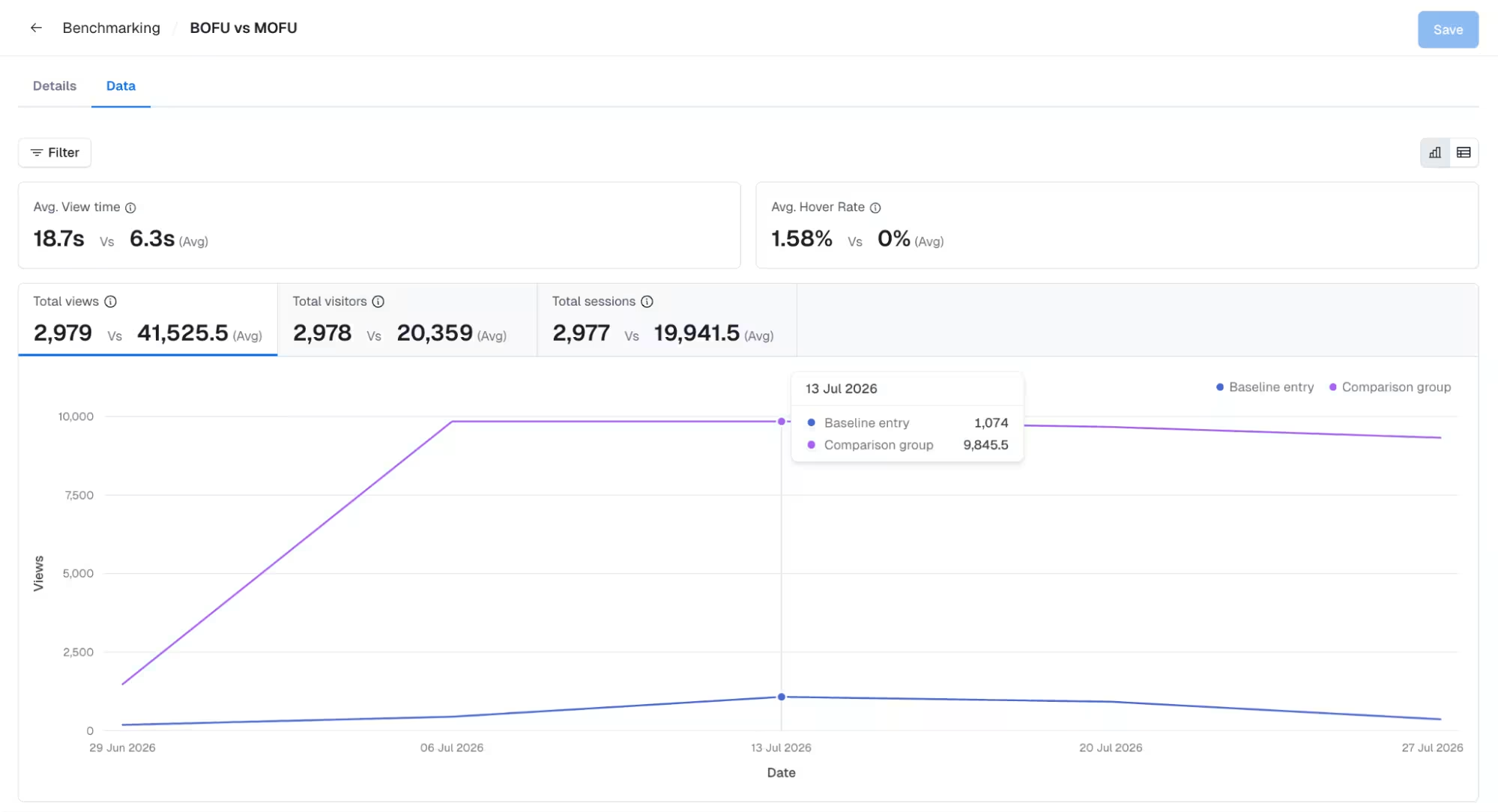
If you're already on Contentful Personalization, this capability is simple to activate. To use the new Analytics capabilities, you'll need to update your SDK.
Native mobile support
Until today, teams building native mobile apps had to work around Contentful Personalization rather than with it. Personalization, experimentation, and analytics were built for the web — leaving mobile teams to either skip optimization entirely or stitch together a separate solution.
That changes with new SDKs for React Native, Kotlin, and Swift, bringing the same personalization and analytics capabilities available on web directly into iOS and Android apps.
Personalize native screens the same way web teams personalize pages — targeting audiences, running experiments, and serving variants natively in-app.
See Analytics for mobile experiences, with Content Insights, Audience Insights, and Benchmarking covering app-based content, not just web.
Use Optimization Agent across surfaces, asking questions and getting recommendations that account for both web and mobile performance in the same conversation, instead of treating mobile as a separate, disconnected data source.
For product and growth teams shipping both a website and a native app, this closes a gap that used to mean separate tools, separate data, and separate optimization efforts depending on which surface a user was on. One workflow now covers both.
Looking forward
Today's release closes three gaps at once. Optimization Agent removes the handoff between spotting a problem and doing something about it. Full Analytics removes the cost of measuring what's working, so every customer starts from the same baseline instead of paying more to see clearly. And native mobile support removes the divide between web and app, so a personalization or experimentation program doesn't have to stop at the browser.
Put together, that's a single workflow—build it, understand it, act on it—available everywhere your audience actually shows up, at no extra cost to get started.
It's also a foundation. As we keep building, the goal is for Optimization Agent to do more of the noticing on its own, across every surface these releases now cover, so less of that work falls on your team by default.
Ready to put this to work? Enable Built-In AI Features to use the Optimization Agent, follow the SDK upgrade guide, or talk to your account team to get set up.

Inspiration for your inbox
Subscribe and stay up-to-date on best practices for delivering modern digital experiences.
Meet the authors

Esat is a Senior Product Marketing Manager at Contentful and enjoys sharing his thoughts about personalization, digital experience, and composable across various channels.
Related articles
Do more with less: Contentful Platform updates for editorial and operational efficiency
October 7, 2025
Integration Roundup: The Vercel App and Contentful Content Link for Vercel
August 22, 2024
Assemble intelligent experiences at scale with Contentful Studio
March 27, 2024

Ready to start building?
Put everything you learned into action. Create and publish your content with Contentful — no credit card required.