Bring Google Docs into Contentful without leaving your workflow
Published on June 25, 2026




Inspiration for your inbox
Subscribe and stay up-to-date on best practices for delivering modern digital experiences.
Content rarely starts in the system where it ultimately gets published. For many teams, the creative process begins in collaborative tools like Google Docs, where ideas take shape, drafts evolve, and stakeholders contribute feedback across multiple rounds of review.
That transition from collaboration to structured publishing in your content management system is where friction tends to emerge. As content volumes grow and teams adopt AI-driven workflows, this gap becomes harder to ignore and more costly to maintain.
Drive Integration, a new app in the Contentful Marketplace, is designed to eliminate that friction. It allows teams to bring finalized Google Docs directly into the Contentful Platform while preserving structure, formatting, and momentum.

The gap between collaboration and publishing
Content teams have well-established workflows for creating and refining content. Drafts are shared, comments are resolved asynchronously, and revisions are tracked until stakeholders reach agreement. These workflows are efficient because they're familiar and collaborative by design.
The challenge begins after approval.
Moving content from a document into a structured platform is rarely a simple copy-and-paste task. Long-form content must often be divided into fields, images uploaded separately, and formatting recreated. Each step introduces the potential for inconsistency and error, especially when repeated across multiple projects and teams.
This disconnect between where content is created and where it's prepared for publishing can slow progress at a critical moment. Instead of moving forward with confidence, teams spend time manually reconstructing work that's already approved. As content volume grows, that repeated overhead becomes a recurring operational cost rather than a straightforward path to publishing.
A more connected path into Contentful
The Drive Integration app is designed for teams that want to keep the workflows that already work for them while making the path into Contentful more connected and efficient.
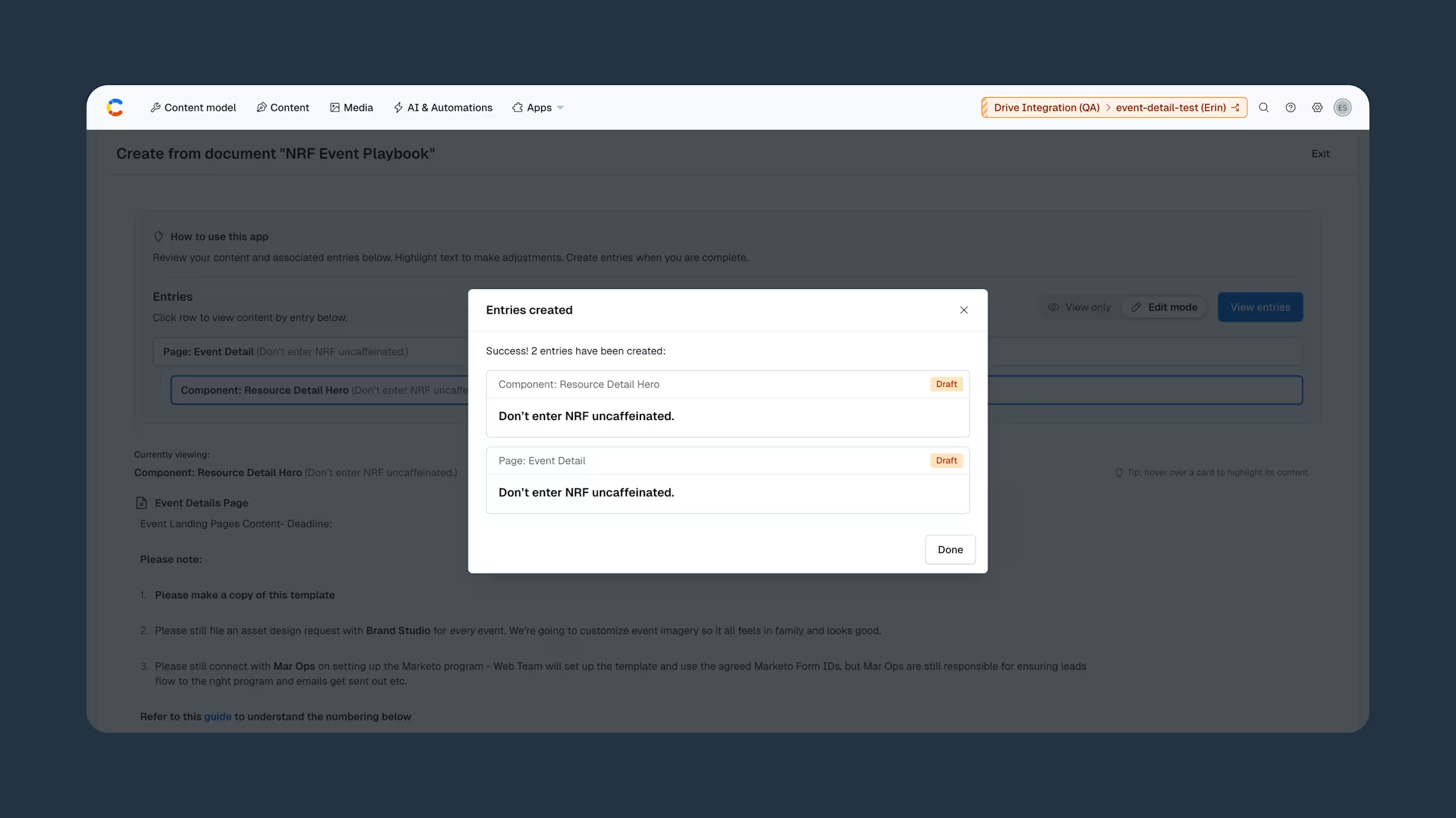
The app allows teams to import finalized Google Docs into Contentful as draft entries. It carries over supported formatting and images while aligning content to the structure defined in an existing content model. The experience feels less like starting over and more like continuing work that is already done.
For teams already using Contentful, this creates a smoother transition from collaborative drafting to publishing. For teams evaluating structured content models, it demonstrates that adopting a modern, API-first platform doesn't require giving up the tools that support day-to-day collaboration.
How intelligent import supports structured content
At the center of the Drive Integration app is an intelligent import flow powered by Contentful’s agentic AI architecture.
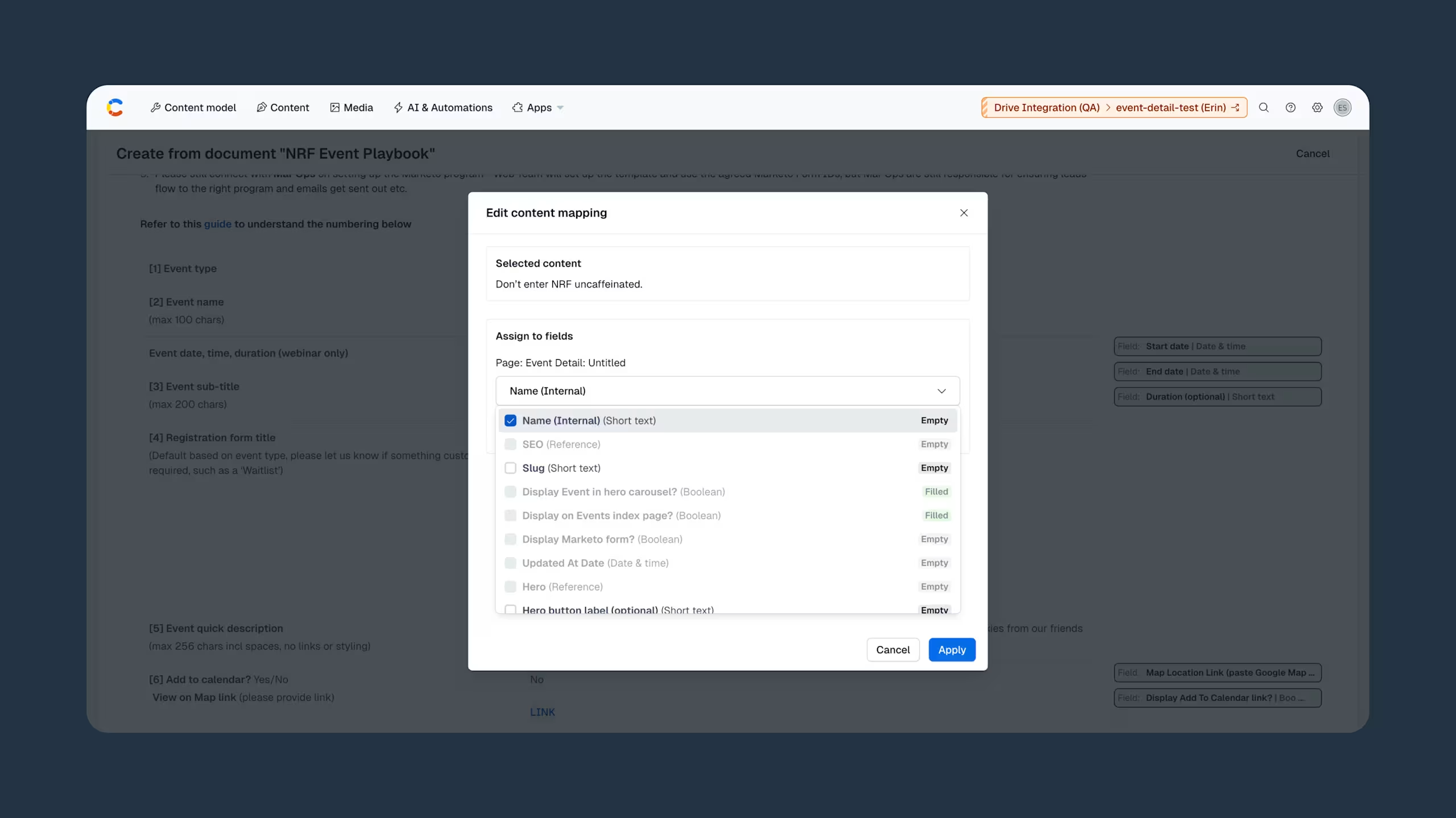
Unlike traditional import tools that move content as-is, the app interprets the structure of a finalized Google Doc and suggests how its content should map to an existing content model. This includes mapping sections to fields and highlighting anything that may need review before import.
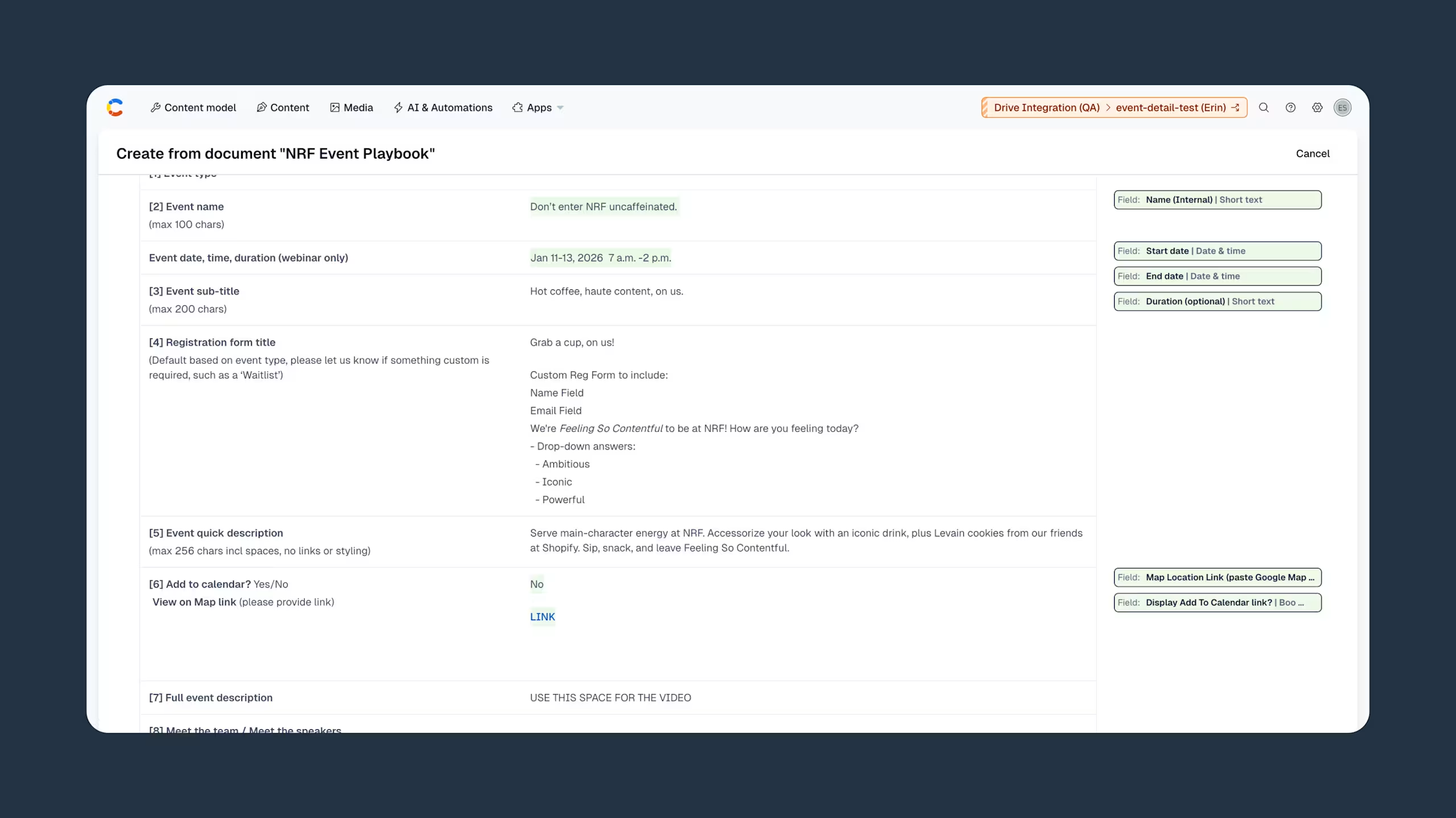
Teams can refine these suggestions and then bring content into Contentful as draft entries with much of its structure already in place.
In practice, this preserves the flow of long-form content, places summaries and body content in the right fields, incorporates images into the appropriate workflow, and translates documents into reusable structured formats with far less manual effort.
Because the import is grounded in the content model teams already use, the result is a stronger first draft inside Contentful. It more closely reflects how the content should live in the platform, while still giving teams full control to review and refine before publishing.
This shift is practical but meaningful. It reduces time spent reworking approved content and increases confidence in the transition from collaboration to publishing.
Supporting real-world content workflows
The Drive Integration app is particularly valuable for workflows that are collaborative, repeatable, and structured enough that manual transfer creates unnecessary overhead.
A marketing team might draft a campaign asset or blog post in Google Docs, iterate quickly with stakeholders, and move finalized content into Contentful without rebuilding the entire entry.
Documentation teams often manage longer-form source material where consistency and reuse are critical. Structured import helps maintain standards across documentation sets while reducing formatting work.
Content operations teams can standardize document patterns to streamline recurring imports and reduce cleanup across publishing workflows.
Across these scenarios, the advantage isn't limited to a single use case. It compounds over time. Reducing repetitive tasks improves efficiency, increases consistency, and helps teams publish faster, reuse content across channels, and scale operations with fewer bottlenecks.
Why this shift matters
The Drive Integration app addresses a specific, common challenge: moving finalized documents into a structured content platform. More importantly, it reflects a shift in how teams approach content operations: applying structure at creation, not retrofitting it later.
Collaboration tools and content platforms serve different purposes, yet both are essential. Effective workflows connect these systems in ways that reduce duplication and preserve context.
By bridging the gap between Google Docs and Contentful, the app helps teams:
Maintain the tools that support collaboration
Apply structure without recreating content
Scale publishing workflows with greater efficiency
This alignment is especially important as organizations manage increasing volumes of content across channels. Structured content enables reuse, personalization, and multi-channel delivery—but only when content enters the system in the right shape. By aligning documents to content models at the point of import, teams can unlock these capabilities without additional cleanup or rework.
Get started with Drive Integration
The Drive Integration app is now available in the Contentful Marketplace. Install it to your workspace to streamline your content operations and simplify the path from approved document to structured entry.

Inspiration for your inbox
Subscribe and stay up-to-date on best practices for delivering modern digital experiences.
Meet the authors

Zachary is a product manager on the Marketplace team at Contentful, where he focuses on delivering apps and integrations that help customers get more value from the platform. With a strategic approach to product discovery and market research, he identifies opportunities, shapes direction, and ensures strong execution.

Stephanie Diaz
Product Marketing Manager
Stephanie Diaz is a Product Marketing Manager at Contentful, where she leads product messaging, positioning, and launch strategy for the Contentful Ecosystem. She's passionate about turning technical capabilities into clear, compelling narratives that connect platform innovation, enterprise use cases, and ecosystem storytelling.
Related articles
From creation to optimization: Automate your content process with new AI innovations from Contentful
March 31, 2025

Contentful honors 2026 Partner of the Year Award recipients
March 26, 2026

Why Contentful is moving to cursor-based pagination across all content APIs
March 11, 2026

Ready to start building?
Put everything you learned into action. Create and publish your content with Contentful — no credit card required.