Protecting yourself with essential audit logs
Published on April 16, 2026




Inspiration for your inbox
Subscribe and stay up-to-date on best practices for delivering modern digital experiences.
Enterprise organizations, as well as teams operating at scale, need visibility and accountability across their operations. This means being able to show who did what and when — throughout the organization, not just in the most critical systems, but everywhere. Because when something breaks in production, permissions change unexpectedly, or an entry disappears, the first question is always the same: who did what, and when?
When properly implemented, audit logs provide that transparency. They are a detailed record of changes, actions, and user activity from across the organization and are essential for legal and regulatory compliance. To work with confidence and at scale, the transparency of audit logs provides a much-needed foundational element to your systems. Let’s take a look at what’s involved and how the Contentful platform provides audit logging for everything we do.
What are audit logs?
Audit logs are append-only records that capture important events in your system, such as who did what, when, and how. Unlike system logs, which capture routine details like system reboots or network connection attempts, audit logs focus on user actions or any system changes that could affect security and compliance.
The types of activity you would want to capture in audit logs are numerous, but they include:
User authentication activity, such as logins or failed authentication attempts
Resource accesses, such as when files or other system resources were used
Management changes, typically of resources being added, removed, or updated
Unusual activity, such as unexpected login attempts or unusually large data exports
Security-related events, including changes to firewalls, permissions, or role assignments
For each of these events, audit logs need to capture consistent data. The data captured in audit logs can vary, but the critical information will be:
Time and date of the event
Event name, which describes what happened
User identifier
Resource affected
Error information if the action failed or caused a warning
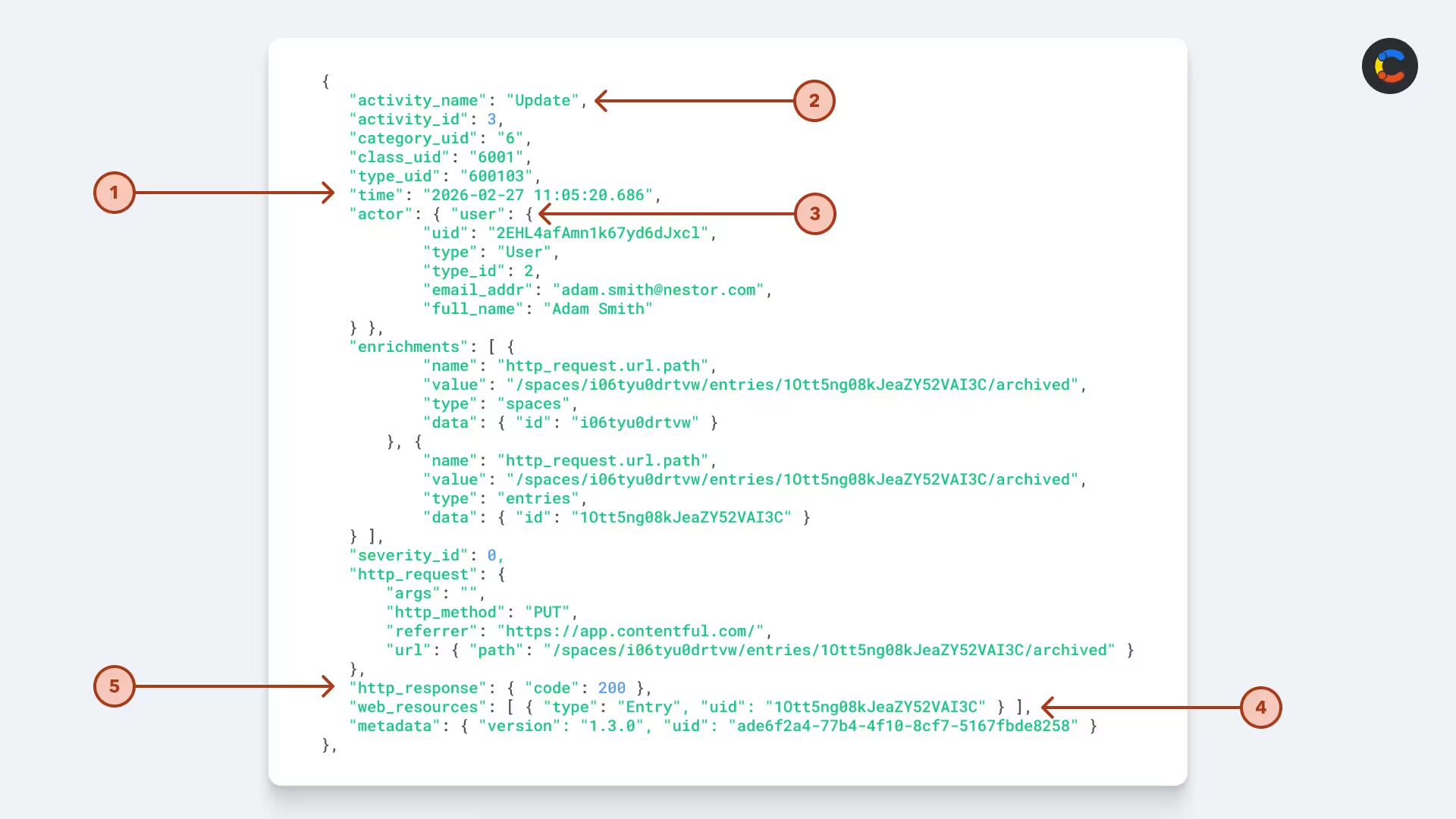
Example of a Contentful audit log entry.
A snippet of a Contentful audit log update.
Your compliance officer and legal teams may ask for additional fields to be collected, but the above are key pieces of information that most audit logs include.
All of this information helps build a picture for anyone wishing to reconstruct the events of an incident and needs to be stored securely and immutably in a location where it cannot be tampered with.
Audit logs do not capture items such as stack traces, developer comments, and API call debug information. While these are important for developers to diagnose issues — and would still be used in responding to an incident — they do not belong in an audit log, which may be referenced in legal proceedings.
The security that audit logs give you
The crucial role of audit logs is to provide your organization with concrete and immutable information for when an incident does occur. This doesn’t always have to be a major breach of customer data or even carry legal ramifications. It might simply be that a customer was unable to access services they should be getting or for some compliance correction after an administrative oversight.
Audit logs support enterprise governance by recording the evidence needed to comply with policies and regulations. While they can be used for troubleshooting (along with other types of logs), their primary value is that they record a clear sequence of actions taken by systems or users to reveal the journey that a given resource took to result in a certain state.
This journey is the evidence used to demonstrate regulatory compliance and adherence to policy and procedure that the legal team will be looking for in order to make an effective argument that proper process was followed. This will be revealed when, for example, investigating security breaches and attempting to provide legal evidence.
During compliance reviews or legal investigations, audit logs help you answer essential questions, such as:
What change was made — the affected resource or data
When the change was made
The state before and after the change
Who made the change, including who approved it
Beyond answering these questions, which are mostly about CRUD (create, read, update, and delete) operations, audit logs can also be used to capture other useful information. For example, Contentful audit logs capture CRUD changes made to customer entities in their content spaces.
Who uses audit logs?
Unlike system or error logs, which are accessible to developers and tech support for troubleshooting issues, audit logs are restricted to a small number of key stakeholders in your organization. The level of permission and frequency of access are determined by each person’s role. Here is a breakdown of the roles and responsibilities across the audit log lifecycle:
Role | Responsibilities |
|---|---|
Tech Lead | Oversees the implementation and initial configuration of audit logging. |
SysAdmin | Creates policies for audit logging, specifying what is to be logged. Manages the system, ensuring smooth running. |
IT Support/DevOps | Has limited access to review logs for support operations and maintains the infrastructure storing the audit logs. |
Compliance Officer | Specifies the adherence requirements. Conducts regular audits to ensure adherence to policies and regulations. |
Security Analyst / Incident Response Team | Regularly reviews audit logs for security threats and investigates incidents using audit logs. |
Legal/Risk Team | Reviews audit logs for legal and regulatory compliance and evaluates the legal implications of evidence obtained from the logs to provide guidance during incident response. |
Audit challenges
Creating, policing, and immutably persisting actually useful audit logs means solving a number of challenges.
Storage costs
Storage costs will likely be your first concern. Depending on the legal obligations of your business and, more importantly, the potential legal consequences if things go wrong, you may need to store your audit logs for a very long time. This challenge increases if your systems are generating a lot of log entries. If regulations require you to store data for years, this cost adds up.
Object storage is generally the cheapest cloud option for storing audit logs. There are cost-effective services available, with the big cloud services such as AWS S3, Azure Blob Storage, and Google Cloud Storage usually having the most competitive rates. All three also offer even cheaper cold storage tiers — for example, AWS S3 Glacier — for data that you only need to access rarely. The colder the storage, the slower and more expensive it will be to access, so consider increasingly colder storage options as log files age.
If you’re using Contentful, audit logs are delivered directly to any of the big three object storage services, so you can choose whichever provider best suits your needs. This ensures that you always have access to a daily record of audit logs in your own storage environment, with full control over how you retain your data. If you need logs to be resent, Contentful can do this for any action that occurred within the last 30 days.
Deciding what your audit logs should cover
Carefully consider what needs to be audited. The obvious data points are what happened, when it happened, and who (or what system) performed the action. However, for your logs to be useful, you need a clearer audit policy than that.
You’ll need to decide which events are important for your company to capture. Common important events for audits include content updates, bulk operations, authentication events, and permission changes, but there may be other company-specific operations you need to cover.
Audit logs need to provide enough context to enable investigating issues, but too much info can be overwhelming. At a minimum, audit logs should include an ID of the user or system that made the change, the affected resource, and the before-and-after state of that resource. With the rise of AI agents, audit logs need to be expanded to record not only the system that made the change but also the user on whose behalf it made it.
Consider looking around for industry standards that can inform and dictate the types of data to be stored for specific incident and monitoring requirements, such as CEF (Common Event Format) or the format Contentful logs meet, OCSF (Open Cybersecurity Schema Framework).
Complying with regulations
Your audit logs will need to comply with regulations required by your industry and any regions you operate in. Note that most countries and regions have regulations strictly governing how personally identifiable information (PII) data can be stored:
Europe has GDPR (General Data Protection Regulation) for the processing of EU residents’ personal information.
The US has HIPAA (Health Insurance Portability and Accountability Act) for patient data and PCI DSS (Payment Card Industry Data Security Standard) for secure credit card processing environments.
Canada has PIPEDA (Personal Information Protection and Electronic Documents Standard) for handling personal information.
The most straightforward way to ensure you’re in compliance with all these regulations is to align your auditing practices with security frameworks like ISO 27001 or SOC 2 and to check that any third-party systems you use, such as Contentful, also meet these standards.
Reliability
When audit log delivery fails, even for a single day, it disrupts your audit trail. This can happen due to something like a system being down, network errors, or even expired credentials. It is therefore essential to be notified when this happens so that your tech lead, DevOps, and system administrator can step in to restore logging operations as soon as possible. Contentful handles this by sending an email notification when delivery fails, showing a list of missed files by day (up to 30 days back) in the Audit Logs UI, and letting you retry failed deliveries with a single click.
Best practices for audit logging
Your compliance officer and legal/risk team will help identify what to audit, but engineers need to decide how to best capture these events.
Log the right level of detail
Too much detail in audit logs creates noise and makes it hard to find the information you need. A common issue is when small changes to a resource log out the entire before-and-after state of the data. Logging a “diff” of the changes makes it much easier to see at a glance what changed.
It’s worth considering whether an event action needs to be recorded. An example of recording too much detail would be logging each individual keystroke that a user typed into a content editor. Such granular logging makes it extremely difficult to see meaningful changes.
Avoid logging sensitive data
Sensitive data should never be added to append-only, non-deletable audit logs, as many regulations will require that they be destroyed upon account termination or user request, which is something an immutable log can’t support. This includes PII, financial or payment data, health data, and authentication credentials such as API keys, tokens, passwords, or hashed passwords.
What may seem counterintuitive is that you actually need to log all actions that relate to personal data, such as when a user’s personal information gets updated. Only the actual audit log itself must not contain the PII itself. A good practice is to log references — for example, a user ID instead of a person’s name or email address.
On top of the fact that even auditors don’t have the right to sensitive data unless absolutely necessary, storing PII in audit logs opens you up to significant legal risk. If your audit logs were ever breached, an attacker would gain access to many years’ worth of private data that should never have been stored in the first place.
How long to keep audit logs
As developers, we’re used to seeing debug and network logging that is typically kept for only as long as is deemed useful to diagnose potential errors — perhaps as short as a day or a few months. Because of the legal implications of audit data, just like any audit trail, it must legally be retained for a given period. This is usually a long time and is typically measured in years.
For example, HIPAA requires certain Security Rule documentation to be retained for 6 years, while ISO 27001 doesn’t prescribe a fixed log-retention period. Instead, organizations define retention in policy based on risk, legal, and audit needs (many choose 12+ months as a baseline).
Audit logs have a very different sensitivity, and their longevity is based upon internal company policies, legal requirements, and industry regulatory compliance needs. Exactly how long you should keep audit logs is a discussion to be had with your compliance officer and legal team; however, it’s common to store them for several years.
It’s not practical to retain logs indefinitely, so most companies put policies in place to ensure their audit logs are automatically retained in cold storage for the regulatory compliance period. They are then kept for as long as is practical and as long as the data in the logs holds historical significance.
How to keep audit logs secure
Data breaches are serious, and while we’ve covered the fact that personally sensitive information should not be in audit logs, they are still sensitive to the organization. For this reason alone, their availability and security need to be kept tightly under wraps.
Using one of the big three cloud storage services — which have proven themselves with strong encryption and durability guarantees — is an ideal first step. However, you should strengthen your audit security by ensuring all audit logs are encrypted and making them immutable (append-only). Use appropriate permissions to avoid tampering by ensuring tight IAM (identity and access management) permissions with strict privileges for access to read the logs. In fact, the only log-writing/streaming permissions granted should be to the system producing the logs.
Using systems with audit logs already baked in
You can save your organization time if the platforms you use already have audit logs built in. For example, the Contentful content platform generates comprehensive audit logs using the OCSF standard. These are easily connected to your cloud storage for persistence and secure, long-term storage under your permissioned control. The audit logs feature secure transfers to your own storage, using credentials encrypted in transit and at rest to connect to your external host.
Contentful audit logs record Web Resource Activity, which includes:
Changes to content — such as CRUD activity on content data
Changes to content models — also CRUD operations on the structure of your models
Updates to permissions — changes to user roles and team assignments
Configuration changes — updates to spaces and environments
Our digital content platform removes the need to implement the audit logs for your own content, and Contentful’s audit logging is designed for high reliability and visibility, helping ensure consistent and traceable logging. This solves the challenge of reliability and avoids ruining your audit trail.
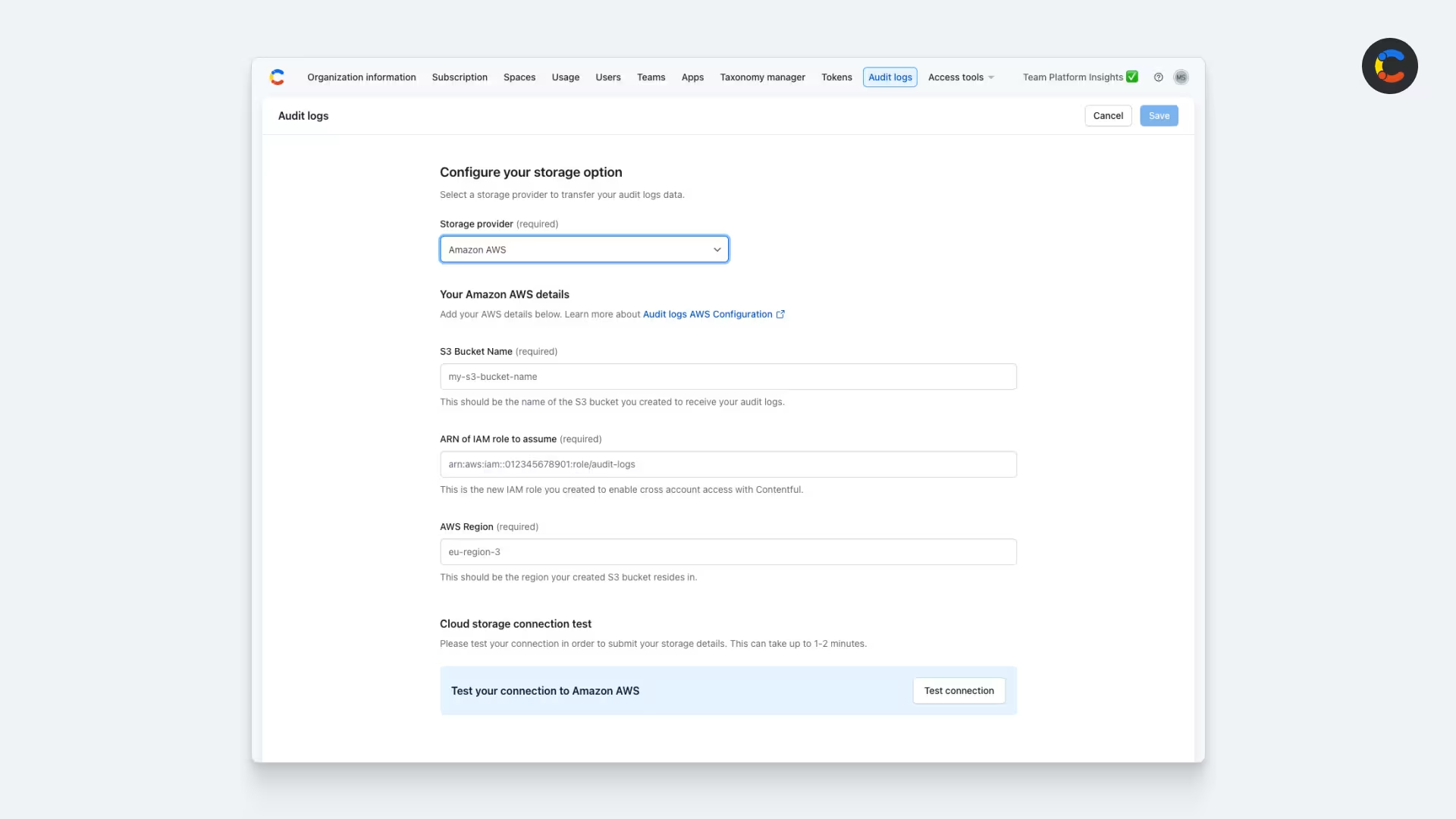
Configuring Contentful audit logs with AWS storage.
Audit logs for your enterprise
Audit logs are an indelible tool for managing and maintaining visibility of your data and infrastructure changes. They allow you to see what has happened not only when things go wrong but also when preventing disaster. Compliance comes in all forms, including strong industry standards with broad support in many enterprise systems, including from Contentful.
On top of the leading digital experience platform, providing everything from GraphQL APIs to AI actions, Contentful’s audit logs help you stay compliant by tracking every change made to your content models, the data they hold, and actions performed using our production-boosting AI Actions. To get started with Contentful, sign up today and reach out to our sales team.

Inspiration for your inbox
Subscribe and stay up-to-date on best practices for delivering modern digital experiences.
Meet the authors

Malin is a Senior Product Manager at Contentful, leading the Platform Insights team in providing customers with greater visibility into their use of the platform. By delivering analytics, reporting, and governance capabilities, he helps organizations make data-driven decisions, optimize their usage, and ensure transparency. With over a decade of experience in B2B SaaS across mobile and web, Malin specializes in building insights-driven solutions that empower customers. Outside work, he enjoys cycling long distances, running, illustrating, and exploring psychology.

Marco is a B2B content creator and product marketer blending technical with creative skills. From the early stages of product ideation to a successful market launch, all the way through to sales enablement, he loves to take products and translate them into clear, relatable messages.
Related articles

From bottlenecks to breakthroughs: How to craft memorable ecommerce customer experiences faster
September 10, 2025

Omnichannel orchestration: How to unify customer journeys across every channel
September 22, 2026
How does Contentful help with SEO and GEO?
July 4, 2025

Ready to start building?
Put everything you learned into action. Create and publish your content with Contentful — no credit card required.