Headless commerce explained: What it is, how it works, and why it matters
Published on October 29, 2026


Inspiration for your inbox
Subscribe and stay up-to-date on best practices for delivering modern digital experiences.
More mid-sized companies and enterprises are making the switch to headless commerce to gain more control over their brands, personalization, tech stack, and the number of different channels they want to support, while also improving site performance.
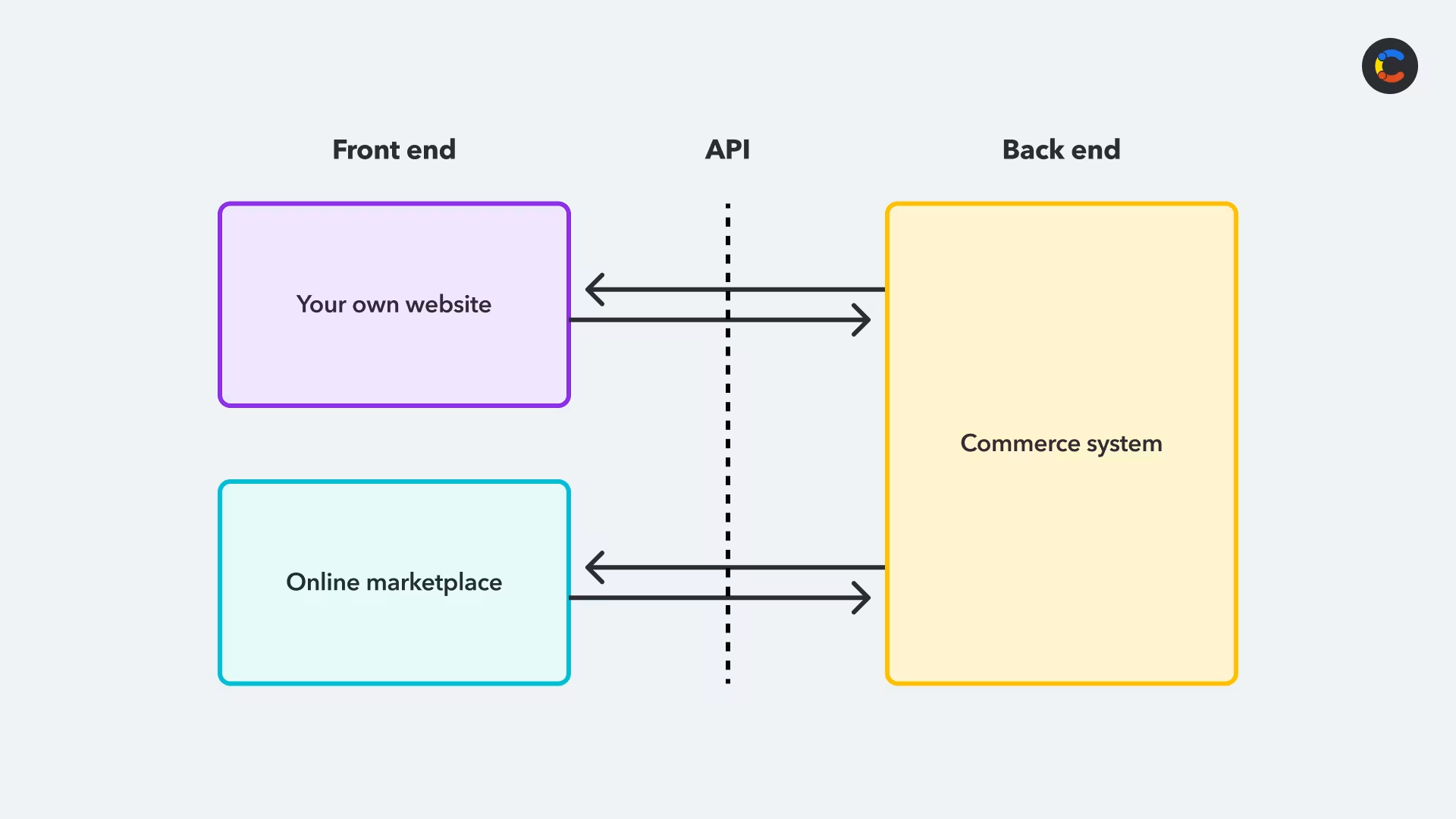
In a headless commerce setup, the storefront (the head) is separated from the backend commerce engine that handles things like your catalog, orders, and cart and checkout processes. The back end has an API that the storefront can use to request the data it needs, and this same API allows other systems — like online marketplaces or AI agents — to also request data in exactly the same way. This means you get to use the same back end as a single source of truth for every channel you s
Despite this benefit, headless commerce isn't the right call for every team, as it can add cost and complexity to your system. This article explains headless commerce in depth, including how it works, how much it costs, and how to decide if it's the right choice for your business and its goals.
What is headless commerce?
Headless commerce is an e-commerce architecture where the customer-facing storefront system is separated from the backend commerce system. The back end is what manages your product catalog, orders, inventory, cart, and checkout processes. It also integrates with payment providers farther down the chain.
Traditional commerce platforms tend to combine both into one product, with your product catalog heavily tied into the presentation of the website, and no opportunity to use that data outside of the e-commerce platform.
As your business scales and expands into different areas, you may turn to headless commerce for more control over your catalog and the ability to sell through multiple channels — such as your own website, online marketplaces, and AI agents that shop on behalf of users.
Headless commerce achieves this by splitting off the back end, which holds your data and business logic, from the front end (the "head"), which is the presentation layer that controls how your products are displayed. Keeping the two separate allows multiple front ends to connect to a single back end using APIs.
A common practice is to buy a commerce system from a third-party provider and use it to manage your product data. You can then build your own storefront (for example, a Next.js website) that pulls product data from the commerce system. You can also connect online marketplaces to the same commerce system so they can receive the same product data via the API.
Once you've decided to go with headless commerce and you know you'll be building your own storefront, it's natural to consider whether you want full control over a few more areas of your site to provide a consistent user experience.
In particular, it's worth considering how you want to manage your blog pages and other content (such as landing pages, banners and navigation). If these are still hosted on a traditional, third-party CMS, it may be a good idea to make the switch to a headless CMS, as this combines the benefits of a traditional CMS (marketing teams can easily update content without having to rely on developers) with full control over your frontend. This includes control over the user experience of your site, as well as the ability to have different frontends for different channels, like a website, a mobile app or an in-store kiosk — all using the same content from the headless CMS.
This approach of using multiple headless backend systems is called headless architecture.
Another option within headless commerce is composable commerce. While headless commerce is about decoupling the front end from the back end, composable commerce goes farther by using different backend systems for different functions — like checkout, payment processing, or order management.
Composable commerce allows you to choose the best tools for each business function. For example:
Business function | Purpose | Example |
|---|---|---|
Commerce engine | Manages your products, orders, and pricing, as well as your cart and checkout flows | commercetools |
Payment provider | Processes payments | Stripe |
Promotions engine | Handles discounts and offers | Voucherify |
CMS | Manages your content | Contentful |
Search | Powers product search | Algolia |
Four benefits of headless commerce
Adopting headless commerce has a number of advantages that can benefit you once you make the switch.
1. Increased flexibility and customization
Once you go headless, you can get your storefront built in-house, giving you full control over the branding experience and the look and feel of your site. You can change how this looks, or build additional storefronts for different audiences or markets. In every case, you keep using the same single source of truth for your catalog, orders, stock management, and other operations.
2. Omnichannel capabilities
Once you start using an API to access data from a headless commerce backend system, this opens you up to using that same API from multiple frontend systems — like a website, online marketplace, or even an AI shopping agent using MCP. You can reuse the same commerce logic across all these different front ends.
3. Better personalization
Your decoupled front end can pull in data from other systems (for example, audience data from Contentful Personalization) and use it to tailor what each user sees.
4. Future proofing
Decoupling your e-commerce system into a front and back end (or, if you're adopting composable commerce, multiple back ends) reduces vendor lock-in, as it's easier to just swap out one component rather than the entire system.
This makes your stack adaptable — when a new technology emerges, you can readily integrate it.
How much does headless commerce cost?
There's no single price for a headless commerce setup: it depends on the scale of your operations, the region your developers work in, and the scope of your project. However, the cost can generally be broken down into these four key areas.
Building the storefront: You'll need to pay developers to build a custom front end for your system.
Maintenance of the storefront: You'll also need to pay some ongoing development costs for maintaining the storefront. Over a few years, this can add up to be more than you spent on the initial build.
Commerce provider back end: You're unlikely to save money from switching to a headless-only option in commerce platforms like Shopify and BigCommerce. In many cases, they put headless access in a higher pricing tier, so it may actually cost you more, even before you factor in the cost of building your own storefront.
A headless CMS for managing content: Many headless commerce solutions involve a headless CMS as well, and the cost can vary with the number of channels, users, or the amount of content you have.
Is headless commerce worth it? It will generally cost you more, both in terms of upfront costs and ongoing maintenance and fees. But it can translate to faster frontend releases, better customer experiences, and omnichannel delivery. You’ll need to decide for yourself whether that's going to increase enough revenue for your business to be worth it.
When not to use headless commerce
Headless commerce can have some real downsides, so if you don't need one of the benefits mentioned above, it's worth considering these before blindly assuming that headless commerce is the best solution for all use cases:
You can't justify the extra cost: Hiring a development team to build and maintain your storefront can be expensive. And switching to a headless plan on an e-commerce platform can also cost more. You need to be sure you can recoup these costs by growing your business. If you don't need any of the main benefits of headless commerce (like the ability to sell through multiple channels or personalize your content for different audiences), you'll be paying more for flexibility you don't need.
You use multiple plugins that may cause issues when you migrate: Some plugins that previously worked with your old commerce platform can stop working when you decouple the front end from the back end. This can be costly, since you’ll have to set aside some budget for your developers to code their own custom versions of this functionality.
You're a small team with a simple catalog: If you're not experiencing any major issues that would require this level of control, headless is probably premature. It's probably worth waiting until you start hitting the scaling and functionality limits of your existing platform.
Examples of successful headless commerce
Headless commerce can sound abstract until you see examples of it being applied successfully. Here's how two very different companies have used headless commerce to improve operations and increase revenue:
Bang & Olufsen
Bang & Olufsen was running a traditional, monolithic e-commerce platform that bundled together its commerce engine, content management and frontend layout all in one. They wanted to move to headless for three reasons:
They wanted to launch in-store digital signage that needed to pull product information from the commerce system using an API. This omnichannel support is best provided by a headless commerce solution.
They wanted to give their customers a better website experience, as they were currently browsing products on one site and doing checkout on a completely different one.
They wanted the option to connect their system to other third-party systems or internal microservices, and using an API is the simplest way to do this.
Bang & Olufsen switched from their monolithic commerce system to commercetools for their commerce engine and Contentful from Salesforce for the content management side. The improved customer experience led to a 60% increase in conversion rates and a 27% increase in average order value.
Chemist Warehouse
Chemist Warehouse is an Australian pharmacy with over 500 stores and over 3 million weekly customers. By 2025, it was responsible for managing content for multiple different brands, including its own online pharmacy. On top of this, its customized legacy system was becoming hard to maintain, with marketing staff needing to rely on developers to do content updates. Turnaround time for any content change was stretching to weeks. And heavy traffic spikes would cause the website to crash.
Chemist Warehouse decided to make the switch to headless commerce, using commercetools as their commerce engine, Netlify for hosting, and Contentful for their headless CMS. Now, marketing teams can manage their own content, launching landing pages and campaigns themselves without developer input. Development cycles are now 14x faster and there has been a 10% increase in site traffic — which the site can now handle.
How to get started with headless commerce
If you’re working on a well-funded greenfield project, you can use headless commerce from the get-go.
Otherwise, if you're already invested in an e-commerce platform, you can get started by working with a developer to leverage this existing functionality and build a new front end for it. Most commerce providers today offer a headless option, even if their default offering is monolithic with a built-in storefront.
If you're migrating to a headless commerce system, you'll need to put a migration plan in place. Typically, a phased approach is best, migrating one functional area at a time. You should start by migrating lower-risk stuff, like product listing pages, individual product pages, and content pages. Wait until later before dealing with higher-risk functionality that risks breaking the whole site, like the shopping cart, checkout, or account management.
For each area that you're migrating, you'll want to develop a new section of your frontend site that's completely decoupled from the main commerce system.
If you're a large enterprise, a migration to headless commerce can take even longer, because you're usually not just creating one new front end for an existing commerce system. You might create multiple front ends, or need to migrate your back end to a completely different commerce system. It's also very common to migrate to a headless CMS as part of the migration process so your marketing staff can continue to create updates. And you may also want to integrate other systems, creating a composable commerce system.
For more information on how to migrate to a full composable headless commerce system, check out our commerce migration checklist.
Going headless means rethinking how you manage content
Content is a large part of how you sell your products: images, product descriptions, reviews, videos, and demos are all essential for engaging and enticing customers.
Normally, a monolithic commerce platform can all be managed using a built-in CMS with templates for catalogs and product pages with slots for banners, videos, and other customizations. Once you make the switch to headless commerce, you’ll have full control over your front end, rather than relying on pre-built templates.
This means you need a platform to store and deliver this content. Just as headless commerce lets you deliver your product catalog to multiple channels, a headless CMS allows you to deliver your content to multiple channels.
Contentful pairs with any headless commerce platform, serving your content to any front end, including your websites, mobile apps, digital in-store displays, and even agentic AI shopping agents.

Inspiration for your inbox
Subscribe and stay up-to-date on best practices for delivering modern digital experiences.
Meet the authors

Esat is a Senior Product Marketing Manager at Contentful and enjoys sharing his thoughts about personalization, digital experience, and composable across various channels.
Related articles

6 exciting customer experience (CX) trends to watch
February 26, 2025
Digital transformation trends shaping the future of customer experiences
June 5, 2026
An introduction to CMS migration: Tips for a smooth transition
January 7, 2025

Ready to start building?
Put everything you learned into action. Create and publish your content with Contentful — no credit card required.