MCP use cases: How the Model Context Protocol is used in real AI workflows
Published on August 20, 2026



Inspiration for your inbox
Subscribe and stay up-to-date on best practices for delivering modern digital experiences.
AI systems no longer just generate text. They're now expected to take action on behalf of users, and these actions need to take place in a variety of external systems.
Model Context Protocol (MCP) provides a standardized way for AI agents to connect to different systems, meaning you don't need to set up a custom integration each time you want your agent to work with a different application.
As MCP adoption accelerates, it's becoming even easier to integrate AI into different workflows. In this article, we cover some core MCP use cases, use our own Contentful MCP server to show you how these use cases can work in the real world, and outline the steps for connecting an AI agent to an MCP server.
What is MCP and how does it work?
Model Context Protocol (MCP) is a new standard that defines how LLMs, whether acting as AI agents or under direct human control, can discover, connect to, and interact with any compatible external systems. It does this by providing a structure for these systems to expose different available actions as "tools" (or "functions") with predictable inputs and outputs, making it easier for AI agents to know how to interact with them.
MCP uses a standard client-server model. Any system that wants to make it easy for AI agents to interact with it needs to expose an MCP server, which tells the agent what tools are available and takes requests for tool calls. An AI agent then acts as an MCP client to interact with the MCP server using a bidirectional transport layer like Websockets or standard input/output (not HTTP).
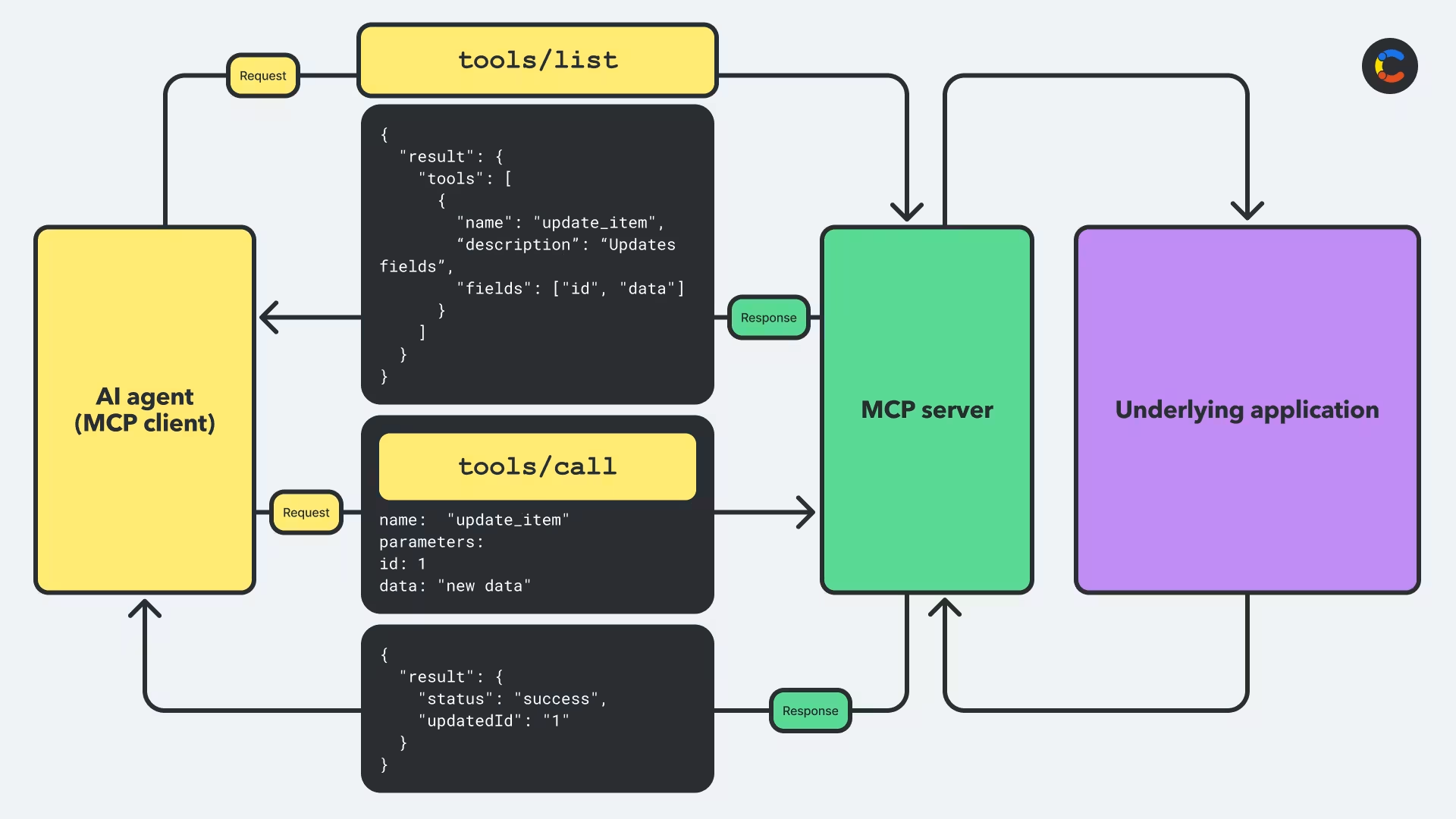
As soon as an MCP client connects to an MCP server, it starts by making a tool discovery request to the MCP server, using the tools/list method. This tells the server that it wants a list of all available tools. The server responds with this list of tools, including their input and output schemas.
Later, when the MCP client needs to perform an action, it knows the tools available to it. It chooses an appropriate tool and then sends a request using the tools/call method, so named because it asks the server to call a particular tool. Along with this request, the client also sends the name of the tool it wants to invoke (for example, update_item), along with a payload (for example, the information to update the item structured in a way that conforms to the schema the server expects). The MCP client knows what structure the payload should be because the server described the schema in the previous response.
The sequence diagram below shows how the MCP client first discovers the tools available to it from the MCP server and then calls one of those tools via MCP.
Why MCP matters for modern AI workflows
MCP offers a standardized, secure layer that allows agents to connect to multiple external systems. Each system's MCP server allows the system's capabilities to be exposed in exactly the same structured way each time.
Before MCP, connecting an AI agent to another platform required a custom integration, which was time-consuming and costly. MCP has made it much easier to integrate AI into workflows by providing a predictable interface with built-in security principles based on OAuth 2.1. This ensures that agents can only perform specific actions that the server has permitted.
The consistency of MCP makes it easy to orchestrate the automation of large, multi-step operations using AI, since one workflow can make calls to different tools hosted on different systems using the same protocol. For example, a content agent could write an article draft, update another in a CMS, and trigger a publishing workflow by chaining together multiple MCP tool calls from different systems. You no longer need to waste time setting up custom integrations, which has slowed down AI projects in the past.
MCP works best with highly structured systems, such as API-first platforms, because an MCP server exposes the tools, schemas, and permissions of an underlying system in a predictable format. This is easiest when the underlying system already defines its data and actions in a structured way. This tends to already be the case for modern API-first systems like developer tools or content platforms like Contentful.
Core MCP protocol use cases for AI workflow automation
Below are some of the most common MCP use cases for AI workflows:
Action-based operations, such as adding a new item to a product catalog or content repository, updating the status of a content entry in a CMS as it moves through its editorial workflow, or syncing article metadata with an SEO service.
Content marketing or digital publishing: MCP excels at orchestrating multi-step workflows across systems, so it’s well suited to workflows within marketing or publishing that span multiple systems. This includes CMSs, analytics tools, and deployment pipelines.
Automating repetitive tasks: This could include applying bulk tag updates to assets or identifying and cleaning up assets in a media library that are unused or have been tagged incorrectly. Essentially, this includes any tasks that can be run consistently each time because they don't involve complex reasoning.
Fetching new data so the AI model's reasoning can stay up to date: Before an agent performs an action using MCP, it can also make an MCP call to find new information that may inform its next action. For example, a content agent could fetch the most recent engagement metrics for a particular marketing campaign, before deciding to update its content. Or a stock agent could check inventory levels of a product, and if these levels are low, it could trigger a restock workflow for the product.
When not to use MCP
Unstructured data: MCP is not a good fit for workflows built around unstructured data. You can still use AI in such cases, but you'd need a different approach to MCP. For example, if you want to give your system a corpus of long documents that it needs to become an expert on, RAG (retrieval-augmented generation) is a better approach. However, it's worth noting that RAG and MCP can be used together.
Non-agentic tasks: Plenty of tasks are still simple enough to not require any AI reasoning. For example, converting all the images in one folder to a different, specific resolution is just a simple automated task. If AI isn't required, you definitely don't need MCP.
Very low-latency tasks: All MCP tasks must wait for the model to complete its reasoning and for the tool call to pass through its bidirectional transport layer, which takes time. If you need sub-second response times (for example, in real-time analytics), a direct API or custom backend service will usually give faster responses.
Real-world MCP server use cases with Contentful's MCP server
To understand how MCP works in the real world, you can take a look at some examples from Contentful's MCP server, which exposes tools for managing web and app content inside Contentful's CMS and content platform. These MCP tools map directly to specific endpoints in Contentful's Content Management API.
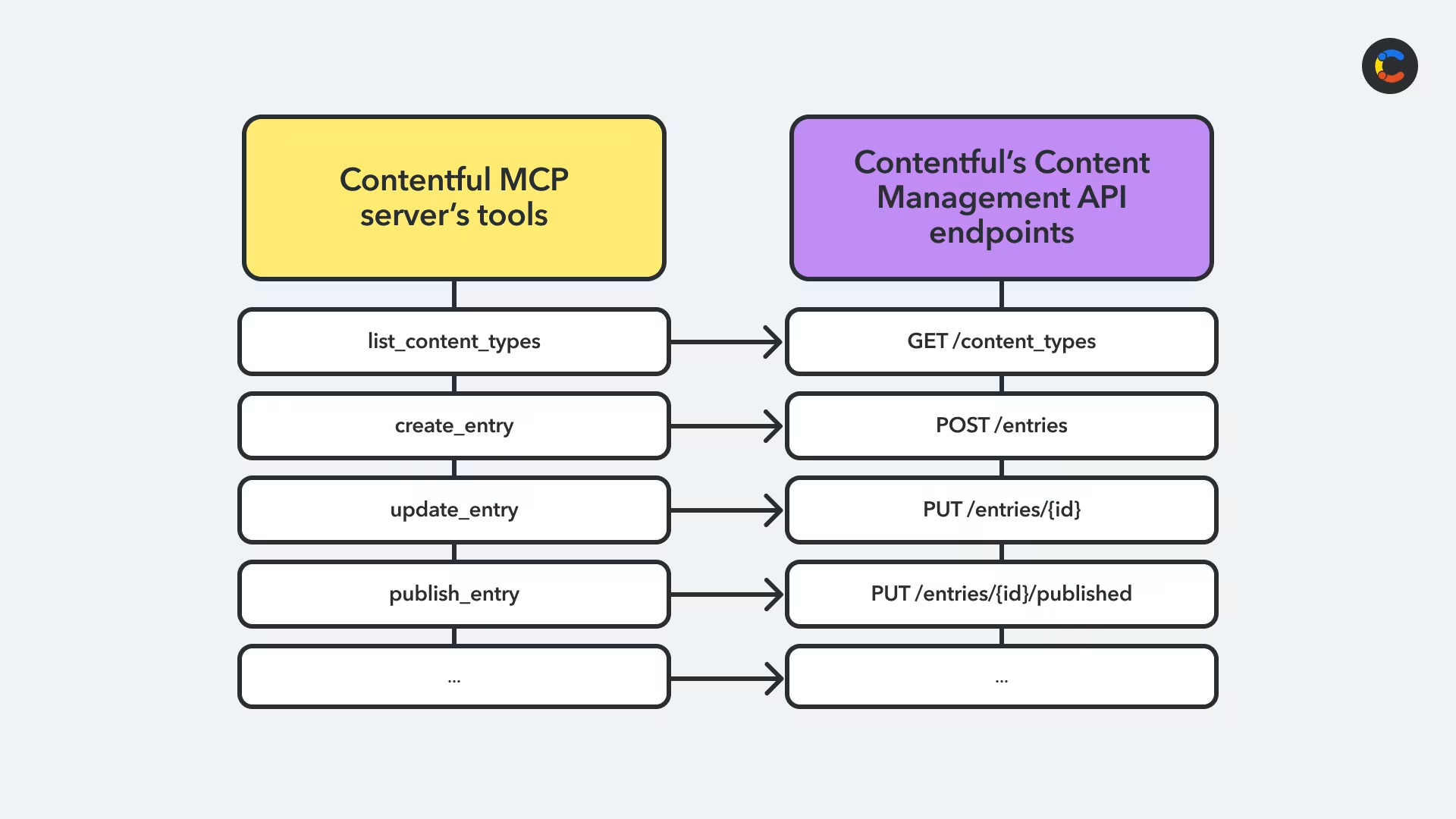
Contentful's MCP server enables a variety of different content operations. A common MCP use case is bulk content operations. The MCP server allows AI agents to apply bulk operations at scale, such as tagging, updating metadata, publishing across multiple spaces, and synchronizing statuses or other fields in bulk.
MCP is also useful for content and asset quality checks. Agents can scan content for broken links, inconsistent formatting, or required fields that haven't been properly filled in. They can also check assets for missing alt texts or metadata, or identifying and cleaning up unused assets.
Our MCP server includes tools for content modeling automation with tools for creating new content types, adding new fields to those types, or updating the fields.
There are also tools that help with content migrations. For example, you can use the MCP server for assistance with moving content from a legacy CMS into Contentful's content platform. This can include data transformations, such as restructuring content to fit a new content model, and validation of the migrated content, including checks on whether required fields exist and whether all referenced assets actually exist.
How to connect your AI agent to Contentful's MCP server
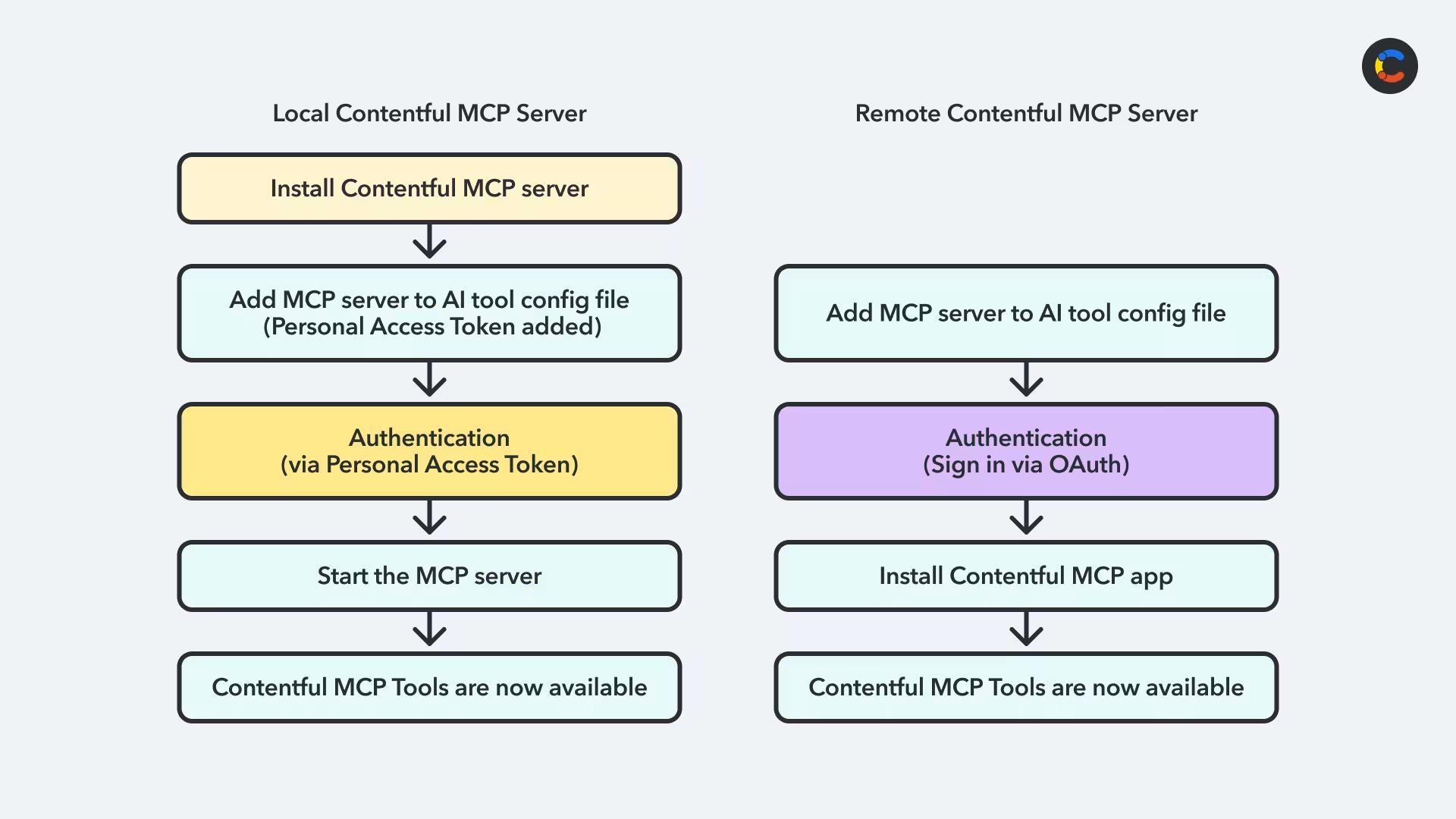
The steps for connecting your AI agent to Contentful's MCP server — whether local or remote
Contentful offers two MCP server options. The first is Contentful's local MCP server, which is open source and self-hosted. If you want to run it on your own machine or infrastructure, you can follow the setup instructions on GitHub. You'll need an AI tool that supports MCP, such as Claude Desktop, Cursor, ChatGPT Desktop, or a code editor with an MCP plugin.
The second option is Remote MCP. Remote MCP is hosted by Contentful at a dedicated endpoint, with global and EU endpoints depending on your organization’s data residency requirements, so you don't need to install and run the MCP server locally yourself. Instead of authenticating with a personal access token passed through environment variables, the remote server uses OAuth so you'll sign in to Contentful's MCP server through your MCP client.
There is one more important detail about Remote MCP: the Contentful MCP app needs to be installed and configured in each Contentful space and environment where you want to use it. All this is built into Contentful's MCP connection flow, so when you're authenticating for the first time, Contentful's configuration UI helps you install the MCP app and apply the selected settings during setup. However, you must be a Contentful admin to do this or ask an admin to set this part up for you.
Note that the MCP app doesn't replace the remote server itself. Instead, it acts as a permission-gating layer that lets admins control which tool categories are available in each environment.
No matter whether you use local or remote MCP, the overall MCP flow stays the same. Your AI client connects to the server, discovers the tools available to it, and then calls those tools when it needs to take action inside Contentful.
How to use Contentful's MCP server for your MCP use cases
If you're using the local MCP server, you'll need to start your client before you can connect to it, whereas the remote MCP server is already started. Once the local or remote MCP server has started, it sends a tools/list request to it to discover what tools are available. The server responds with a list of available tools, such as list_content_types, create_content_type, or upload_asset. This includes the name of each tool as well as other information, such as a description of what each tool is for and what parameters are expected.
Now you can prompt your AI tool and it can do work for you. For example, you might ask "Find all the blog posts that have images missing alt text. Then list the blog posts and the image names for me."
The AI tool's model reads your prompt and determines that it needs to call the Contentful MCP server, and that it needs to call a specific tool. It then calls that tool by sending a tools/call request along with any query parameters that are needed. The MCP server responds, and the model interprets this response and then replies to you, the user, in natural language.
With Remote MCP, the same interaction happens through a hosted connection. The difference is that the remote server checks the MCP app configuration for the space and environment in use, and applies that allow-list on top of the authenticated user's existing Contentful permissions. That gives teams a more governed way to adopt MCP across shared spaces, while still keeping the user experience of MCP tool use the same.
Contentful is a great foundation for AI-enhanced content workflows
The structured content model that Contentful enforces is ideal for AI workflows. Agents need structured, predictable inputs and outputs in order to take action, and this isn't possible if you're storing your content as big blobs of HTML or Markdown. Contentful stores all data and metadata in a JSON schema, which makes it much easier to find relevant data and take action on it.
In addition to this, Contentful was designed to be API first. Every action you can take in Contentful is already possible via API, including creating and updating content, publishing, managing assets, and changing content models. As MCP tools wrap Contentful's Content Management API, many of the actions you can take via Contentful's API can be done via MCP.
That applies whether you're using the local MCP server for self-hosted workflows or Remote MCP for a hosted, more easily governed setup. Remote MCP is especially useful when teams want to connect external AI assistants to Contentful without local setup, while still layering space and environment controls on top of each user's existing permissions.
Contentful now has a wide variety of AI-compatible tools, from our free, open-source MCP server to other paid, in-app features. AI Actions allows you to automate tasks inside the Contentful dashboard using AI prompts, and AI Suggestions give writers and editors inline suggestions to help improve their content.
Finally, a note on security: Contentful already has different user roles and fine-grained permissions baked into it, as well as API tokens that are scoped to specific actions. With Remote MCP, those existing permissions still apply, and admins can add another layer of control through the MCP app by choosing which tool categories are available in each environment. This allows you to ensure that agents can't publish without human approval and that you can limit them to working on specific content types or in certain environments (staging vs. production). Most importantly, every action taken is auditable, so you can ensure your compliance needs are met.
These capabilities make Contentful a great foundation for a variety of MCP use cases.

Inspiration for your inbox
Subscribe and stay up-to-date on best practices for delivering modern digital experiences.
Meet the authors

Niko is a product manager of developer experience at Contentful. Also, an MCP enthusiast.

Stephanie Diaz
Product Marketing Manager
Stephanie Diaz is a Product Marketing Manager at Contentful, where she leads product messaging, positioning, and launch strategy for the Contentful Ecosystem. She's passionate about turning technical capabilities into clear, compelling narratives that connect platform innovation, enterprise use cases, and ecosystem storytelling.
Related articles
What's a static website? How they work and when to use them
July 9, 2026

Ecommerce personalization trends for 2026: AI, data, and real-time experiences
September 16, 2026

Choosing the right Contentful training: Verified skills and certifications
April 17, 2025

Ready to start building?
Put everything you learned into action. Create and publish your content with Contentful — no credit card required.