What Palmata revealed about how AI explains our pricing
Published on November 24, 2026


Inspiration for your inbox
Subscribe and stay up-to-date on best practices for delivering modern digital experiences.
When a prospective buyer asks an answer engine what Contentful costs, the response depends on two things: what the AI assistant can find, and what it can actually use. For a while this year, those were very different things.
Like most companies' pricing pages, ours is visited by answer engines all the time. Yet those engines were citing that page but building their view of our pricing from somewhere else. With nothing there they could quote, they landed on a usage-limits table in our Help Center and filled in the gaps themselves. The story they told was one no pricing, marketing, or sales team wants to hear: unpredictable billing.
We spent months investigating this issue with other Answer Engine Optimization (AEO) tools. In minutes, Palmata pinpointed exactly where the problem was on our site, and its Simulated Impact feature modeled how changing it might shift the answers. Within about a week we'd shipped the first fix.
Here's what Palmata showed us, the two changes we made in Contentful, and how long it took for results to show up.
Diagnosing the problem: Cited, not quoted
Palmata tracks how AI answer engines talk about a brand across a large set of buyer questions. It separates things that are easy to lump together: whether you're mentioned, whether your pages are cited as sources, and what impression the answer leaves. It also shows which claims an engine extracts from a page — the specific statements it lifts and uses in its answer.
Pricing pages are hard to get right. Every update means deciding which parts of the pricing model to show, what information belongs where, and how to stay accurate while helping someone who's on the fence find the right plan for their company. Ours is shaped by teams across the business, from Pricing & Packaging to UX testing to Content and Product Marketing.
The page was built for people and for search engines. But even with all those checkpoints in place, AEO was a blind spot. The AEO tools already in our stack never pinpointed what was going wrong here. Answer engines are a newer audience, and they read the page differently.
Who's doing the talking?
Palmata diagnosed the problem in our first run at the end of June. Answer engines were citing our pricing page, but they extracted zero claims from it. The page was being read and then set aside.
That's an expensive gap, because when an engine cites your page but can't quote it, someone else's framing does the talking. Look at the FAQ on the pricing page at the time, and the reason is clear. Its answer to "How much do Contentful products cost?" read: "We offer a customizable range of plans to suit teams, projects, and businesses of all sizes. To find the right plan for you, please contact our sales team."
An invitation to "Contact sales" doesn't give a buyer much to go on, and it gives an answer engine even less. We hadn't answered the evaluation question on the page. It was a bit like serving a bagel with lox and leaving out the cream cheese.
Being a category leader makes that gap wider. Competitors and comparison sites have every reason to write about how we price, so on topics like this, there's often more written about us than by us.
And it isn't only a pricing problem. Any part of a brand's story can drift this way without anyone noticing. A platform known for flexibility can come back as "complex," and "complex" can quietly turn into "costly." A customizable product can read as "needs a lot of setup." If an engine can't find your version of the story, it will cobble one together from alternative sources.
Fix one: Make the structure explicit
Palmata's first recommendation was structural. When buyers put evaluation questions to answer engines, the pages that get cited are often third-party FAQs, because they're laid out as clear questions and answers. Ours had the questions and answers, but not the markup that labels them as such.
AI systems and crawlers look for clear question-and-answer pairs, and structured data can make those pairs easier to find. So the Web team updated our FAQ component to output FAQPage schema (JSON-LD) that matches the visible copy exactly.
Here's how that works in Contentful. Our FAQs are built with the existing Section: Accordion content type. The team added an "Is FAQ section" toggle to it. When an editor switches it on, the component renders the questions and answers as server-rendered HTML and generates matching FAQPage JSON-LD automatically. There's no new content type and no separate schema to maintain, and the structured data can't drift from what visitors see.
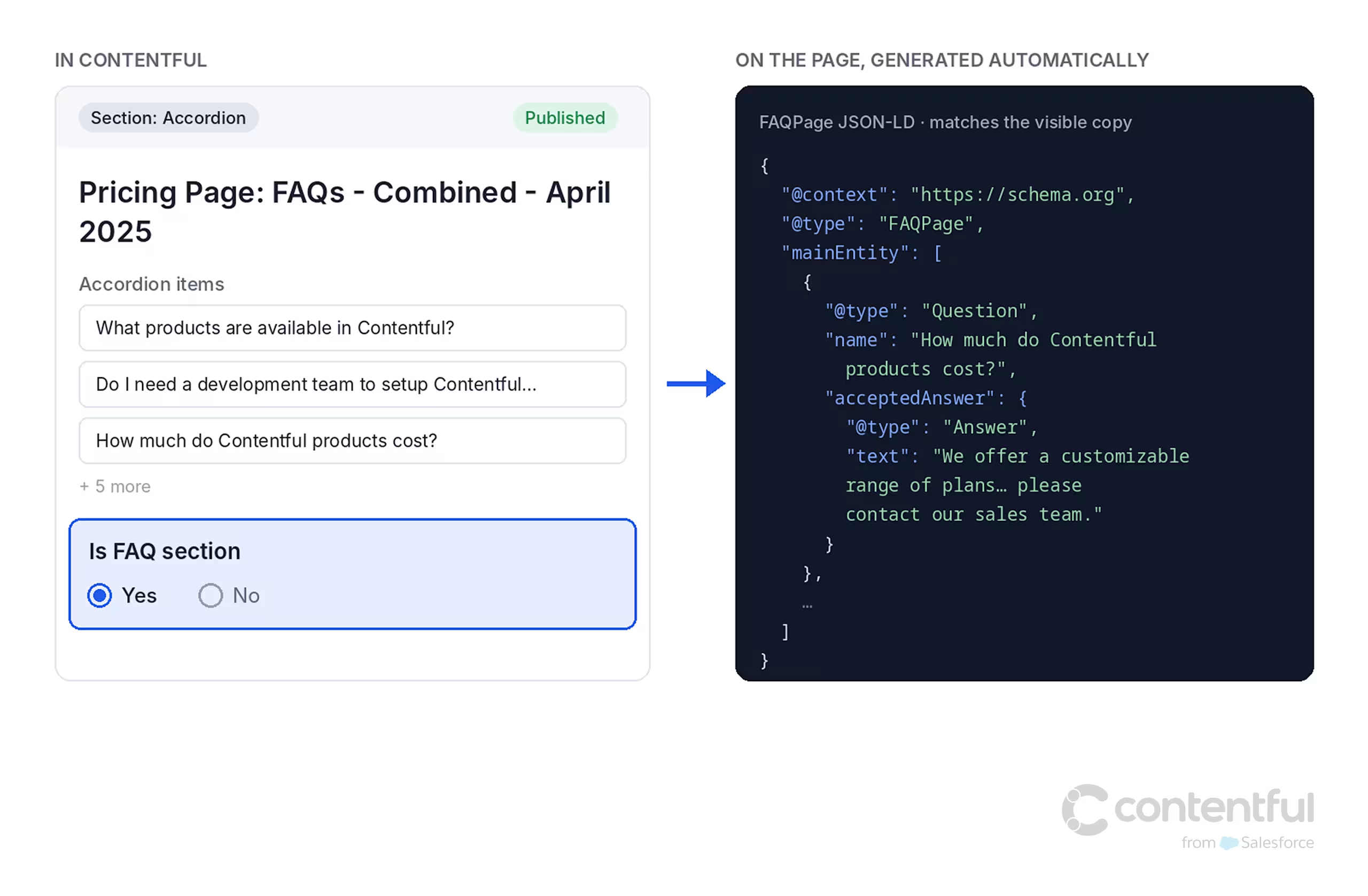
The "Is FAQ section" toggle on a Section: Accordion entry in the Contentful web app.
To find where to switch it on, the team used the Contentful MCP server to crawl contentful.com for accordion sections that looked like FAQs. We moved quickly. The feature shipped on July 7, about a week after our first Palmata report. The comparison pages got it that afternoon, and the pricing FAQ the next day. From then on, adding schema to any other FAQ on the site was an editor's job, not a developer's.
It worked, up to a point. By our late-July run, the pricing page's appearances in AI answers had doubled. But claims extracted from it stayed at zero. The structure was now explicit. What the page still needed was something quotable.
Fix two: Give engines something to quote
The second fix was the content itself. Palmata pointed us at the cost questions buyers were actually asking, especially around overages and predictability, and suggested a short list of FAQ topics to cover. We treated that as a brief, not finished copy, and our team rewrote it to fit the pricing page's context and UX.
It was a cross-functional job. Our AEO and SEO leads set the rules for extraction: lead with the answer, make every answer stand on its own, and keep to one question per buyer concern. The Pricing & Packaging team checked the figures. UX owned the FAQ pattern and where it sits on the page.
On August 18, the new FAQ went live. We removed four questions, including the "contact our sales team" answer, and added five that tackle cost head-on:
Can you get started with Contentful for free?
How do Starter Spaces and Lite Spaces compare?
How does Contentful handle usage beyond your plan's included limits?
What shapes Enterprise pricing?
How are add-on products like Personalization and AI Actions priced?
This time, the answers say what things cost. The overage answer, for example, now reads: "On paid plans like Lite, you can go beyond your included limits and pay only for the overage: $5 per additional 1 million API calls per month … plus $0.15 per additional GB of asset bandwidth per month."
We also updated the usage-limits article in our Help Center, the page engines had been leaning on. It now explains in plain terms that API calls on Premium and Enterprise plans don't accrue overages.
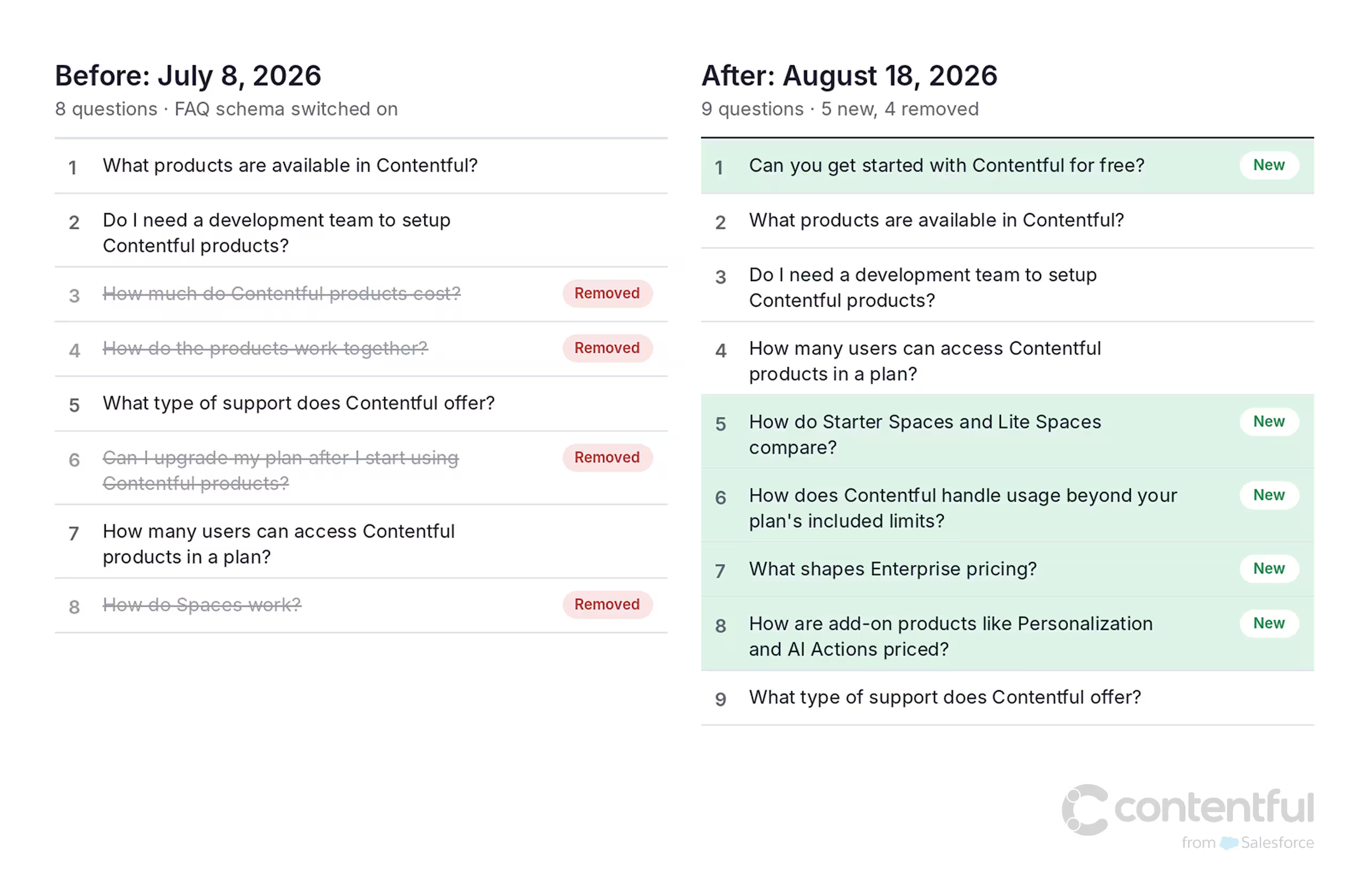
Before/after comparison of the pricing FAQ, showing the July version (8 questions, including "How much do Contentful products cost?") next to the August 18 version (9 questions).
The outcome
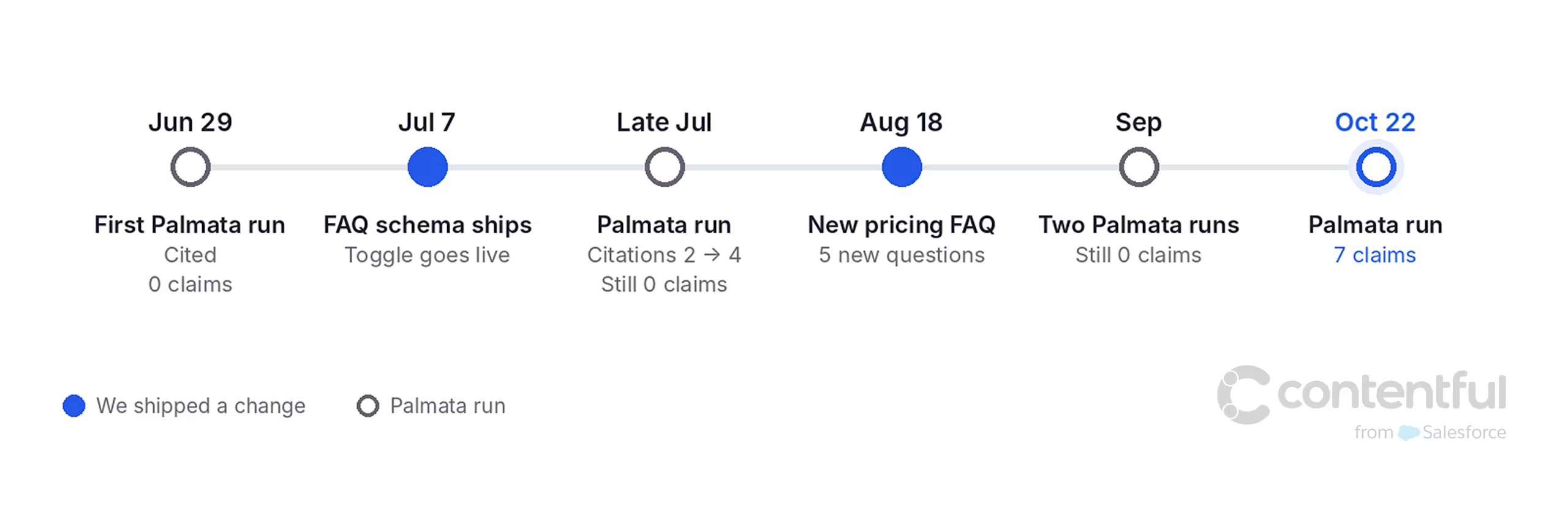
Palmata refreshed its research twice in September, two and five weeks after the new FAQ went live. By the second run, the pricing page was appearing in six times as many AI answers as in July, but claims extracted were still at zero. It takes time for answer engines to pick up a change, and what they quote moves more slowly than what they read.
Then the October run landed, about two months after launch:
The pricing page went from zero extracted claims to seven.
Pricing page appearances in AI answers nearly doubled again, to 11 times the July count.
Claims extracted from the Help Center usage-limits page more than tripled.
These numbers come from the buyer questions we track, not from every AI answer out there, so the raw counts are small by design. What matters is how they moved.
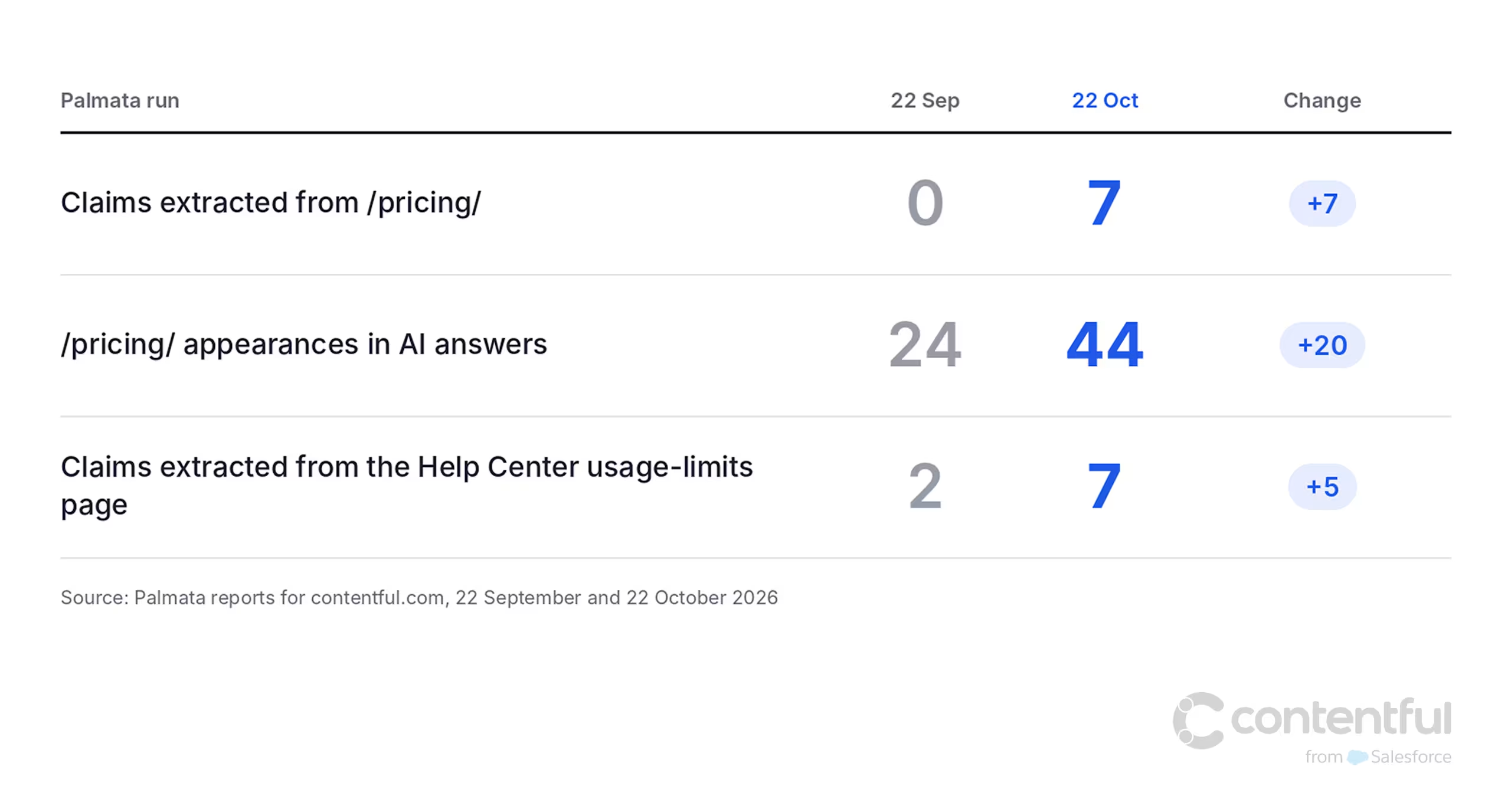
Simple before/after table of the three counts (claims extracted from /pricing/, /pricing/ appearances, claims extracted from the usage-limits page), September vs October.
What does that look like in practice? In Palmata's October run, ChatGPT answered a question about which CMS pricing model works best for high-traffic websites with unpredictable spikes. Our pricing page was the only Contentful source it cited, and the answer listed the overage rates our new FAQ spells out: "Additional API calls at $5 per million" and "Additional asset bandwidth at $0.15/GB."
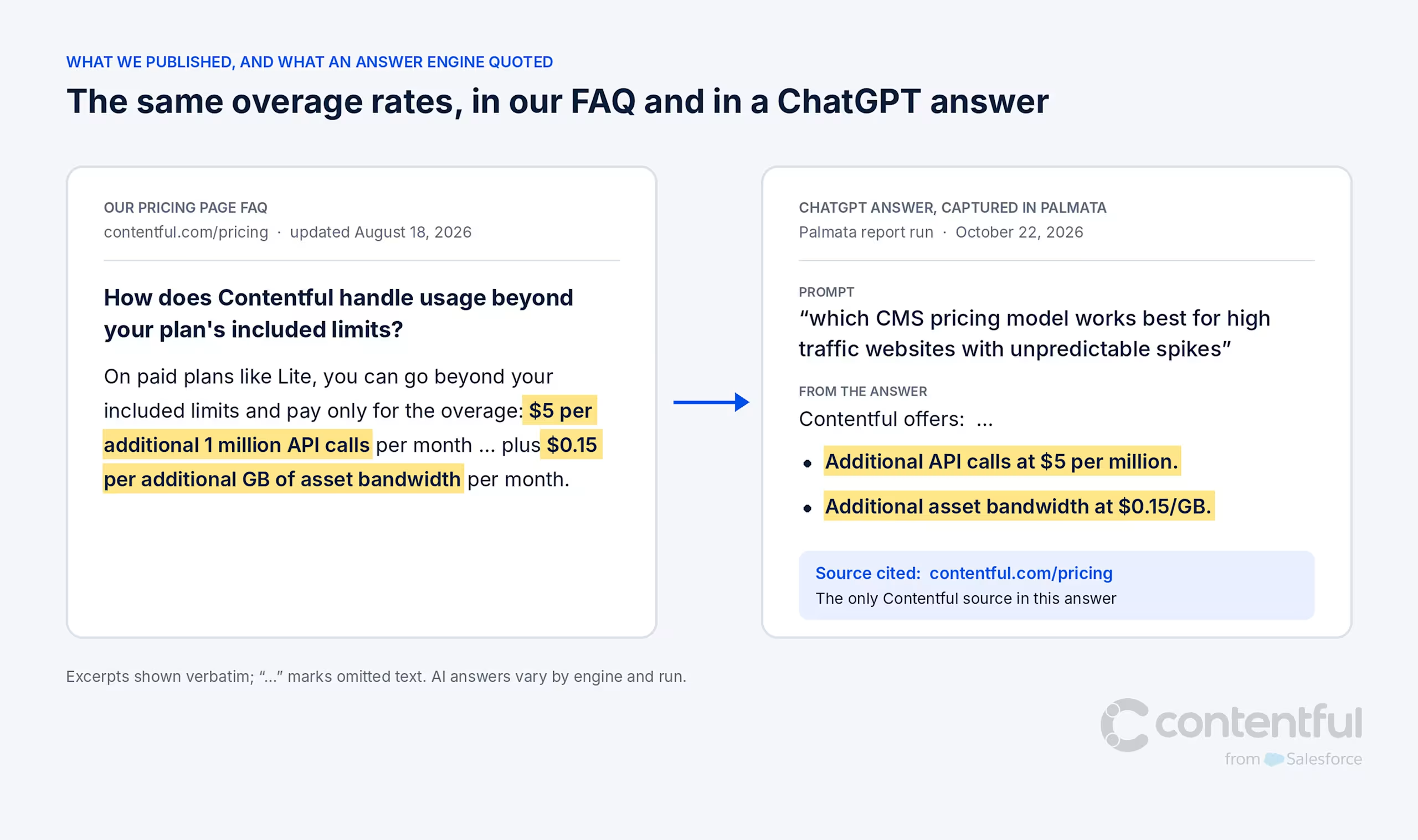
Side-by-side comparison: the Contentful pricing page FAQ answer listing overage rates of $5 per additional 1 million API calls and $0.15 per additional GB of asset bandwidth, next to a ChatGPT answer captured in Palmata on October 22, 2026, quoting the same rates and citing contentful.com/pricing.
Palmata attributed essentially all of Contentful's portrayal in that answer to the pricing page. On at least one question about cost spikes, the answer now comes from our own numbers rather than a Help Center table stripped of context.
What's next?
The pricing page is part of a bigger shift. Between June and October, the citation rate across contentful.com tripled, from 9.7% to 29.7%. A lot of work fed into that number beyond the pricing page, but it tells us the site as a whole is becoming a source that answer engines use.
Our work on pricing isn't finished, though. Not every answer has caught up. In the same run, an answer ranking headless CMS platforms on pricing transparency credited Contentful with the "best documented API overage pricing" but still described Enterprise pricing as less predictable. That's the kind of gap we're working on next.
We're reviewing the AI answers and source pages behind the pricing questions we track, making it clearer when additional charges apply and how costs scale, and looking at where new content could help. Many pricing answers still lean on third-party comparisons, so a first-party look at total cost of ownership is one idea on the table.
That's what our Customer Zero program is all about. Nothing on a website should be one-and-done, and pricing is no exception. We test, learn, and refine: Palmata shows us where to focus, Contentful gives us the tools to improve the content, and the next run tells us what changed. It's the same loop we'd recommend to any team using Palmata.
Take your first (or next) step
If you're wondering how answer engines see your brand, here's where we'd start:
Look beyond citations. Check what answers actually say about your brand, and which pages shape that story. Pages that get cited but not quoted are often your quickest wins, and Palmata's Actions tab is a good place to start looking.
Pair structure with substance. Schema makes your structure explicit, but it's the answers that get quoted. That doesn't mean writing more, or writing like a spec sheet. It means finding the right angle and level of detail for the question a buyer is actually asking.
Give it time, but stay close to it. Our change took about two months to show up. You might not need to run a report more than once a month, but use the time in between to review what the answers say and plan your next move.
Want to know what AI is saying about your brand? Run a free Palmata report and see where to focus first. And for more on why every page now has to work as an entry point, read our companion post, All content is now TOFU content.

Inspiration for your inbox
Subscribe and stay up-to-date on best practices for delivering modern digital experiences.
Meet the authors

Casey leads content strategy and messaging across Contentful.com, partnering with cross-functional teams to create impactful digital experiences that drive engagement, support launches, and strengthen brand storytelling.
Related articles
Optimizing the content lifecycle
March 4, 2025

Rolling into composable commerce with Ruggable
June 18, 2024
How to create a digital content strategy for the digital-first era
August 6, 2024

Ready to start building?
Put everything you learned into action. Create and publish your content with Contentful — no credit card required.