Headless CMS migration: A how-to guide
Published on October 13, 2026


Inspiration for your inbox
Subscribe and stay up-to-date on best practices for delivering modern digital experiences.
If you’ve been relying on your legacy content platform for years while your business has been launching campaigns and growing its customer base, then you’re probably not imagining it — your content management system (CMS) is slowing down.
Growth is great, but only if you and your hard-working marketers are able to sustain the quality behind it. The fact is, many businesses run out of steam because their legacy CMSes don’t have the flexibility to keep up with the demands of the modern marketing landscape.
Plenty of brands launch their content on out-of-the-box CMSes like WordPress and Drupal, but then run into problems as a result of those platforms’ inflexible page-based architecture, high maintenance costs, and vendor-locked functionality.
More than ever, marketers need to be agile and in complete control of their content. They need to be able to work with content assets autonomously and efficiently, responding quickly to challenges and opportunities in order to generate as much value as possible.
In this post, we’ll explain the steps involved in the headless CMS migration process — from deciding whether you actually need to make a change, right through to what to expect after you adopt your new content management architecture.
Do you need to migrate to a headless CMS?
If you’re prioritizing growth and scalability, and have an evolving content strategy, then yes, a headless CMS makes a lot of sense.
But let’s explore the other side of the argument first: If you only have a limited web presence, or a relatively small website, monolithic CMSes (like WordPress and Drupal) can be a good fit for your content management requirements.
The problems with traditional CMS platforms start when your content needs get more complex. When you launch new products and campaigns, for example, you may need to create new kinds of digital assets, expand into new markets, add new channels, or bring new brands into the ecosystem.
Basically, increased operational complexity makes it harder to manage and reuse content efficiently in monolithic systems. That’s because content is tied to individual pages and predefined templates: When you want to build new or different experiences, you’ll need to recreate content from scratch, and maybe spend hours copying and pasting text (and other assets) manually between environments.
The page-based limitations of monolithic CMSes can also create technical barriers. You’ll likely need to add a separate CMS for each channel you add to the ecosystem (apps, emails, in-store kiosks, etc.). Similarly, certain legacy systems require specialist expertise: Developers need to know the PHP programming language, for example, to build experiences in WordPress.
The point is, monolithic systems not only make it harder for brands to keep their content consistent, but they also create additional maintenance work for development and marketing teams.
The headless CMS solution
Headless CMSes remove the code complexity and page-template limitations from the content management workflows.
With a headless CMS, brands are free to define their own frontend presentation because the system makes no assumptions about what content will look like when it's published.
That means they can implement user-friendly CMS interfaces that marketers can use without needing help from developers or specialist knowledge. They can create and reuse content anywhere within the ecosystem, on any channel, without any risk of formatting error.
That freedom is a launchpad for growing brands. Marketers can work directly on the content experiences they create, responding to the markets and audiences’ needs with less risk of bottlenecks or delays.
And that efficiency compounds. It translates to improved core web vitals, static site generation (SSG) benefits, more cohesive content, and, ultimately, better, more engaging customer experiences.
Composable possibilities
Headless CMSes are typically deployed as part of composable architecture, which means brands can integrate them as part of best-of-breed marketing tech stacks leveraging application programming interfaces (APIs) to ensure compatibility and connectivity across the ecosystem.
In a composable environment, headless CMSes become growth engines. Marketing teams can create reusable digital assets that can be published on any front end (website, app, email, social media, etc.) as part of any campaign or content strategy, on multiple platforms, and in any market.
Audit what you have
Once you've decided that migration makes sense, it’s time to take stock of what assets you have, and what you need in your new environment.
Your legacy CMS’s content database probably holds far more than the pages visible on your website.
A WordPress installation, for example, might contain posts and pages alongside custom post types, custom fields, media, taxonomies, forms, search functionality, ecommerce features, analytics integrations, and numerous plugins.
Depending on the size and scope of your digital footprint, it may be worth leveraging content audit software to help you get the job done.
Categorize content
Divide your content inventory into broad categories. Those categories can be defined based on context, but the following groupings can be useful.
Content that can be moved over intact | Blog posts and articles Pages Images and other visual media files Author bios |
Content that might need restructuring in the new model | Custom posts Nested content Reusable page elements Content stored inside page builders |
Functionality provided by the existing CMS | Forms Site search Customer comments Customer memberships Ecommerce Personalization Analytics Third-party integrations |
There’s no guarantee you’ll be able to replace all content one-to-one in your new CMS. You may need to completely rebuild certain assets, do without them, or find a workaround.
That’s why it’s important to understand the function of your content before the content migration. If you know what you need to do, it will be easier to understand what you need post-migration.
Map assets and their functionality
The audit isn’t just a list of the content assets on your site, but what those assets do, and their relationship to each other.
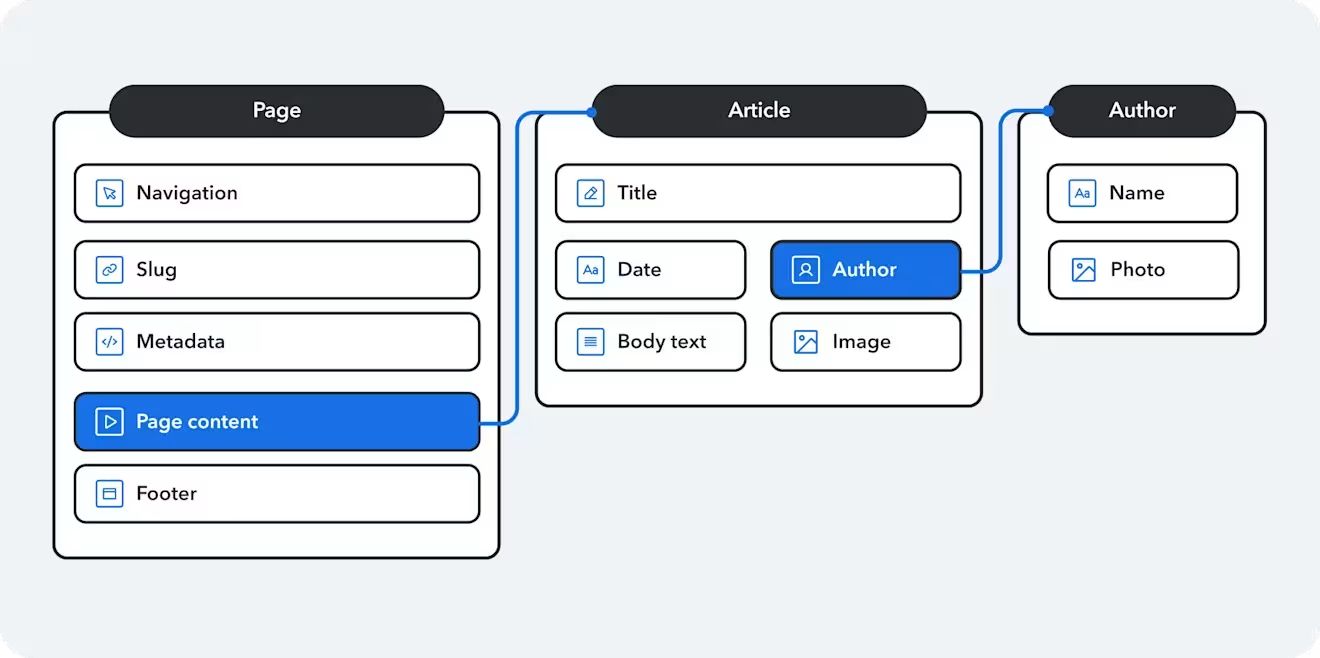
For example, a blog post might be connected to an author, topics, related articles, images, or other reusable components. Losing those relationships during migration can leave you with content that no longer works as intended.
Include the editorial experience in your audit. How do you create content? How do editors build pages? Who reviews and approves the content before it gets published? How does localization work?
The more comprehensively you understand what you have and how it works, the more effectively you can implement your new headless CMS content model.
Rethink your content model
Your existing content structure was designed around the needs and limitations of your old CMS.
But because you’re not bound to the page-based limitations of a traditional CMS, you can use your new headless CMS to adopt a structured content model.
In other words, you can reconsider how your content should work. Instead of starting with: How do we recreate this page? You can ask: What content assets make up this experience, and how can we reuse those assets in other experiences?
A content model is just a plan for the inventory and infrastructure you’ll need to create, review, publish, and maintain your digital content. The model defines the content types you need, the fields that make them up, and the relationships between them.
Why structured content?
In a structured content model, instead of treating an entire webpage as one large chunk of content, you can model it as individual elements such as a hero banner, body text, an author, an image, a call to action, a product, and so on. Those elements aren’t bound to the page — they’re reusable; you can pull them through to any experience you need them for.
Your “blog post” content might have a title, hero image, author and body. But the author can exist independently and be referenced by multiple posts. The same goes for the image, which you could use in a product page, or a hero banner, or anywhere else you need it.
And if any of those assets change — an author’s job title, for example — you can update it once rather than changing every individual page where that information appears.
It’s also worth noting that structured content and structured data are much friendlier to AI agents. The primary reason is that it’s machine readable, which makes it easier for answer engines and agents to understand the content they’re looking at, retrieve it faster, and feature it in their responses.
Find a balance
Your model should support the way your developers and marketers need to work to optimize your content.
An overly simplistic model won't give your teams the flexibility they need. One that's too complex makes the content creation process more difficult, and potentially increases the need for developer intervention.
With that in mind, bring the people who will use the model into the planning process — including editors, marketers, developers, and other relevant stakeholders — in order to help find the balance you need.
Don't expect the model to be perfect forever. As new trends and economic challenges shape the marketing landscape and as agentic AI evolves, your content model shouldn’t be a blocker to change. Structured content is key: The more flexibility you have across your content workflow, the easier it will be to adapt.
Build the new frontend
Keep in mind, in a headless CMS, there’s no predefined frontend. You decide how your content will be presented.
That means you’ll need to implement a frontend yourself. Your development team can choose the frontend technologies and tools that best fit your business’s needs rather than being constrained by preset, vendor-authorized templates.
Contentful from Salesforce, for example, supports frontend development using frameworks including React, Angular, and Vue, with content delivered through its APIs and SDKs.
Long story short, you need to understand what your frontend is going to look like before your migration begins, and be able to answer questions such as: Who is going to build and maintain the frontend? Where will it be hosted? Who will manage deployments? And how will you handle issues relating to performance, accessibility, and security?
It may be the case that your internal engineers can take on the relevant roles, or you can engage an implementation partner to handle it. You may choose a combination of the two.
Some roles and responsibilities previously attached to your CMS may sit elsewhere after the migration.
Consider your content workflow
Part of your front-end rebuild should be considering how your marketers and editors are able to work in the new environment.
If your existing CMS lets your marketers and editors work directly on content experiences, visually assembling pages to see what they’ve created, your new system should provide that same capability.
Contentful's Live Preview, for example, lets content teams edit content alongside a preview of the experience, with changes reflected in real time. As part of that functionality, “inspector mode” lets users jump to relevant source fields around the page to make the necessary changes.
The goal here is to create an editorial experience that aligns with your content model, and ensures your teams have confidence in the content they’re publishing.
Migrate your content
Now you're ready to start moving content. Some content will map neatly to your new model, some will need to be transformed, and some may need to be recreated manually.
If you’re moving from a legacy, page-based system like WordPress or Drupal, it may not be possible to automate the entire transfer: HTML-based content, for example, may need to be transformed into a structured format.
The order in which content is migrated can matter, too. If a content entry references another, the referenced content needs to exist in the system first. For example, authors may need to be migrated before the blog posts that reference them.
1. Phased migration
You don't have to migrate your entire website in one go — a phased migration, or moving assets and workflow incrementally, can reduce the risk of disruption or downtime. This means that during each phase, your teams get to test and validate the move on the new CMS before initiating the next step.
Contentful’s composable architecture is an advantage for phased migrations. You could start by selecting a single microservice — ideally a non-critical functionality — as your first phase. Once that has been set up and validated in the new frontend, you can move to another microservice or broaden the scope of the migration.
2. Protect SEO
It’s vital that your migration doesn’t undermine your content’s search engine results page (SERP) ranking. Protecting its search visibility and maintaining search engine optimization (SEO) and generative engine optimization (GEO) performance must be a priority.
Before you begin the migration itself, crawl your entire site to establish a baseline inventory of existing URLs and SEO-critical page attributes.
Then use that inventory to build your redirect map, identify broken links, and determine what important URL data is changing. If content is being removed, for example, is new content replacing it? And does the new content have the same URL? Where URLs do change, make sure the appropriate redirects are in place.
Other critical search ranking elements, including metadata, canonicals, internal links, and your sitemap, should also be inventoried and reviewed.
3. Testing and validation
You need to be sure that the new headless architecture is not only functional but delivering the improvements you expect: faster-loading pages, improved security, greater omnichannel efficiency, and so on.
That means setting up a systematic testing plan and executing it at each phase of the migration. Your tests should address developer and marketer priorities.
Following a successful migration, it makes sense to continue testing to capture problems you may not have anticipated.
Wrapping up
Headless CMS migration isn’t just about adding speed and efficiency to your content operations.
Those things are important benefits, but the right headless CMS is a way to build a foundation for the future. By decoupling your front and back ends and introducing structured content, you're laying the groundwork for the ongoing evolution and optimization of your content experiences — and ensuring your brand is able to continue to grow and delight customers.
Contentful makes that process as simple as possible. Our headless CMS setup doesn’t impose migration templates on brands: You can design your journey to suit your business needs, moving content in phases, testing at every step, and feeding back to development and marketing teams.
Headless CMS migration is a big deal. But it doesn’t have to be difficult. And we’re here to help you make the change — from designing your new content model and planning the steps of your migration, to navigating the technical challenges.
Ready for the next step in your migration journey? Reach out to our team to get started.

Inspiration for your inbox
Subscribe and stay up-to-date on best practices for delivering modern digital experiences.
Meet the authors

Thomas leads the Enterprise Solution Engineering Team in EMEA. With over a decade of experience in Marketing Technology, he has partnered with a wide range of customers to enhance their digital presence, streamline customer journeys, and drive sustainable growth through online engagement.
Related articles
Using React with Node.js
February 6, 2025
What is backend as a service? A guide to developing better apps faster
September 2, 2025
Building an app? These are the best JavaScript frameworks
January 30, 2025

Ready to start building?
Put everything you learned into action. Create and publish your content with Contentful — no credit card required.