Headless architecture: Seven things to know
Updated on March 27, 2025




Inspiration for your inbox
Subscribe and stay up-to-date on best practices for delivering modern digital experiences.
Many traditional, page-based CMSes couple content management with a presentation layer, which can make reuse across channels harder. Headless architecture separates how content is displayed from how it’s managed, so you can deliver your content to any channel, from web to mobile apps, and even AI agents.
This article helps you understand headless architecture, explaining its meaning and exploring its relationship to content management. It also goes deeper into headless architecture’s key characteristics and benefits.
What is headless architecture?
Headless architecture is a decoupled approach to the development of software applications. In this approach, the front end, or head, is separate from the backend system:
The head is the part of the application that deals with content presentation and controls what the end user can see and interact with.
The back end is the server side of the application that dictates structure, defines logic, and stores data for any front end to consume.
By decoupling the head, the content is no longer tied to the templates or code of any one front end. Text, images, and video are stored in the back end as structured data, so they’re no longer restricted to a single device, layout, or channel. Front ends communicate with the back end through application programming interfaces (APIs).
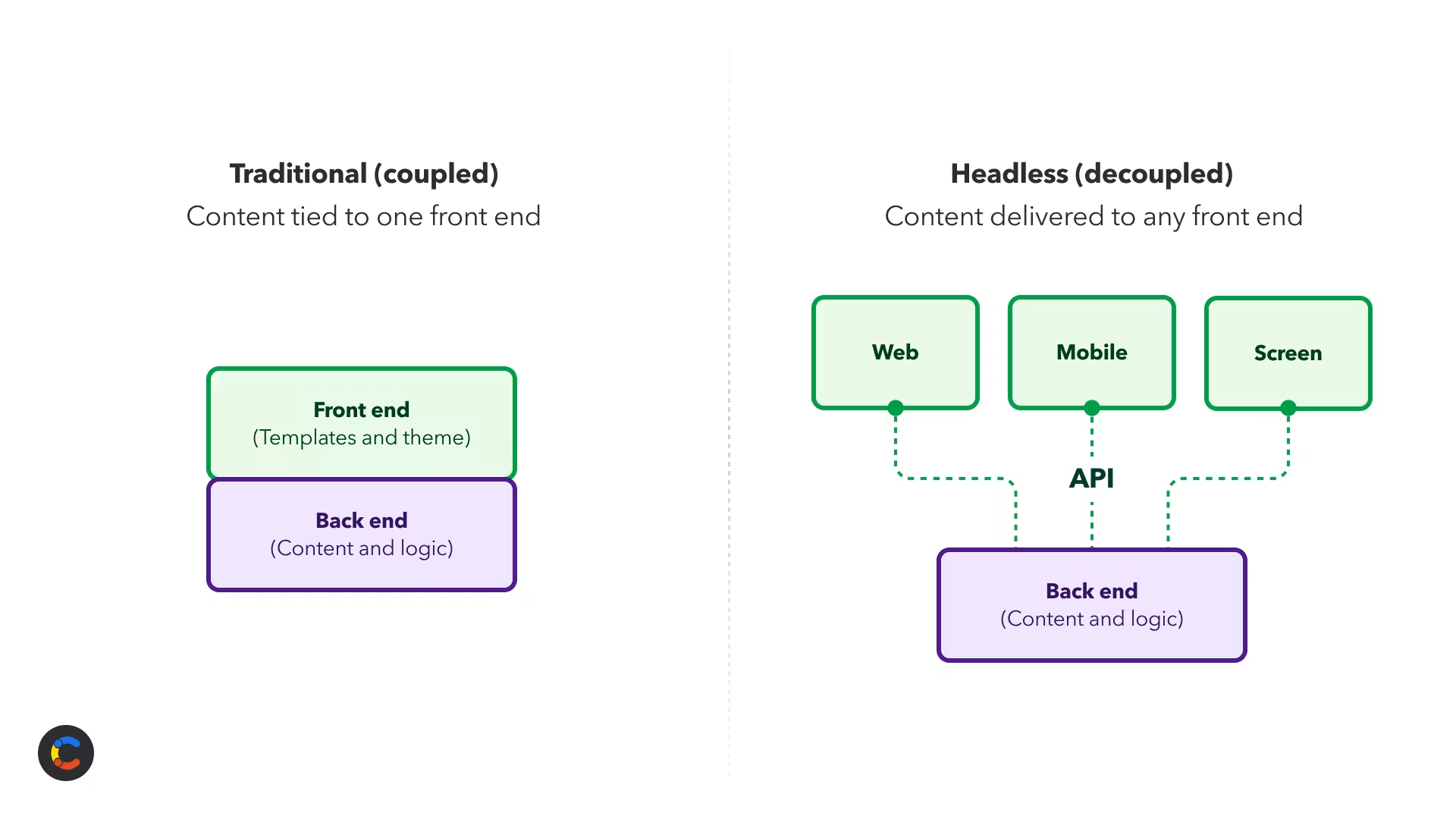
If you make the decision to use headless architecture, you can develop a web app and then ship the same business logic and functions to another channel — say, a mobile app — where users can experience it on the go without any need for extra software development gymnastics on your part.
Headless architecture vs. monolithic architecture
Monolithic architecture is the alternative to headless, where the front end and back end are built and deployed as a single tightly coupled system. That coupling makes monolithic architecture useful for all-in-one website building solutions that contain everything a developer needs to launch a site. This typically includes a CMS with a user interface, website design tools, search engine optimization tools, and e-commerce tools. Those tools and features are all packaged together and interlinked to help developers get their sites up and running as quickly as possible.
Monolithic architecture offers out-of-the-box functionality, with all features delivered by a single vendor, which is also a convenient source of technical support. This is an ideal setup if you’re a brand with a small digital footprint or limited content needs, but if you’re a growing business with a busy content schedule, monolithic technology can hold you back.
The issue with monolithic architecture is that it can be difficult to upload or adjust content because you’re limited by the underlying code and formatting. This not only slows down content creation workflows but it also anchors the content to its environment, meaning you won’t be able to easily display it on different front ends or across new channels. Instead, you’ll need to copy and paste content between different CMSes — a process that is both tedious and error-prone.
Ultimately, headless architecture opens up a landscape of content possibilities and gives you complete control over the digital experiences that you create for your audiences.
Monolithic architecture | Headless architecture | |
|---|---|---|
Structure | Front end and back end in one tightly coupled system | Front end and back end separate, linked by API |
Channels | Generally a single website | Any channel: web, mobile, digital displays, AI agents |
Tech stack | Decided by the vendor | Your choice of language or framework on the front end |
Content reuse | Tied to templates, manually copy between systems | Create once, deliver anywhere |
Scaling | The whole system must be scaled | Scale front end and back end independently |
Suited to | Single sites with simple content needs and limited dev resources | Multichannel, growing or complex content needs |
How does headless architecture work?
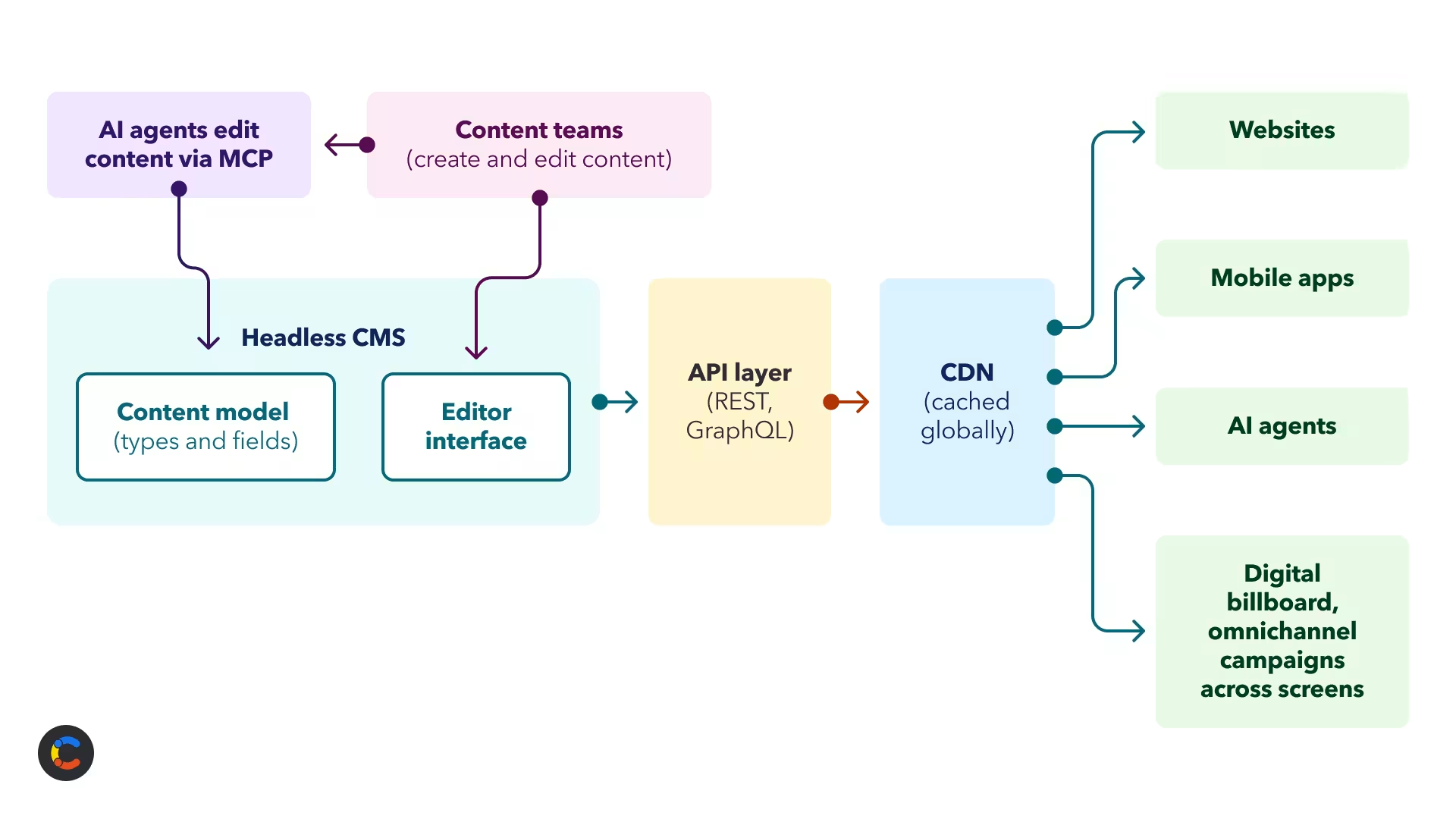
A common headless architecture generally includes a content model, APIs, and one or more front ends. Depending on the platform and delivery design, a CDN may also cache and serve content closer to users.
Content model
The marketing team and editors create content in the CMS based on a content model, which is a set of content types structured and agreed upon by the team. You may have content types such as Blog Post, Author, or Product. Because the data is structured, it can be easily accessed by any front end or AI agent.
API layer
While front and back ends aren't tightly coupled in headless platforms, they still need to speak to one another. That's where the application programming interfaces (APIs) come in. APIs are software intermediaries that enable communication between applications. In the context of headless architecture, developers configure specific APIs, often REST APIs or GraphQL, to pass content from the backend layers to the frontend presentation layers. Content is generally exchanged as JSON, a lightweight format that every major language and framework can read.
CDN
Most headless CMSes serve content through a content delivery network (CDN). A CDN is a network of servers scattered all over the world that allows you to respond to API requests closer to your users’ locations. This keeps response times low and takes strain off the main CMS during traffic spikes.
Front end
Your development team builds the front end. This could be a website, a mobile app, or another interface. You’re free to choose whichever framework you prefer. The front end requests content from the API and then decides how to render and display it to the user.
Seven key advantages of headless architecture
Now that you know what headless architecture is and why it’s so useful for modern content management, let’s look at some of the advantages of this architectural choice.
1. Omnichannel delivery
With the internet of things (IoT) expanding rapidly across web apps, mobile apps, wearable technology, voice assistants, AR/VR, and whatever comes next, the digital dominance of desktop apps is over. And with it, the general preference for the coupled architecture of legacy solutions.
In this new era, a key advantage of headless architecture is that it enables brands to easily build and manage multichannel digital experiences — an approach often referred to as omnichannel marketing.
Traditional CMSes, such as Drupal or WordPress, struggle to accommodate multiple channels because they were built for a single use case: namely, supporting tightly coupled websites. The digital assets held in those CMSes, including text, CSS, HTML, or JavaScript, typically serve single touchpoints such as blogs, landing pages, or homepages. It's difficult to make this content available across multiple devices and channels — without adding complexity to the content workflow, at least.
You could introduce a new CMS for each new digital channel that you integrate with your brand, but that would also mean more tools to manage, more administrative overhead for developers and content creators, and greater financial commitment.
It's much easier, and more cost-efficient, to lean into the flexibility of headless architecture, where content can be created once and then used across any front end and any digital channel. Many online retailers choose headless commerce platforms for that very reason, leveraging omnichannel potential to spin up new product pages, launch campaigns, and drive expansion quickly and efficiently.
2. Easy integration with other tools
The next key reason that companies opt for headless architecture is its potential for integration with other tools.
The option to introduce open-source, third-party, and custom-built technologies, or even entire suites of tools to headless platforms, makes it possible to create an ecosystem of microservices tailored to the needs of a brand’s present and future projects.
You can think of each microservice in your tech stack as a building block that can be added, removed, or reconfigured to build out any digital experience or desired feature. The scalability of headless architecture also supports future-proofing, because development teams can integrate best-in-class tools today with the flexibility to augment the tech stack in the future.
In contrast to the headless approach, using a monolithic platform means working within the restrictions set by a vendor. This would require you to wait until the platform is upgraded with new tools, or find a potentially unauthorized workaround for an absent functionality, which could end up creating unnecessary tech debt.
3. Accommodation of diverse languages and frameworks
Headless architectures allow development teams to diversify both the programming languages and frameworks.
That’s a big difference from monolithic systems and the traditional CMS, where the software vendor decides on the languages and frameworks that developers must use. These legacy platforms typically offer a breadth of capabilities as a way to address as many content needs as possible — but this comes at the expense of functionality and flexibility.
In headless platforms, both programming language and framework of choice can be tailored to a given project, its ecosystem, and developer skillsets. Frontend developers might mix and match their use of popular frontend frameworks, such as React or Vue.js, while backend developers might reach for backend frameworks like Node, Express.js, or Nest.js.
Language and framework flexibility not only makes content production more efficient in headless environments but it also removes friction from content workflows, which makes team members’ lives easier and ultimately supports employee retention.
4. Accelerated productivity through Agile workflows
Headless architectures reduce time to market in more ways than one. In addition to supporting a diversity of frameworks and languages, the headless approach supports Agile workflows — rather than traditional waterfall workflows of monolithic platforms that require certain tasks to be completed before others can be started.
How is that agility achieved? Each microservice within a headless architecture is typically managed by small, dedicated teams who can work autonomously. These teams have the freedom to iterate on their service and deploy new functionality as it’s needed, without worrying about the interdependencies common to tightly coupled monolithic approaches.
In traditional monolithic systems, the stages of a given project are usually completed independently, in isolation from each other, by technical and non-technical teams. That doesn’t need to be the case in a headless platform. Since content and code are decoupled, it’s easier for technical and non-technical teams to collaborate. Creatives can generate and edit content via a simple user interface while developers tweak code, without either workstream stalling or becoming reliant on the other.
Agile development, publishing, and optimization processes also enable brands to implement end-user feedback more efficiently, delivering better customer experiences, faster.
5. Improved performance
With a traditional CMS, certain choices are made for you, such as frontend technologies and rendering strategies. With headless architecture, you get some autonomy back — you can choose a cutting-edge frontend framework that allows you to work with faster rendering strategies, such as static site generation (SSG) or server-side rendering (SSR). Most headless CMS platforms serve content from a high-speed CDN, further improving performance.
6. Improved scalability
Because the back end and front end are separate, they can be scaled independently. Your website or app can either run on hosting that scales automatically, or on hosting that your dev team can scale as needed with any traffic spikes or changes in usage patterns. On the back end, you can use a managed SaaS headless CMS that handles scaling for you.
7. Structured content support
Headless architecture is more than just a catalyst for developers; it also makes life easier for editors, marketers, and anyone else who creates, updates, manages, or supports content work. One of the key ways it does this is by facilitating structured content.
Instead of having content tied to a specific layout within a CMS, structured content breaks content down into its structural elements: header, body text, image, and so on. Those elements can then be assembled, like building blocks, into chunks of larger content, such as a hero banner, author bio, blog post, or product review. Those larger content chunks can be deployed anywhere within the digital framework and can be easily edited and reused on other channels, or in support of new content experiences, because there's no risk of incompatibility with the host environment.
Structured content eliminates the need for excessive copying and pasting between environments during migration and reduces the risk of human error associated with that kind of manual task. It’s also more accessible to web crawlers and lends itself to personalization and translation, all of which can improve SEO and help smooth the path into target markets.
To leverage this kind of flexibility, you’ll need a platform like Contentful from Salesforce, which enables you to work with structured content. If you want to test the waters, you can sign up for a free Contentful account and start building in minutes.
Common challenges of headless architecture
It should be noted that headless architecture isn’t the right fit for every team and project. While there are many benefits, there are also some drawbacks for some use cases that you should bear in mind before committing to a decision.
Primarily, you need to build, host, and maintain the front end yourself, since it’s not included. So you’ll need more time upfront to launch and ongoing resources to maintain and update what you’ve built. On top of this, a headless stack often combines different tools and vendors (hosting, search, etc.) rather than being provided by one platform. That leaves you with several integrations to set up, secure, and manage.
For marketers, previewing content can be tricky. Depending on the platform, editors can’t always see how content will look before publishing. Contentful solves this with features like live preview, which lets you see exactly how content will look on users' screens when displayed in different front ends. SEO decisions like metadata, sitemaps, and rendering strategies like SSR and SSG are also responsibilities you need to take on. For single sites where the content needs are fairly simple, the extra tooling and development can outweigh the benefits.
Use cases: Who should use headless architecture?
Some use cases are positioned better than others to benefit from headless architecture. This architectural choice really pays off when your content needs to reach multiple channels or markets, or when your development team needs the freedom to choose its own stack.
Commerce (headless and composable)
The migration to headless commerce architecture has become much more common in the past decade — along with the use of composable commerce platforms.
With composable commerce, you have the flexibility to create a completely customized tech stack from modular microservices, all focused specifically on selling products and services online. Key components that you’d need to build out your composable commerce platform include a CMS, a shopping cart, a checkout and payment processing service, and an order tracker — but you’d obviously be free to customize your stack further, according to your needs.
Contentful has helped brands around the world, including Kraft-Heinz, On, Vodafone, KFC, and Audible, to migrate their e-commerce platforms to composable commerce models, transforming customers’ digital content experiences and boosting bottom lines.
Content-heavy publishing
Publishers and media brands can push content simultaneously to multiple websites, apps, and newsletters. The structure-first and multichannel nature of headless architecture enables you to create content once and then reuse it across various channels, now and in the future.
Multi-brand / multi-region sites
Organizations that have many websites can use headless architecture to share one content model across brands, then localize content for each market or language.
Documentation sites
Documentation sites normally have to cover multiple product versions in different languages for different audiences. When modeled as structured data, you can reuse content across versions and localize it once. This structured data can also be plugged in to AI help assistants or in-app help.
B2B customer portals
Businesses' customer portals need to display account data, pricing, and order information from existing systems such as CRMs. With headless architecture, you can build a modern and performant front end that pulls in data from existing systems via an API. Alongside that, you can also pull in content from your CMS, such as up-to-date product information and documentation. This lets you continually modernize the experience for customers without having to replace your backend systems.
Headless architecture and AI agents
AI agents can act on your content in two main ways: They can be a channel that delivers your content to users (think AI support chatbots) or they can be a collaborator that fetches or works on your content directly. Headless architecture supports both, because your content is structured and made available through an API.
Most CMSes used in a headless architecture encourage you to separate and label data so you end up with clear relationships shared between your content (product name, price, author). This allows AI to retrieve and interpret it more easily than if it had to scrape data out of HTML and infer context.
AI agents, such as Claude, ChatGPT, or Cursor, can work with your content directly through the model context protocol (MCP), an open standard for connecting AI tools to external systems. For example, the Contentful MCP server allows your agents to read, create, and update your content within permissions you have control over. This allows you to automate content management tasks like bulk update or translations using AI agents.
From headless to composable with Contentful
If you’re thinking about migrating to headless architecture, it’s going to be worth digging a little deeper into your options. For more targeted information on the relationship between headless architecture, headless commerce, and modern content management platforms, check out our white paper, or get the rundown directly from Contentful Solution Engineer Harry Jeyarajah.
If you’re a modern, growing brand with a busy digital content schedule, you’ll need the flexibility that a headless approach provides. But there’s no need to stop there. To really future-proof your brand, keep your customers engaged, and ensure your digital experiences stay agile and innovative, it makes sense to embrace composability.
Contentful will help you leave your traditional CMS behind and refresh your marketing operations with customizable freedom for every part of your tech stack. Explore a vast partner landscape of extensible apps and plugins, shape content experiences down to the smallest detail, iterate and innovate with structured content across any digital channel, and prepare your website, or your online store, for whatever the future holds.
FAQ
What is the key difference between headless and microservices architectures?
Both headless and microservice architectures are decoupled; the difference is where the split happens. Headless separates the back end from the front end; microservices split the back end into smaller independent services, each handling one function. The two are actually complementary — a back end in headless architecture can be built as a monolith or with microservices. MACH architecture actually combines both.
What is a headless commerce architecture?
Headless commerce separates an online store’s front end from the e-commerce back end, which handles orders, cart, and checkout. The two communicate via an API so you can sell across web, mobile, and social platforms from one back end. You can also redesign the storefront without touching the underlying e-commerce logic.
What does headless mean in software?
In software, “headless” describes a system that runs without a graphical user interface (GUI), or “head.” Instead, you interact with it through an API or code, and build the head yourself if you need one.
What's the difference between headless and decoupled architecture?
Both headless and decoupled architecture separate the front end from the back end, but a decoupled CMS still provides templates and a presentation layer, which you can choose to use alongside its APIs. Headless CMSes have no front end at all — they only deliver content through an API, allowing for more customization.

Inspiration for your inbox
Subscribe and stay up-to-date on best practices for delivering modern digital experiences.
Meet the authors

As a writer at Contentful, Stephanie contributes to blog posts, white papers and other assets that demonstrate the power of content and the platforms that hold it. She also maintains brand consistency across the company through copyediting.

Marco is a B2B content creator and product marketer blending technical with creative skills. From the early stages of product ideation to a successful market launch, all the way through to sales enablement, he loves to take products and translate them into clear, relatable messages.
Related articles
What is microservice architecture? A guide to future-proof composable apps
November 12, 2025
How to start automated browser testing with Playwright
February 20, 2024

Modernize your web strategy and deliver customer-winning experiences
January 11, 2024

Ready to start building?
Put everything you learned into action. Create and publish your content with Contentful — no credit card required.