RAG hallucinations: Why retrieval augmented generation can give bad answers (and how structured data fixes it)
Published on July 2, 2026


Inspiration for your inbox
Subscribe and stay up-to-date on best practices for delivering modern digital experiences.
Retrieval augmented generation (RAG) promises to give users access to your business’s specific data via LLMs, allowing them to get answers to questions that are grounded in reality. But if you’ve built a RAG pipeline, you may have noticed that the answers can sometimes be disappointing.
Sometimes it gives answers that sound plausible but are nevertheless completely wrong. Other times, it confidently answers the wrong question entirely. Or maybe it just returns a large number of vaguely relevant results instead of one correct answer. These are all types of RAG hallucination.
This article explains why the most effective fix is not the model or the retrieval method, but the source data and how it is structured.
What RAG actually does, and what it’s good at
RAG improves an LLM’s response by retrieving relevant data from a curated knowledge base, which is stored in a vector database as vector embeddings. It then injects this data into the LLM prompt as additional context. A semantic search algorithm is used to find the relevant data, and this works by looking for data with a similar vector embedding to the contents of the user’s question. So essentially, RAG works like a very fast search engine over your documents.
RAG excels at finding specific answers that exist clearly in one place, like “What is your company's returns policy?” It scales well across large sets of documents — for example, a support engineer can find the exact troubleshooting information they need across hundreds of documents within seconds. RAG is also good for alerting the user to related information, like pointing a user asking about password resets to a guide on two-factor authentication.
Why RAG fails
RAG struggles with providing an accurate answer when it has access to multiple versions of the same document. It can’t choose between conflicting answers in different versions of the same document or work out which data is deprecated. Deprecated data can lead to situations like a sales representative asking what promotions they can offer and being given one that has expired. Sometimes, RAG can even end up surfacing data from draft ideas or proposals that were never meant to be published, if it ends up pulling data from a directory in a poorly organized shared drive.
RAG also does not account for situations in which different users should receive different answers to the same question, depending on context. For instance, “How many days of sick leave do I get?” could have different answers depending on job title, region, or tenure. Likewise, “How do I authenticate this API?” may depend on which SDK or API the user is using.
It’s also not great at answering questions where the answer is spread across different documents — for example, in an API documentation RAG, a code example may live in one document, but prerequisite steps might live in another. As RAG retrieves the most semantically relevant content, it may just return the code example but miss the prerequisite steps.
Finally, when there’s no good answer in the knowledge base for a particular question, RAG may just retrieve whatever is semantically the closest match and then try to produce an answer from that document, even if it’s only loosely related.
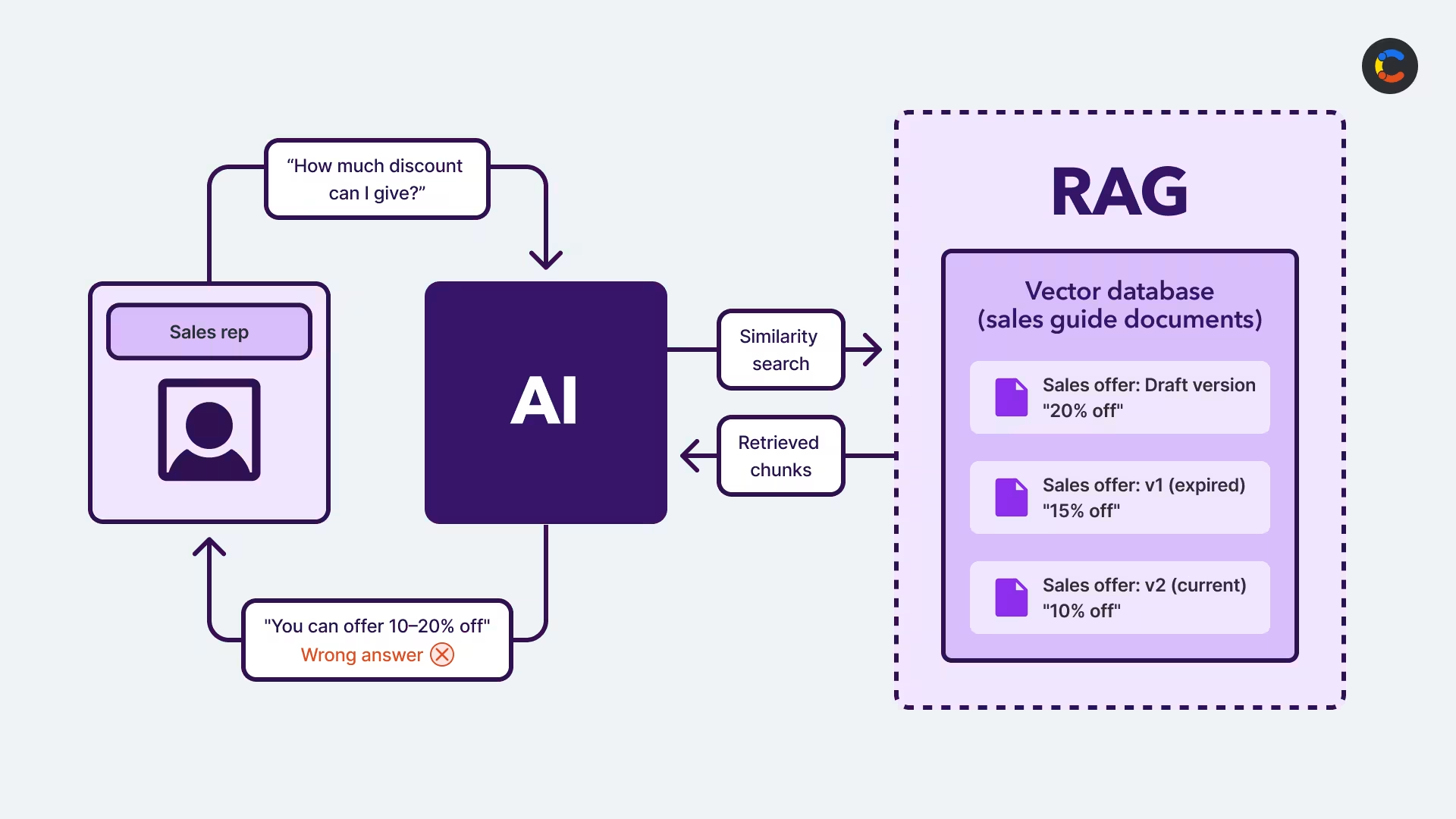
Example of a RAG hallucination: The RAG should have returned “You can offer 10% off,” as the current published document states.
The obvious fixes for RAG hallucinations (and why they’re not enough)
When faced with problems with RAG, the first instinct is usually to blame the model itself. You know that LLMs can hallucinate, and you know the correct answer exists somewhere in your documents! So it’s perfectly reasonable to suspect that the problem lies with the LLM. You might try a better model, a lower temperature, or more specific prompts.
Sometimes these can help a little, especially if you have an outdated model or a particularly vague prompt, but it often doesn’t make much difference. Once you start debugging the issue, you’ll usually find that the correct document wasn’t even retrieved in the first place, or if it was retrieved, it was buried within a huge pile of related results.
Then you might move on to fixing the retrieval itself. There are several common methods to try, but they cost a lot of time and money. These include:
Better chunking: For instance, splitting documents by meaning instead of character count.
Metadata filtering: Adding metadata to documents and then filtering on it to exclude irrelevant documents from the start.
Hybrid search: Combining semantic vector search with keyword searches, which are better at finding exact matches.
Top-k tuning: This controls how many documents get passed to the LLM. Too few documents can mean the right answer is completely missed, but too many create noise where the relevant content can get lost.
Re-ranking: Running retrieval results through a smaller, specialized model called a cross-encoder to reorder results by relevance. Each result is passed through along with the query, and a relevant score is generated. Then they are reordered by the relevance score.
While the above techniques can help, they take a lot of time to implement, can be expensive to run and maintain, and often don’t fully solve the problem. The maintenance overhead can also be a real pain: as most vector databases don't support upsert, every time you need to update a source document, you have to delete the old chunks from the vector database and re-chunk everything from scratch. And even setting that aside, if the correct document never made it to the retrieval results set in the first place, re-ranking isn’t going to help. And while you probably do need better chunking, it’s hard to split your documents by meaning when the data is completely unstructured.
Eventually, it makes sense to look at the root cause, which is the source data and how it’s structured (or rather, how it isn’t structured). When your documents give no information about their contents, who they’re aimed at, or when they were written, then your RAG system will be working blind.
Fixing your source data can go a long way toward solving this problem. Even adding a few metadata fields to each document can make a big difference.
Why unstructured documents are the root cause of RAG hallucinations
If you’ve tried all the above techniques but are still getting bad answers, this is almost certainly an issue with your source documents themselves and their lack of structure.
Most RAG knowledge bases are cobbled together from a variety of sources: PDFs, Confluence pages, Word documents, and shared drives — all of which were written by different people, for specific audiences of other people. It's important to note that these were not written for LLMs to consume. The writer will have known the audience and made assumptions that the reader already had some context, which the LLM usually lacks.There is typically no consistent structure to documents in a RAG. While this can make it fast to get started with RAG (as preparation time is minimal), if the results are inaccurate, you may need to rethink.
A fundamental problem with this approach is that, to a RAG system, all documents have equal importance. It doesn’t know who the intended audience is, if a document is out of date, or even if it was meant to be published in the first place. Some of the key issues with a standard RAG system are:
No distinguishing between versions
If V1, V2, and V3 of the same document all exist in your knowledge base, RAG will treat them as equally relevant. Instead of returning content from the most recent version, it’s more likely to return a RAG hallucination, whereby a blended version from all three documents is returned as a single confident (but incorrect) answer.
No distinguishing between statuses
RAG has no way of knowing if a document is active, deprecated, published, or still a draft. Each document is equally valid from the retrieval system’s perspective. This explains how a sales rep can end up with information about an expired promotion or how a customer can be served information from an internal draft of a document that was not meant to go live.
No knowledge of audience or scope
Unstructured documents can’t provide information about who the intended audience is, so RAG can’t tell the difference between a policy document written for senior executives only vs. another written for the whole company.
It can’t tailor its answers to different users, for example, by inferring that information from its Python SDK docs is right for a Python user but that JavaScript code is more suitable for a JavaScript developer.
Chunking can be arbitrary
In RAG, text gets split into chunks. Each chunk is converted into a vector embedding, which is then compared for semantic similarity with the vector embedding of the user’s question.
With unstructured documents, there’s no logical way to know where one concept ends and another begins, so they’re often chunked by character count or paragraph breaks instead of by meaning.
It is possible to chunk by meaning on unstructured documents, but it’s a lot more complicated to implement. If you start off with structured data, you’ll make chunking much easier, as the structure is already built in.
How structured content in a headless CMS helps your RAG
Structuring your content helps solve these failures. A headless CMS can store structured content, such as versioning, workflow status, or audience. This will allow your RAG to retrieve the right data at the right time for the right user. Structured content allows for:
Explicit fields for the context your RAG is missing: This includes fields like
audience,status,version, orlast reviewed.Published/draft status as a standard field: In content platforms like Contentful, new content begins in a draft state and must be explicitly published when it’s ready to be shared. You can then set up your RAG to only pull in published data.
Metadata filtering: Some of your CMS structured content fields can be stored as metadata in your vector database, which allows your retrieval system to filter out irrelevant documents from the start. For instance, you could choose to implement role-based access control (RBAC) on your documents, filtering documents by audience so that users can only retrieve info from the documents they’re authorized to see.
Beyond RAG, structured data can also future-proof your AI architecture. RAG is ultimately just a retrieval tool attached to an LLM — it can find relevant information, but it can’t easily reason across relationships or maintain state across different systems. The most common ways to do this today are with agentic systems and knowledge graphs, and having structured data helps with both these systems.
How to design your content model for RAG
In an ideal world, all data would be perfectly structured, with clear relationships between every concept. In practice, most RAG data consists of unstructured documents like PDFs, Word documents, and Confluence pages.
The good news is you don’t need to completely restructure lengthy documents. All you need to do is import your documents into a CMS and add a few structured metadata fields around each one.
To get started, group your documents into types, such as HR policies, API documentation, customer FAQs, sales guides, or product information. Then create a content model for each type, choosing a few of the most relevant metadata fields for each type. For example, a sales guide might need a last reviewed field, some API documentation might require an SDK field, and an HR policy might need a region field. You can add any fields that make sense for your content type, but some examples to consider are version, status, region, date range, last reviewed, audience, or job title.
Of course, manually adding multiple metadata fields to hundreds of documents could become tedious and wouldn’t scale well. That’s why we recommend using an LLM agent to do it for you, making the changes via the Contentful MCP server, or using Contentful's AI Actions as part of your publishing workflow.
Let’s look at a specific example of how to build your content model based on the issues you may already be having with your RAG. Imagine you’ve built a RAG over your API documentation, but your users are still getting bad answers. One question that is consistently going wrong is: “What is the rate limit for the API?” When you debug the retrieval step, you see it’s returning three documents:
/docs/getting-started— last updated in 2022 and mentions rate limits only in passing./docs/api-reference/rate-limits— current rate limits for the standard plan./pricing/enterprise— rate limits for the enterprise plan only.
The RAG can’t decide which is more important, so it returns a confidently incorrect answer that blends data from all three documents.
The fix for this is to add two structured fields to your API documentation content model: status ( active or deprecated ) and audience ( standard or enterprise). Create an instance of this content model for each API document (i.e., a content entry), uploading the document or copying the text into a body field and setting the status and audience for each one.
How to implement this in Contentful
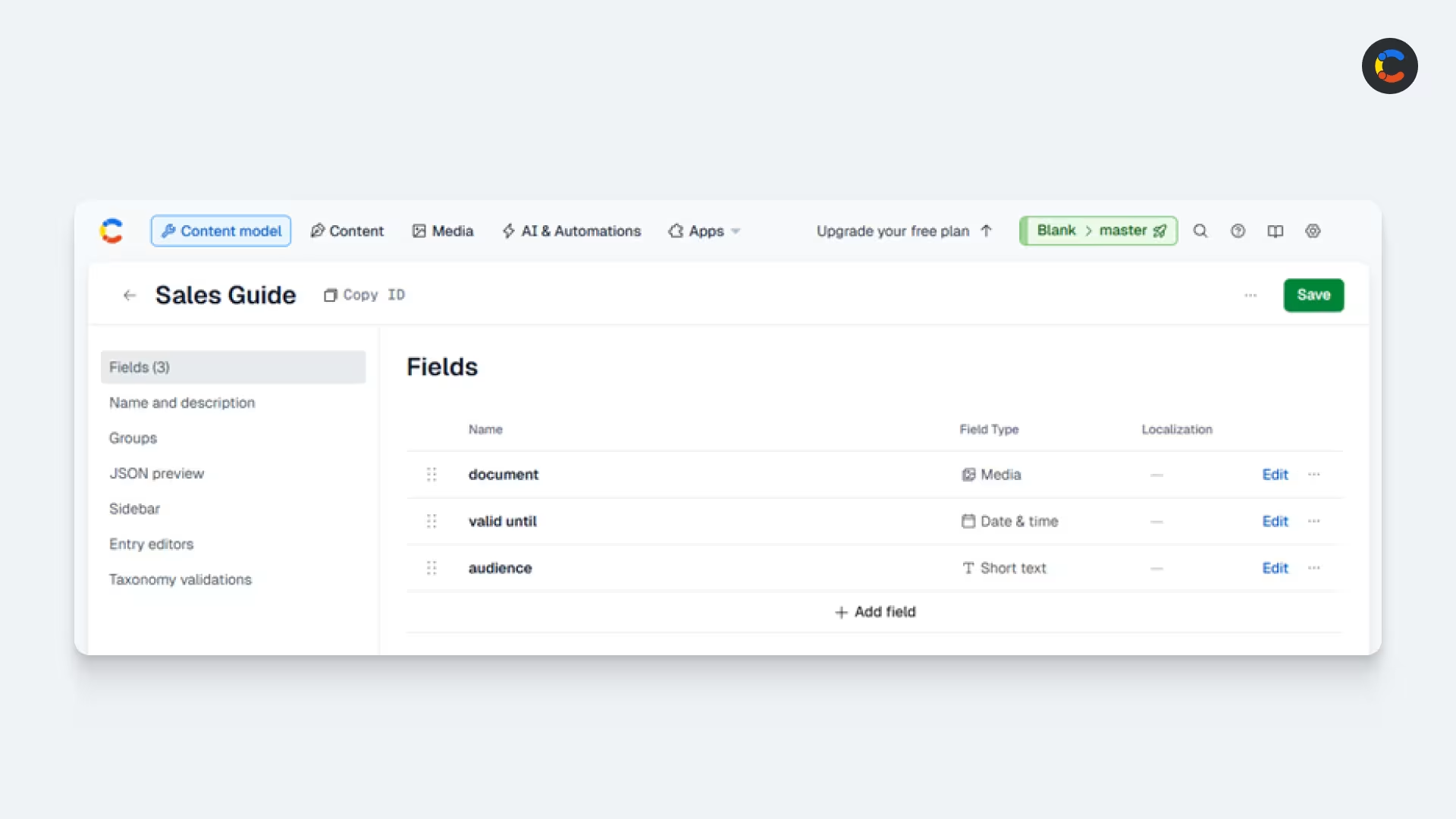
A “Sales Guide” content model in Contentful.
Start by auditing your documents before importing anything. Think about the questions your RAG consistently gets wrong and work backward to help you build your content model. All content models will require a document field (usually of type Media if you’re importing a file).
You can use your knowledge of the specific bad answers that users commonly complain about to guide this process. For instance, if sales reps are getting details about the wrong promotions, this might suggest you need a valid until field or an audience field. If users are getting bad answers about a product warranty, you may need a field that describes what product or series of products the warranty belongs to, or another for the coverage period.
It’s worth the time to get the right fields up front because your RAG will create embeddings based on your data. This has a cost attached — if your content model isn’t right and you need to redo it, you pay again.
Once your content model is defined, you can create it in Contentful. If you’re happy to let AI do the heavy lifting of your migration, you can use the Contentful MCP server by writing a migration script, something like:
“Here are 50 sales guide PDFs. Create a Sales Guide content entry for each one with three fields: 1. document of type Media. 2. valid until of type Date. 3. audience of type Short text. While doing this, find the date in the document name and add it to the valid until field. Also, set the audience to junior or senior based on the title. And add the sales guide PDF itself to the document field.”
If you want full control over your migration, the Contentful CLI is an alternative to the MCP server that allows you to create content entries in bulk using JSON.
After you’ve structured your content model in Contentful, you’re ready to run your RAG ingestion phase. Use the Contentful Content Delivery API to fetch your documents and the structured fields from their content model. With this data, you can create embeddings from the document content and store them in your vector database, add the contents of the structured fields as metadata, and add a reference to the actual document stored in Contentful.
Giving your RAG system the context it needs
Once your ingestion pipeline is up and running, your RAG system will have the context it needs to return accurate, relevant answers.
You get to choose what context is important — whether that’s audience, status, or something else entirely that’s specific to your use case. Once you’ve added your structured fields, your RAG will be able to filter by them.
Your RAG is only as reliable as the data behind it, and now that you know how to structure your data, it can be much more reliable.

Inspiration for your inbox
Subscribe and stay up-to-date on best practices for delivering modern digital experiences.
Meet the authors

Casey is a Senior Solutions Engineer at Contentful, where he spends his days helping customers rethink what’s possible with composable architecture and AI. He believes the best way to learn something is to build it, which explains the ever-growing list of side projects, prototypes, and 100 browser tabs.
Related articles

Speak the same language as your customers: AI translation made easy
June 27, 2025
42 AI statistics every digital team should know in 2026
June 30, 2026
Omnichannel retail: What it is, and how to make it work
July 28, 2026

Ready to start building?
Put everything you learned into action. Create and publish your content with Contentful — no credit card required.