

Experience SDK
This Experience SDK is for Contentful Analytics use. If you are looking for the Experiences SDK for Studio, see the Studio documentation.
Overview
We provide SDKs and plugins for modern web frameworks to use Contentful Analytics. Our SDKs include first-class TypeScript support with exported type definitions for a smooth development experience in TypeScript projects.
The SDKs provide abstractions that communicate with the APIs that power Contentful Analytics by:
- Creating
page,track, andidentifyevents and sending them to the Experience API - Providing built-in capabilities to handle errors, retries and queuing
- Enabling caching of the profile client-side via
localStorage.
Composed JavaScript SDKs
Our SDKs have three levels of abstraction. At the lowest-level, the Shared SDK @ninetailed/experience.js-shared creates an API Client that communicates with the Experience API’s endpoints. The data objects, types, and methods it provides are applicable across all SDKs.
The JavaScript SDK @ninetailed/experience.js is based on the Shared SDK. It creates an instance that stores and updates a profile in response to events.
Front-end SDKs
The Shared and JavaScript SDKs can be used to integrate Contentful Analytics with arbitrary front-ends that run JavaScript. For fast integration with popular front-end frameworks, we provide SDKs for:
Server-side SDK
The Node.js SDK (@ninetailed/experience.js-node) is provided for integrating Contentful Analytics in server or edge runtimes.
Install the SDK
Dependency installation
React
Next.js
JavaScript
Create an instance
At its core, the Experience SDK defines a Ninetailed class instance based on your input configuration. That instance then:
- Keeps track of the current profile and provides a hook into profile changes.
- Exposes declarative methods to interact with the Experience API.
- Provides extensibility through plugins.
When working with the React or Next.js SDK, an instance will be created and made available to your application globally through a React context provider.
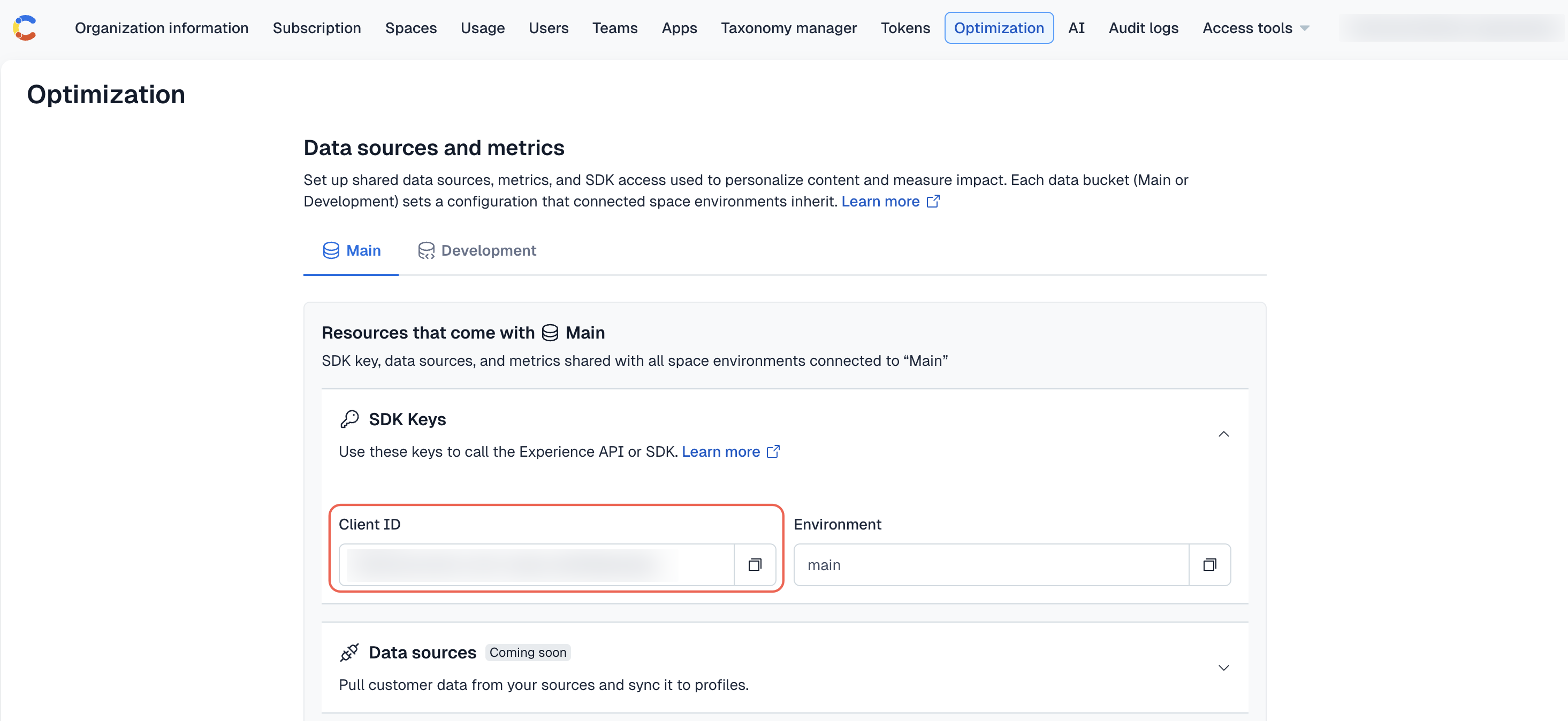
Your API key is the Client ID field value displayed under the “SDK Keys” section on the Optimization tab.
React
Next.js
JavaScript
Add the <NinetailedProvider> component to the top level of the application, so that the profile can be consumed from any child component.
Browser instance access
Installing the Experience SDK exposes several properties and methods on a window.ninetailed instance for testing and debugging.
For a full list of instance properties and methods, see the JavaScript SDK documentation.
Send events
Contentful Analytics uses profiles to identify users. A profile is created and updated by sending three types of events about that profile to the Experience API: page, track, and identify. We recommend using the methods provided by any of the Experience SDKs for sending events.
page events
A page event represents a user viewing a page. The SDKs provide a context object that captures important parameters of the page, including the referrer, url, path, and user-agent, which are sent to the Experience API.
Typical usecases will call the page method without arguments. However, you may optionally specify any properties you want to send alongside the page view event. This can be useful for creating Audiences - for example, if the category of blog posts is not contained in the URL, yet you’d like to create an Audience that has viewed blog posts of a certain category a certain number of times. In this case, you can pass the category along in the argument:
NOTES:
- The Next.js SDK also sends
pageevents automatically on page changes, but only if you’re using Page Router. If you’re using App Router, you have to set up the logic for sending the event. Here is an example where the event is sent in theTrackPagescomponent for App Router. - If your application uses the React, JavaScript or Node SDK, you have to manually implement a
pagecall on every route change.
track events
A track event logs user actions, like signup or registered_for_newsletter.
It can be arbitrarily named and accepts a properties argument that enriches the event with additional information.
For example, you might include the SKU and quantity of items on a track event called "add_to_cart".
Contentful Analytics uses track events to calculate conversions and the importance measure.
You have to configure a metric for track events for this purpose.
identify events
An identify event allows adding custom information, called traits, to a profile.
Traits are arbitrary attributes in JSON form. They allow you to customize the data that segments profiles into audiences.
For example, a user’s responses from a sign up form, a list of recently viewed products, or data from any upstream source, like a CRM or CDP, may be traits.
identify events allow setting a custom alias for a profile. That way, IDs stored within, for example, an analytics system, customer data platform, or e-commerce platform can be used to identify that profile.
An aliasing profile is reinstating on a different device or browser by calling identify again, which merges the latest activity of the current profile with the profile at that alias.
To reidentify users across sessions, we recommend calling identify after each successful authentication.
identify is powerful but should be used with caution. In particular, you should consider what privacy legislation your application needs to abide by, and whether that affects what data should not be stored as traits. For example, you probably would not want to store contact information, such as email addresses or phone numbers as traits, or use them as aliases.component events
A component event records every time a user views a Contentful content entry on a website, as well as how long they viewed it for. It includes contextual details such as the entry ID, timestamp, device type and environment. component events are automatically sent by the SDK.
Component events:
- Track the total number of views for each component.
- Track the amount of time that each component was viewed for.
- Attribute conversions to specific components.
- Analyze the impact of content at the component level.
- Support Contentful Personalization by linking views to specific experiences or variants.
component click events
A component_click event records every time a user clicks an interactive element inside of a Contentful content entry on a website. It includes contextual details such as the entry ID, timestamp, device type and environment. component_click events are enabled by adding the trackClicks prop to an <Experience /> component.
Component click events:
- Track the total number of times each component was clicked.
- Analyze the impact of content at the component level.
component hover events
A component_hover event records every time a desktop user hovers an element inside of a Contentful content entry on a website, as well as how long they hovered it for. It includes contextual details such as the entry ID, timestamp, device type and environment. component_hover events are enabled by adding the trackHovers prop to an <Experience /> component.
Component hover events:
- Track the total number of times each component was hovered.
- Analyze the impact of content at the component level.
Access event methods
React, Next.js
Javascript
The useNinetailed hook provides the tracking methods page, track, and identify. These will call the Experience API using the configuration parameters supplied to a <NinetailedProvider>.
Render Analytics Entries
When using one of the React SDKs, Contentful entries must be rendered as children of an <EntryAnalytics /> component, or an <Experience /> component for Contentful Analytics to work correctly.
- Render entries as children of an
<EntryAnalytics />component if you use Contentful Analytics as a standalone product. - Render entries as children of an
<Experience />component if you use Contentful Analytics and Contentful Personalization. This will require additional setup work as described in the Personalization Experience SDK documentation.
The <EntryAnalytics /> component
The React-based SDKs provide an <EntryAnalytics /> component for rendering Contentful Analytics entries.
7.17.6.The <EntryAnalytics> component functions wraps your existing React component. It automatically detects the properties needed from the wrapped component.