Customization vs. personalization: What's the difference and why does it matter?
Published on October 6, 2026



Inspiration for your inbox
Subscribe and stay up-to-date on best practices for delivering modern digital experiences.
This post explains the difference between customization and personalization, two key concepts that marketers must understand when guiding design and content decisions for websites, apps, and other digital products. It explains the meaning of each and how you can use them separately and in combination to provide your users with tailored, engaging experiences.
What is customization?
Customization is when you give users control over their own experience in your app or website. You provide them with sensible defaults, and they are given options that they can tweak and toggle to suit their preferences. It's an explicit process that puts the user in control of aspects of your app.
This can range from simple UI tweaks, like providing dark and light mode options and letting users set the font size, to more advanced, product-specific customizations like user-defined playlists.
Not all users want the same thing, and customization lets you make sure you are giving users the experience they want, often by providing features that assist with accessibility or allow them to curate what they see.
What is personalization?
Personalization is an implicit process which your website or app presents users with content automatically determined by data both gathered about them and provided by them.
This can range from simple personalizations like adjusting the display language based on the user’s location to product-specific functions like recommendation systems that build a profile on the user based on their activity (both within your app and more broadly). This is commonly used in apps to suggest songs, videos, content, and products. This all happens without the user explicitly defining what they want to see — the data is gathered when the user builds a playlist, creates a shopping list, or performs other interactions.
Personalization benefits users most when you give them more than what they asked for: for media, shopping, and social apps, keeping your audience's attention is the highest priority. If your users don't consciously know what they want to see next, you need to try and predict it, or they may move elsewhere. Leveraging data to make assumptions about users and target content can also drive better outcomes, such as longer browsing sessions and an increased conversion rate.
What’s the difference between customization and personalization?
Put simply, if the user decides how your app behaves, looks, or displays content, it's customization. If you're deciding what they see based on data signals from your own app or third-party data, it's personalization.
Customization | Personalization |
|---|---|
Controlled by the user making choices in your UI The user directly makes choices about their experience or features that they opt in to | Automatically controlled by the app or website The user consents to how data collected about them is used, including for personalization |
Customization and personalization aren’t mutually exclusive. They can be used at the same time in parallel and can even complement and benefit each other in mature digital products. This gives users the power to control elements of their experience and provide data that can be used to infer more about them and improve your personalization efforts.
Data from customization used as a source for personalization is called "declared personalization". For example, the user can customize their music streaming app by choosing their favorite bands, and this data can be used to personalize recommendations for new music.
Real examples of personalization vs. customization
The successful outcomes of customization and personalization are visible everywhere: leading digital platforms all invest significant resources in tailored experiences because they work and drive real outcomes.
Common real-world examples include:
E-commerce platforms personalize based on your habits as well as broader demographics while letting you customize which products are hidden from your profile and recommendations.
Almost every app has dark/light mode and lets you hide unused icons and features.
Streaming services personalize suggestions based on the customizations you make via categories and favorites.
Travel sites let you customize the holiday destinations you receive notifications and offers for, while personalization may target additional products like travel accessories or activities.
Instagram provides an example of the "gray area" between customization and personalization: You can tell Instagram that you don't want to see certain ads by clicking a "see less like this" button. This is a customization, but it results in better, more targeted personalization from the platform.
Best practices for customization and personalization
Getting personalization wrong can have the opposite of its intended effect. Because users supply the data for customization directly, it's clear to them how it's happening. However, this may not be so clear for personalization where data may come from third-party sources. If users feel like they've been spied on or that their data has been misused, they may be put off from using your app.
Data can also be misinterpreted to give outdated, overly broad, or just plain wrong personalization that delivers content that is of no relevance or interest to users.
There's also the matter of who knows best. For example, a customer with a weakness for overspending on dinosaur-related products may specify that they want to see fewer dinosaur-related ads. They've given their preference, but all the data collected about them tells you the opposite: that they really want to see dinosaur stuff!
It's generally best to work as hard as you can to understand your audience while respecting individual user preferences. Otherwise, you risk frustrating them and driving them away. This requires a bit of a balancing act with your own marketing priorities.
It's also possible to get customization wrong by letting the user make poor choices. A user choosing "day mode" and then opening your app at night might get blinded and immediately close it. It might make sense to override their preference if they haven’t toggled it for a few hours and you're confident it's actually nighttime where they are. Users don't always know what the best outcome is, and personalization can account for this.
In some cases, you can respect user preferences by simply withholding the option to customize certain things that will work against your own goals. For example, one-click checkout drastically increases sales, so you may not want to give customers the option to disable it. Other customizations may end up restricting your ability to personalize effectively in the future.
Customization can also be iterative and prompted. For example, rather than just hoping a user will regularly go and curate their playlists or wishlists, you can periodically remind them to add new favorites. This helps you keep up with their tastes and expands the range of content or products you can display or recommend.
Beyond these privacy and consent considerations, typical web and app design best practices apply. Start with a good product first, then identify where customization and personalization will benefit users without compromising the core experience.
Keep in mind that customization preferences are data points, just like personalization data. If a customer says "I like red shorts," it can be stored in the same way as "I bought red shorts last week" or "I frequently filter the shorts category search results to red."
Giving users power over their experience with customization
While marketers aren't usually focused on implementation, you should understand the tools and concepts behind customization and personalization. This way you know what can be achieved practically.
Content platforms allow you to modularize your content to make it suitable for customization. Rather than baking text, design elements, and media into your websites and apps (making them largely static assets), you can store each element separately and dynamically display it depending on your users' preferences or signals.
For example, storing the translations for your website in a content platform allows you to display a default language based on the user's detected geographic location. You can then give them the ability to change it with a click, without needing to reload the page or maintain separate regionalized versions of your product.
Personalizing user experiences with composable content
You can build on this by breaking down your content into granular pieces. You can create structured, composable content and leverage content platforms to store and deliver it based on the user's selection or the system's personalization recommendations. This can create highly effective feedback loops that build and maintain engagement.
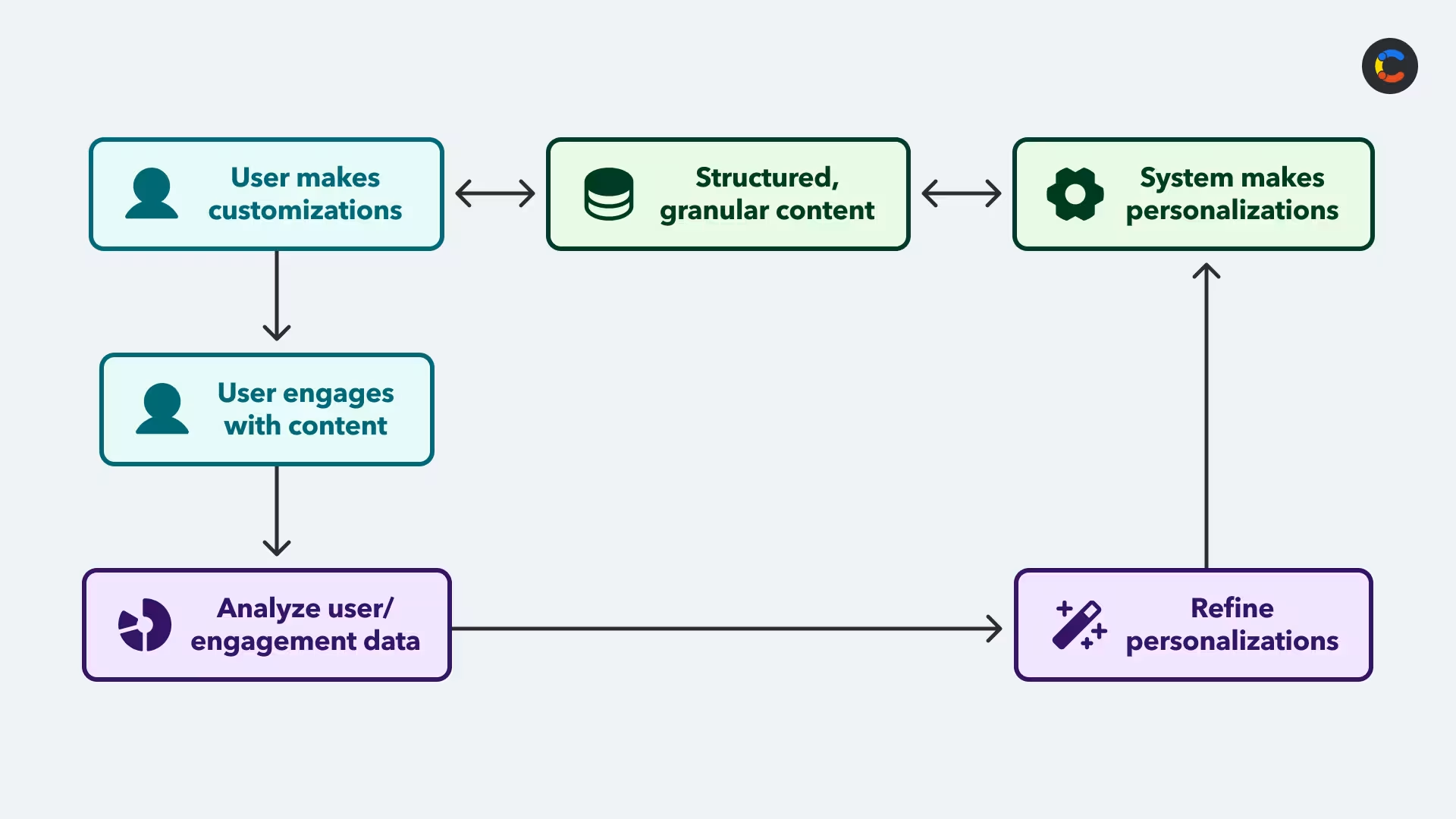
The Contentful digital experience platform includes content modeling tools for breaking down and storing your content in a strategic content taxonomy. This enables customization and personalization to empower users and enable marketing.
Contentful also provides agentic AI workflows for creatives to create and maintain content within this structure (with live visual previews, so you can see exactly what your users see), as well as analytics and personalization tools for collecting personalization data and adapting content to meet user expectations and drive interaction.
Marketers, content teams, and developers can all collaborate in the same platform to keep content on message, in sync, and ready for use in customizable, personalized apps.
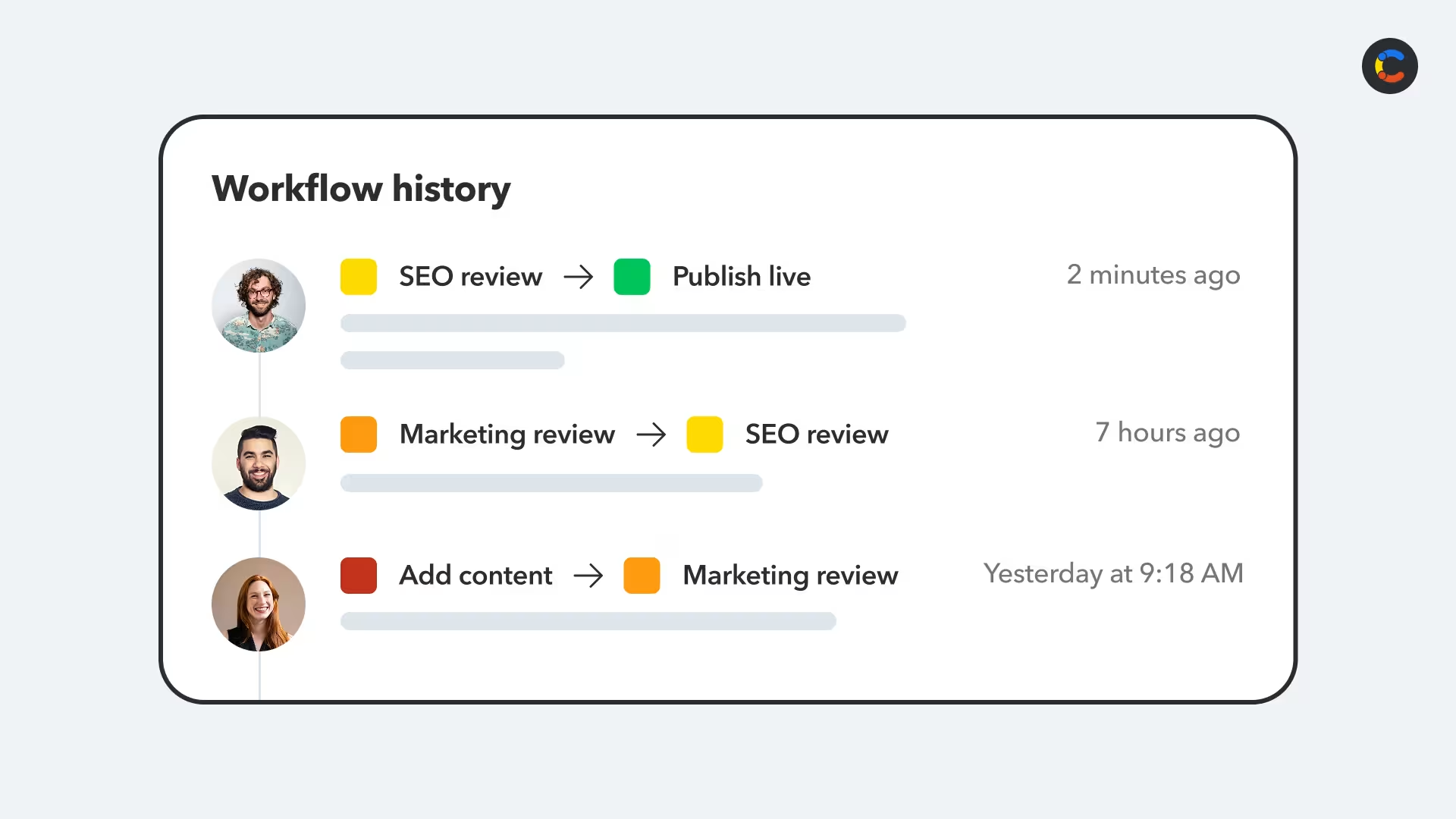
When you deliver digital products with Contentful, your content loads quickly from the global CDN with every tap, scroll, and user interaction — and all of this can be collected so that you can see how customers react to their customized and personalized experiences. You can better anticipate what your users want to see after the next scroll, and keep them engaged with your brand.
Customization vs. personalization isn't a matter of picking one or the other, and your content platform should support ways to implement and improve both.
The personalization tools provided by Contentful let you answer important questions about your customization and personalization efforts: Do customers react well if they have customized their experience? Does it make them buy more? Do they bounce less when provided certain recommendations?
Not only does this inform your personalization strategy, it can direct your future product and channel direction.

Inspiration for your inbox
Subscribe and stay up-to-date on best practices for delivering modern digital experiences.
Meet the authors

Thomas leads the Enterprise Solution Engineering Team in EMEA. With over a decade of experience in Marketing Technology, he has partnered with a wide range of customers to enhance their digital presence, streamline customer journeys, and drive sustainable growth through online engagement.
Related articles

7 effective ways of using website content personalization to create compelling customer experiences
November 4, 2024
Why marketing teams feel slower than ever (and what to do about it)
June 24, 2026

Content lifecycle management: Ensuring quality from creation to distribution
August 4, 2025

Ready to start building?
Put everything you learned into action. Create and publish your content with Contentful — no credit card required.