

Enterprise observability
Enterprise observability overview
Enterprise observability is the ability for enterprise customers to monitor and understand system behavior across your entire digital stack, from infrastructure and applications to APIs and content delivery, in near real-time.
Contentful handles delivery, while you manage storage, access and analysis using your preferred tools.
Log streaming overview
Log streaming is an Enterprise observability capability that provides continuous access to activity data generated by Contentful APIs. Log streaming is useful for teams that need visibility into how your organization is consuming Contentful APIs across applications and environments.
Logs are streamed in near real time to your configured storage destination, where they can be processed, analyzed, or retained using your existing tools and workflows. Contentful handles the delivery, while you manage storage, access, and downstream processing.
Delivery guarantees
Contentful’s log streaming follows an at-least-once delivery model. Which means each log event is sent one or more times:
- Events are retried automatically if delivery fails. No action needed from the user.
- In some cases, the same event may be delivered more than once.
Best-effort delivery
Log delivery operates on a best-effort basis. Due to typical challenges in any distributed system (such as network faults, latency, or temporary unavailability of your destination), delivery is not guaranteed in every circumstance.
In rare cases, a log record may be dropped to preserve system performance and stability. There are no SLAs on delivery timing or completeness.
Frequency and file output
Logs are sent every few minutes. The exact interval is not configurable. Each delivery cycle may produce multiple files.
Files are delivered in NDJSON format, compressed as .jsonl.gz. Each file follows a structured naming convention:
log_source=<api_type>/organization_id=<org_id>/year=YYYY/month=MM/day=DD/compacted-<api_type>-<uuid>.jsonl.gz
Example:
log_source=cda/organization_id=274qvl9SkVAlToItncE81X/year=2026/month=04/day=21/compacted-cda-023c67dd-564a-4ada-9bbf-570ae8f17067-36.jsonl.gz
This path structure allows multiple log sources to be delivered to the same cloud destination without files overwriting each other. There are no configuration options for delivery frequency, interval, batch size, or file format.
Setting up log streaming
Contentful uses log streaming to continuously deliver API activity data to your configured destination. Logs are emitted and sent in near real time, allowing you to process and analyze them using your existing observability tools.
Log streaming supports Content Delivery API (CDA), GraphQL API, Content Management API (CMA), and Content Preview API (CPA) log streaming, along with near real-time Audit logs, to Amazon S3, Google Cloud Storage and Azure Blob Storage.
Prerequisites and limits
Before setting up Enterprise Observability, ensure you have:
- An Enterprise plan subscription.
- Organization owner or admin role in Contentful.
Configuration limits: A maximum of 2 configurations per storage destination per log source per organization. For example, you can have up to 2 configurations for each log source — CDA, GraphQL, CMA and CPA — all configured to the same destination, such as Amazon S3. The same limit applies to each other destination (Google Cloud Storage, Azure Blob Storage).
Static IP addresses
Contentful uses static IP addresses to deliver logs, ensuring consistent and secure communication with your storage destination. You can use these IPs to configure allowlists or firewall rules for uninterrupted log delivery.
If your organization requires IP allowlisting, configure your firewall or network settings to include the static IP addresses Contentful uses for Enterprise Observability log delivery. The addresses vary by data residency region and are the same as those used for Audit Logs.
For the full list, read Audit Logs: Static IP addresses.
Amazon S3 setup
Contentful uses IAM role assumption to write logs to your S3 bucket without storing any AWS credentials. You grant Contentful cross-account write access by creating an IAM role it can assume.
Prerequisites
- An AWS account with permissions to create IAM roles and edit S3 bucket policies.
- Contentful’s AWS account ID:
- For US customers:
606137763417 - For EU data residency customers:
101997328120
- For US customers:
Step 1: Create an S3 bucket
- Log in to your AWS Management Console.
- Navigate to S3 and click Create bucket.
- Enter a unique bucket name and select the region where you want the bucket to reside. Note the bucket name and region — you will need them later.
- Configure options as required (versioning, logging, tags, object lock).
- Review and create the bucket.
Step 2: Create a new IAM policy
- Log in to your AWS Management Console.
- Navigate to IAM → Policies → Create policy.
- Select the JSON tab and paste the following policy, replacing
<your-s3-bucket-name>with your bucket name. Keep the/*at the end:
- Click Next, give the policy a meaningful name and description, then click Create.
Step 3: Create an IAM role for cross-account access
- In the IAM dashboard, go to Roles → Create role.
- Select AWS Account under “Trusted entity type”, then choose Another AWS account and enter Contentful’s AWS account ID (see prerequisites above).
- Enable Require external ID and enter your Contentful organization ID. This prevents the confused deputy problem. Your organization ID is available in the Contentful web app.
- Click Next, skip attaching permissions for now, then review, name the role, and create it.
Step 4: Attach the policy to the IAM role
- Go to the newly created role in IAM → Roles.
- Under Permissions, click Add permissions → Attach policies.
- Find the policy you created in Step 2, select it, and click Add permissions.
Step 5: Configure your S3 bucket policy
- Go to S3, find your bucket, and click Permissions.
- Edit the Bucket policy and add the following statement, replacing
<your-iam-role-arn>with the ARN of the role from Step 3 and<your-s3-bucket-name>with your bucket name. Keep the/*at the end:
- Save the changes.
Step 6: Configure log streaming in Contentful
Your AWS setup is complete. To start streaming logs, follow the configure log streaming in Contentful steps below.
Google Cloud Storage setup
Contentful authenticates with GCS using a service account key. You grant Contentful write access by creating a service account with the Storage Object Creator role and generating a JSON key for it.
Prerequisites
- A Google Cloud project with permissions to create and manage service accounts and storage buckets.
- Google Cloud Storage API enabled in your project.
Step 1: Create a GCS bucket
Create a new GCS bucket or use an existing one. Note the bucket name — you will need it later. To create a bucket, refer to Google’s guide on creating a bucket.
Step 2: Create a service account
Create a service account that Contentful will use to write logs. Follow the instructions in the Google Cloud documentation. Note the service account email — you will need it later.
Step 3: Create a JSON key
Create a JSON key for the service account and store it securely. See Creating and managing service account keys in the Google Cloud documentation.
When you download the key file, Google provides a JSON object. Contentful requires the value of the private_key field from that file — a PEM-encoded string that begins with -----BEGIN PRIVATE KEY-----. Copy that value, including the header and footer lines, and paste it into the Private key field in Contentful.
Step 4: Assign the Storage Object Creator role
Grant the service account write access to your GCS bucket. See Using Cloud IAM permissions in the Google Cloud documentation.
- Go to Cloud Storage → Buckets and select the bucket you created in Step 1.
- Navigate to the Permissions tab and click Grant access.
- In Add principals, add the service account email (e.g.
my-service-account@my-project.iam.gserviceaccount.com). - Under Assign roles, select Cloud Storage → Storage Object Creator.
- Click Save.
Step 5: Configure log streaming in Contentful
Your Google Cloud Storage setup is complete. To start streaming logs, follow the configure log streaming in Contentful steps below.
Azure Blob Storage setup
Contentful authenticates with Azure Blob Storage using a Shared Access Signature (SAS) URL. You grant Contentful write access by creating a container and generating a SAS token with Create and Write permissions scoped to that container.
Prerequisites
- An Azure account with permissions to create Storage Accounts and generate SAS tokens.
Step 1: Create an Azure Storage Account
- Log in to your Azure Portal.
- Navigate to Storage Accounts → Create.
- Select your subscription and resource group, or create a new one.
- Enter a unique storage account name and select the region. Note the name — you will need it later.
- Configure options as required (performance, redundancy, etc.).
- Click Review + create, then Create.
Step 2: Create a container
- Open the storage account you created in Step 1.
- On the left sidebar, under Data storage, click Containers.
- Click + Add container, enter a unique container name, and click Create. Save this container name for Step 3.
Step 3: Create a SAS token
- In the storage account, navigate to Data storage → Containers and click the container you created in Step 2.
- On the left sidebar, under Settings, click Shared access tokens.
- In the Permissions dropdown, deselect Read, then select Create and Write.
- Set an expiry date that complies with your secret rotation policy.
- Click Generate SAS token and URL.
- Copy the Blob SAS URL as you will need it in the next step.
Step 4: Configure log streaming in Contentful
Your Azure Blob Storage setup is complete. To start streaming logs, follow the configure log streaming in Contentful steps below.
Configure log streaming in Contentful
After preparing your cloud storage destination, complete the configuration in the Contentful web app.
-
Go to Organization settings → Observability.
-
Click Create new configuration.
-
Select a Log source: Content Delivery API, GraphQL API, Content Management API, or Content Preview API.
-
Select a Storage provider: Amazon S3 Bucket, Google Cloud Storage, or Azure Blob Storage.
-
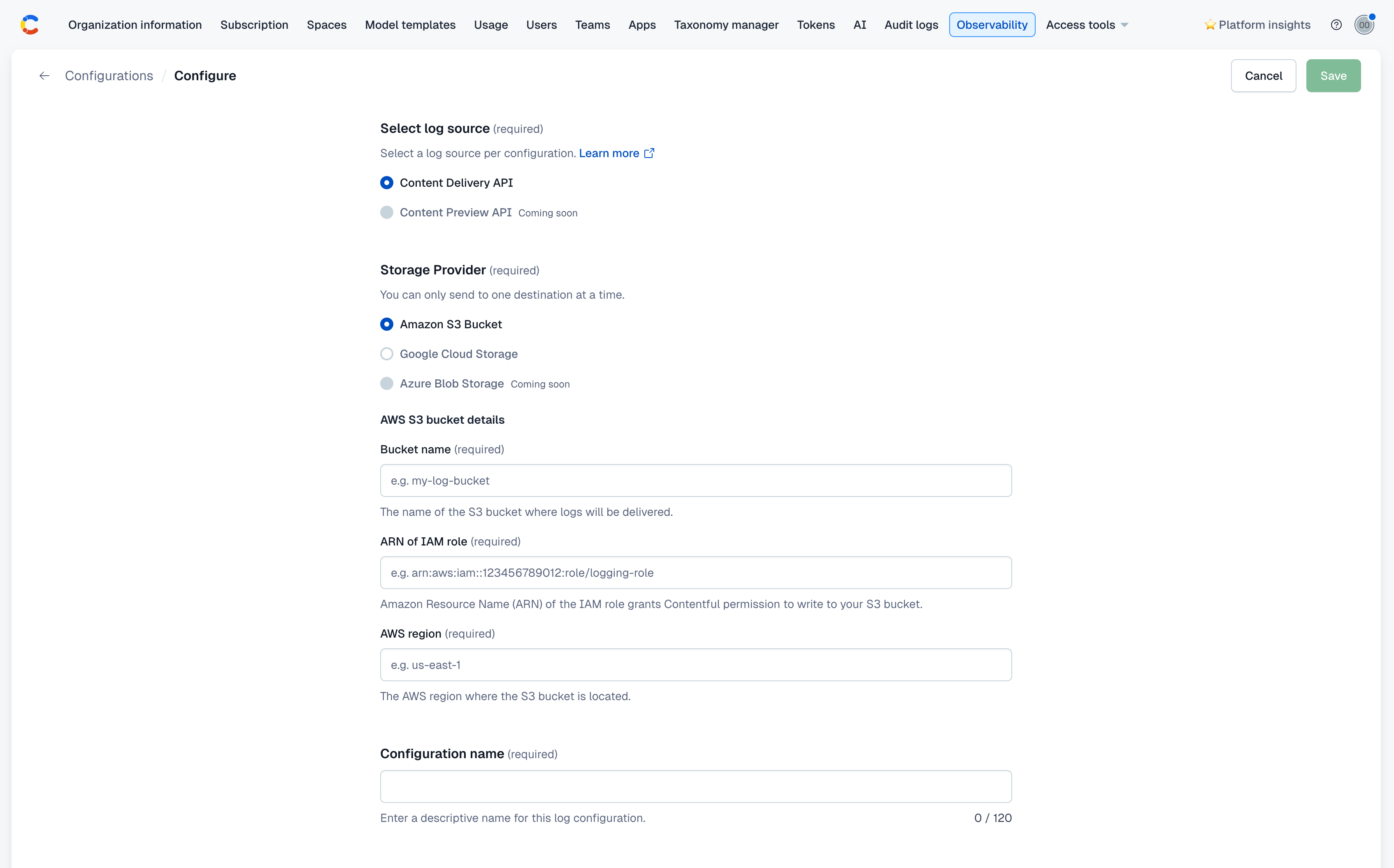
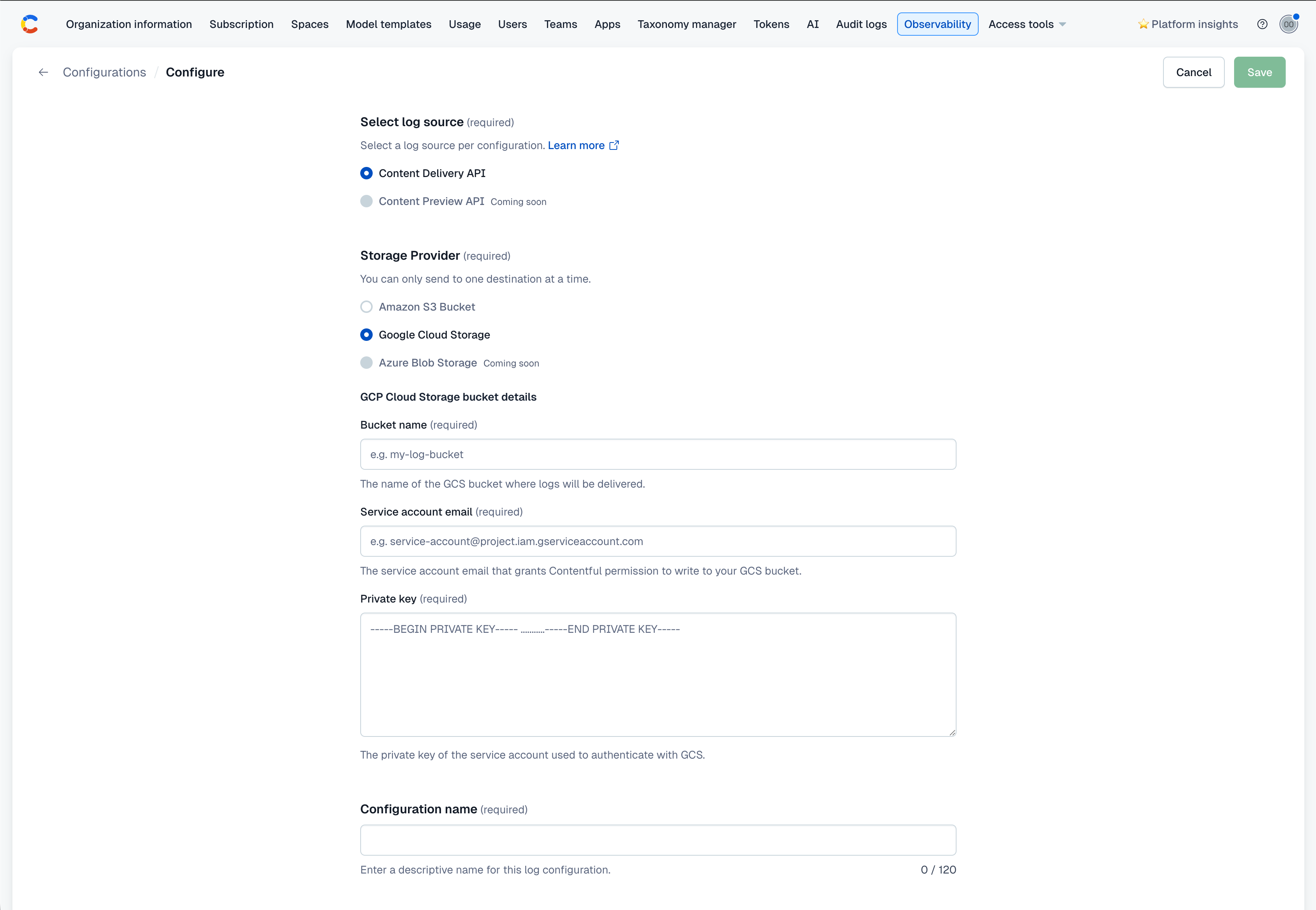
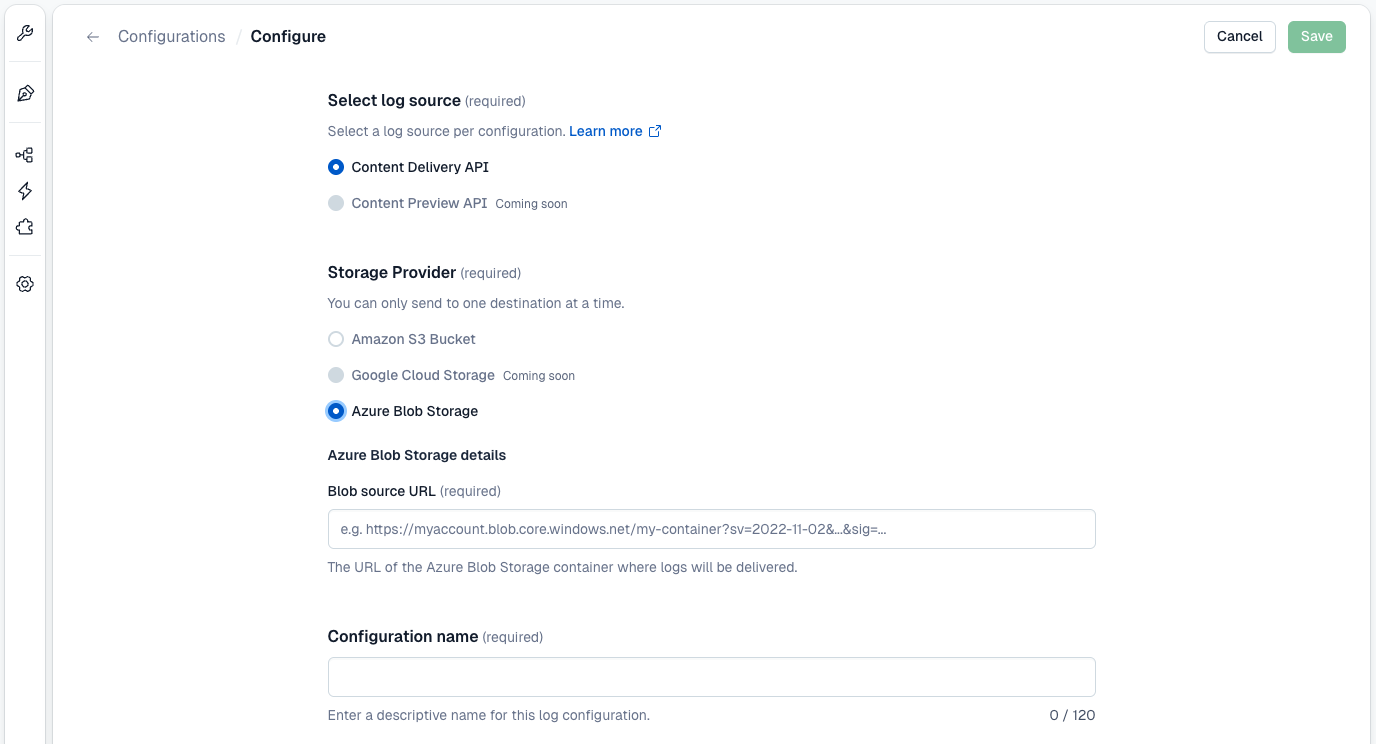
Enter the required credentials for your chosen provider:
-
Enter a Configuration name. This is a descriptive label to identify this configuration (e.g.
cda-logs-production). -
Click Save to begin streaming logs to your configured destination.
Amazon S3 Bucket configuration
Google Cloud Storage configuration
Azure Blob Storage configuration
What happens next
-
After successful configuration, your organization is enabled automatically. Logs will begin arriving within 5–10 minutes.
-
You can monitor delivery status in Organization settings → Observability in the Contentful web app, or use the delivery status API to check programmatically.
-
Contentful’s log delivery operates on a best-effort basis, meaning logs are sent as quickly as possible (typically within minutes), but timing is not guaranteed and may vary depending on system load.
Log streaming schema
Use the following schema to understand the structure of each log event delivered through log streaming. Each event represents a single API request and response, including metadata such as request details, response status, and performance metrics.
When building parsers, expect that additional attributes may be added. Reference by attribute name instead of field position.
Shared fields
The following fields are present in log events for all log sources.
GraphQL-specific fields
The following fields are only present in GraphQL API log events.
CMA log events carry only the shared fields above — there are no CMA-specific fields.
Example events
Content Delivery API:
GraphQL API:
Content Management API:
Monitoring delivery
Delivery statuses
Each configuration has a delivery status visible in the Contentful web app and returned via the Management API using the delivery status API. You will see the following statuses:
- Verifying: the configuration has been saved. Waiting for activation or first successful delivery.
- Delivering: the logs are being delivered successfully.
- Failing: ensure in the Contentful web app that the configuration details are correct. Action required: Fix your cloud storage configuration within 24 hours to prevent data loss by following the below troubleshooting steps.
Email notifications
When delivery failures are detected and automatic retries have not resolved them, Contentful sends an email notification to all Organization Owners and Organization Admins for the affected organization.
Visualizing logs in Datadog
Contentful provides a ready-to-use Datadog dashboard template covering Content Delivery API logs. It gives you immediate visibility into traffic volume, error rates, latency (p50/p90/p99), cache efficiency, rate limiting, and top consumers without building queries from scratch.
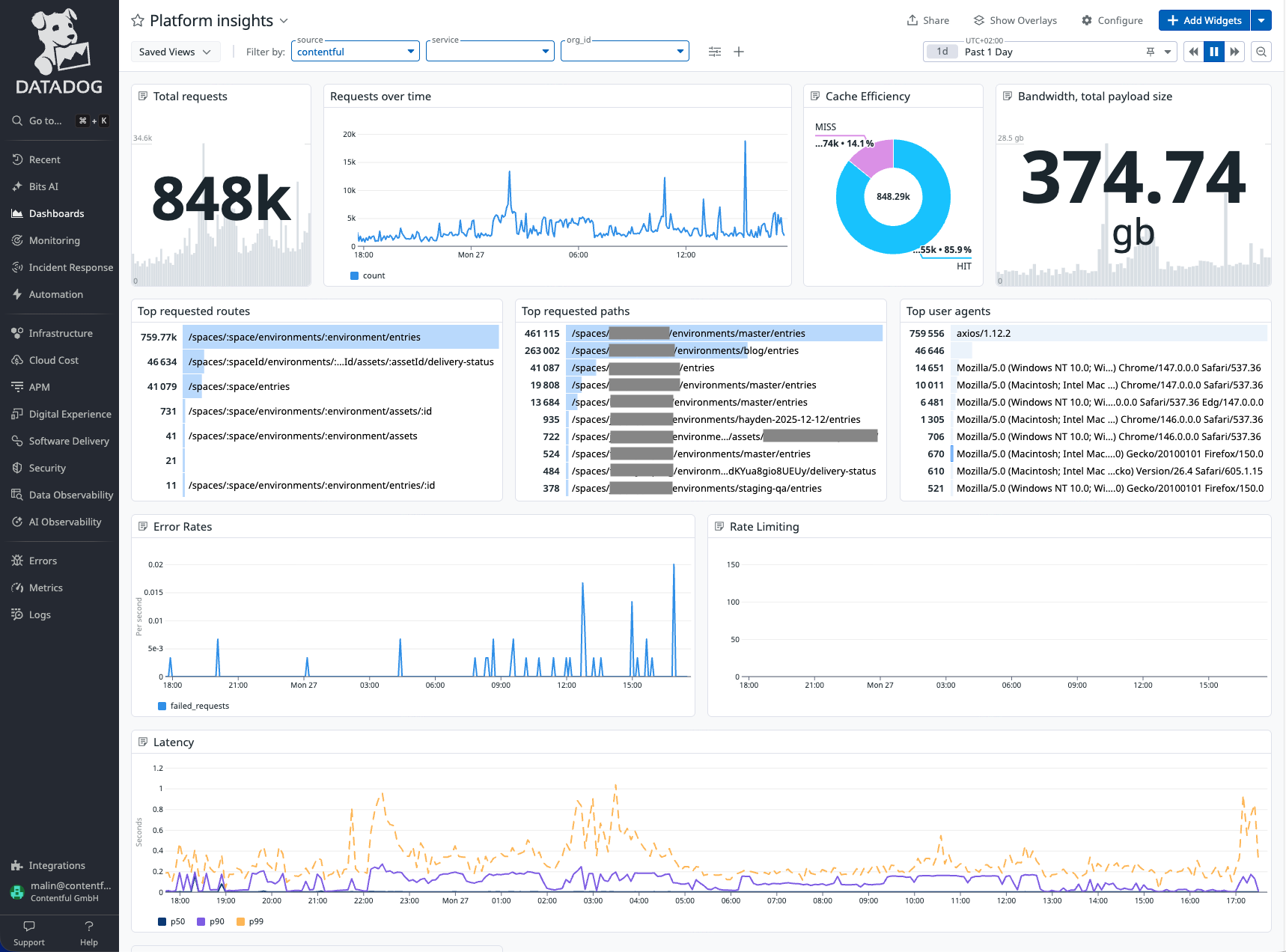
To use the integration dashboard:
- Forward your Contentful logs to Datadog:
- Datadog’s AWS Lambda Log Forwarder can read the logs from an S3 bucket and forward them to your Datadog account.
- Follow the instructions on the Datadog page on how to set up and deploy the log forwarding lambda.
- Make sure to include the following configuration in your log forwarder deployment:
- Download the dashboard JSON here.
- Create a new Dashboard on Datadog and import the downloaded JSON.
- Update the
Filter by:variables on the dashboard:- Replace service:
<your_service_name>with the service name you provided in thedd_tags. - Replace org_id:
<your_contentful_org_id>with your Contentful organization ID.
- Replace service:
- Update the
Troubleshooting log delivery failures
Log streaming can fail when Contentful is unable to deliver log data to your configured storage destination. These issues can be caused by misconfiguration, such as invalid credentials or insufficient permissions.
When delivery fails, Contentful will notify organization admins and owners by email and continue retrying automatically.
Status shows failing
Delivery is failing due to an issue with your destination configuration. Common causes depend on your storage provider:
Amazon S3
- Expired or invalid IAM role: the IAM role ARN is incorrect, the role has been deleted, or the trust relationship no longer allows Contentful to assume it.
- Insufficient write permissions: the IAM policy does not grant
s3:PutObjecton the target bucket. - Incorrect bucket name or region: the values in your configuration do not match your actual S3 bucket.
- Bucket policy blocks cross-account access: the bucket policy does not allow Contentful’s AWS account to write objects.
Google Cloud Storage
- Incorrect service account email: the email does not correspond to a valid service account in your project.
- Insufficient role: the service account does not have the Storage Object Creator role on the target bucket.
- Invalid or expired private key: the private key does not match the service account, or the key has been deleted or revoked.
- Incorrect bucket name: the bucket name in your configuration does not match your actual GCS bucket.
Azure Blob Storage
- Expired SAS token: the SAS token has passed its expiry date and must be regenerated.
- Insufficient permissions: the SAS token does not have Create and Write permissions on the container.
- Incorrect SAS URL: the Blob SAS URL does not point to the correct container or storage account.
How delivery failures work
Contentful attempts to continuously stream logs to your configured destination. If delivery fails, logs are retried automatically.
IP address blocking: if your destination uses an IP allowlist or firewall, ensure Contentful’s static egress IPs are permitted. See Static IP addresses above. This is a common cause of persistent delivery failures that do not surface as a configuration error.
- Organization owners and admins will receive an email notification once per day while failures persist.
- If configuration is updated, the delivery resumes within 24 hours, no log data will be lost.
- After 24 hours, undelivered logs for that period cannot be recovered.
How to resolve delivery failures
- Go to Organization settings → Observability in the Contentful web app.
- Locate the affected configuration.
- Review your storage configuration in your cloud provider (AWS S3, Google Cloud Storage, or Azure Blob Storage).
- Update any invalid credentials, permissions, or configuration values.
- Save your changes in Contentful.
Once your configuration is corrected, Contentful will automatically resume delivery on the next retry. No manual retry is required.
Receiving duplicate events
Duplicate events are expected. Enterprise Observability uses an at-least-once delivery model by design. Use the contentful.request.id field to deduplicate events in your downstream pipeline.
Logs are missing for a specific time period
If no working configuration existed during that period, those logs cannot be recovered. Enterprise Observability does not backfill historical data.
If a configuration was active but logs are missing, check the delivery status API for failures during that period. If failures occurred more than 24 hours ago, those logs have been permanently discarded.