CLI security check

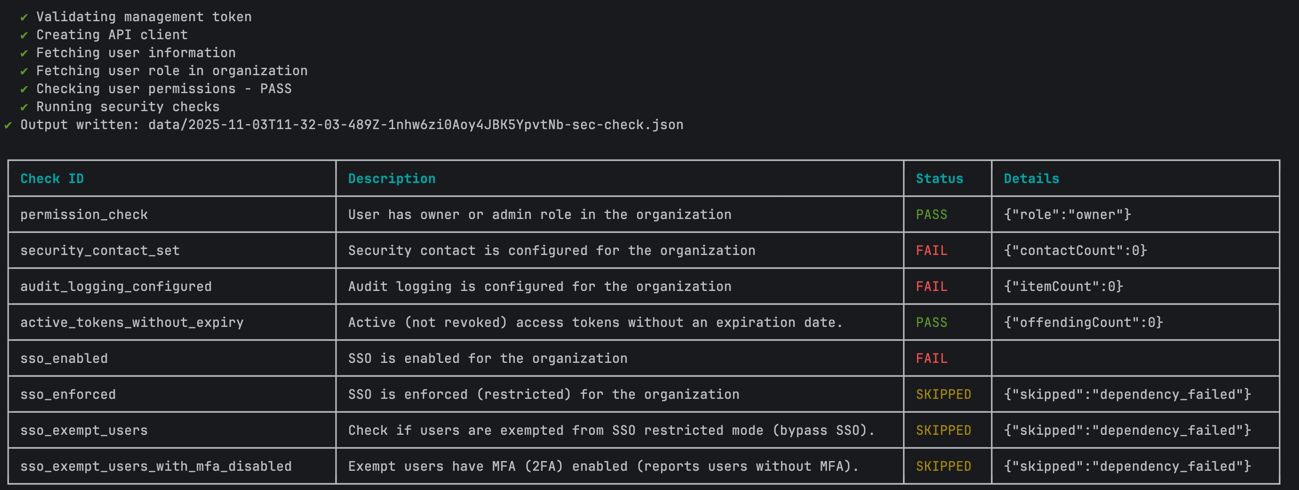
You can use the sec-check command to quickly assess your Contentful organization’s security posture. It runs out-of-the-box with the following check points:

  • Permissions. Only an organization admin or owner can perform the security check.
  • Security contact configured
  • Audit logging enabled
  • Long-expiry access tokens
  • SSO enabled
  • SSO enforced
  • SSO exempt users identified
  • MFA status for exempt users
CheckDescription
permission_checkValidates if the user has the required permissions (owner/admin) to perform security checks.
security_contact_setEnsures at least 1 security contact is configured.
audit_logging_configuredConfirms audit logging is enabled.
active_tokens_with_long_expiryFlags active access tokens whose expiration date is more than 1 year in the future.
sso_enabledValidates SSO is enabled.
sso_enforcedValidates SSO restricted mode is on.
sso_exempt_usersFlags users exempt from SSO enforcement.
sso_exempt_users_with_mfa_disabledFlags SSO-exempt users without MFA.

Each check delivers clear PASS/FAIL results with actionable data.

Prerequisites

Usage

Usage: contentful organization sec-check --organization-id <organization-id>
Options:
-h, --help Show help [boolean]
--organization-id, --oid Contentful organization ID [string] [required]
--management-token, --mt Contentful management API token (overrides stored
context token) [string]
--header, -H Pass an additional HTTP Header [string]
--output-file, -o Write JSON results to a file. If used without a
filename, a default file
./data/<timestamp>-<org-id>-sec-check.json is
created. [string]

Example

contentful organization sec-check --organization-id 123456789 -o

The security check output

The results can be exported as a JSON file with a single flag -o, making it easy to archive, track changes over time, or integrate with monitoring dashboards. Each failing check includes contextual details (counts, affected IDs) to help with troubleshooting.

Output JSON with fields:

1{
2 "permission_check": {
3 "description": "User has owner or admin role in the organization",
4 "pass": true
5 },
6 "security_contact_set": {
7 "description": "Security contact is configured for the organization",
8 "pass": true,
9 "data": {
10 "contactCount": 1
11 }
12 },
13 "audit_logging_configured": {
14 "description": "Audit logging is configured for the organization",
15 "pass": true,
16 "data": {
17 "itemCount": 1
18 }
19 },
20 "active_tokens_with_long_expiry": {
21 "description": "Active (not revoked) access tokens whose expiration date is more than 1 year in the future.",
22 "pass": false,
23 "data": {
24 "offendingCount": 6
25 }
26 },
27 "sso_enabled": {
28 "description": "SSO is enabled for the organization",
29 "pass": true
30 },
31 "sso_enforced": {
32 "description": "SSO is enforced (restricted) for the organization",
33 "pass": true
34 },
35 "sso_exempt_users": {
36 "description": "Check if users are exempted from SSO restricted mode (bypass SSO).",
37 "pass": false,
38 "data": {
39 "exemptUserIds": [
40 "2qEuWkv9GLQ8ypPK96xjZk"
41 ],
42 "exemptCount": 1
43 }
44 },
45 "sso_exempt_users_with_mfa_disabled": {
46 "description": "Exempt users have MFA (2FA) enabled (reports users without MFA).",
47 "pass": false,
48 "data": {
49 "mfaDisabledUsers": [
50 {
51 "id": "2qEuWkv9GLQ8ypPK96xjZk",
52 "email": "hussam.khrais+test@foo.com"
53 }
54 ],
55 "mfaDisabledCount": 1
56 }
57 }
58}

Next steps