Live events
Overview
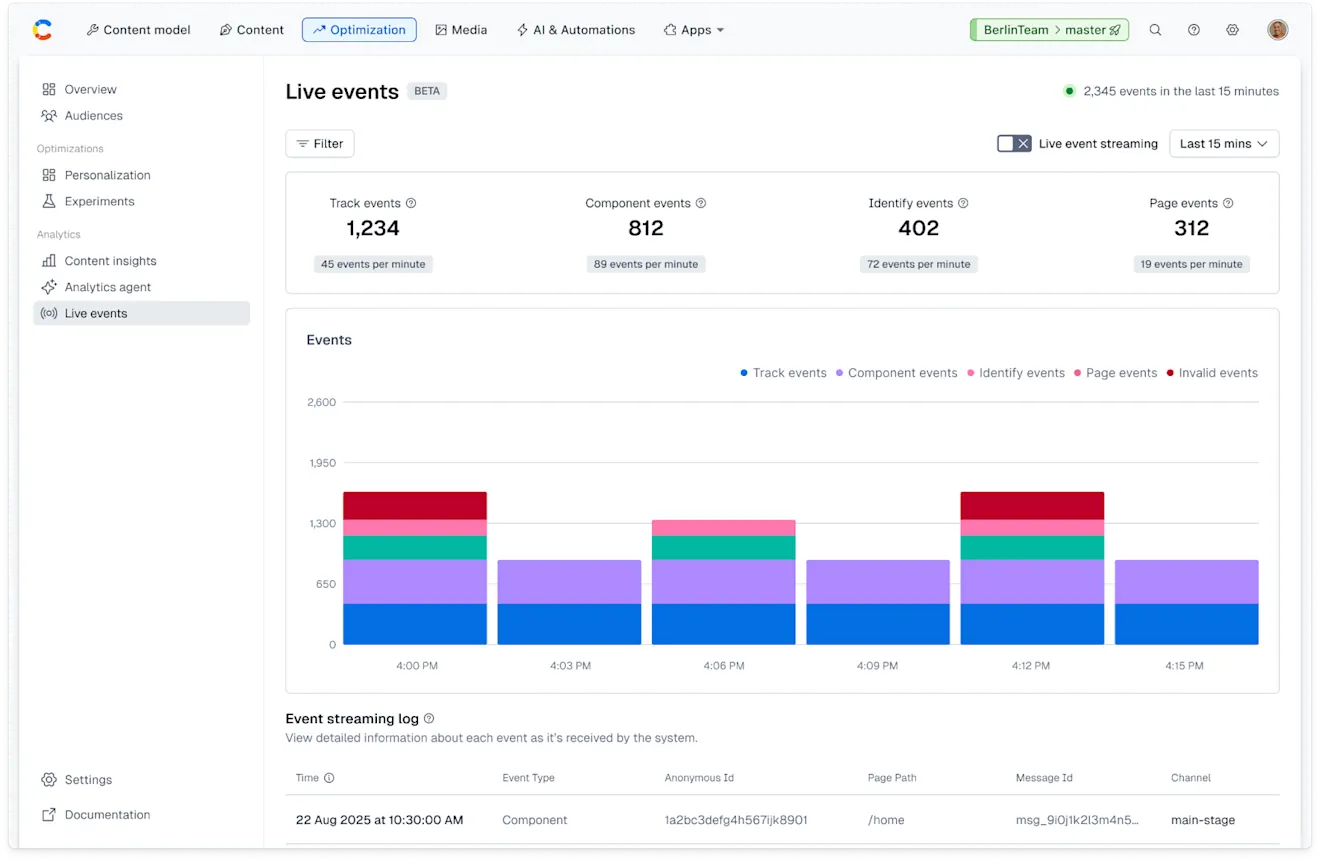
The Live events page contains details about all the events that are coming in from your setup. By analyzing the live events surrounding your content, you can better understand if your setup is working, so you can troubleshoot any potential issues.
NOTE: When accessing the Live events page, the Live event streaming option becomes automatically inactive. If you want to get real-time data about your events, enable the option.
Event types
You receive analytics on the following type of events:
Track – A
trackevent is used to log specific named actions a user takes.Component – A
componentevent is an event that is generated and recorded every time a user views a component (such as a content entry) on a website. This event is used to track the total number of views for each component, attribute user actions (like conversions) to specific components, and analyze content engagement and performance at component-level.Identify – An
identifyevent allows you to add custom information, called traits, to a profile. Using this type of event, you can name or "alias" a profile so that it can be referenced by that same alias in the future.Page – A
pageevent indicates a user has viewed the current page.
Event streaming log
Important: Only organization admins have access to the "Event streaming log" section.
When accessing the Live events page, the Live event streaming option becomes automatically inactive. When the Live event streaming option is enabled, we fetch the latest events at regular intervals (every 5 seconds) so you won't need to refresh the page to see the latest events arriving.
You can use the event streaming log to check the live analytics and see if your events are correctly coming in and they contain the right information.