Content Operations Agent (Beta)
Content Operations Agent is an AI-powered agent that automates repetitive content operations in Contentful. Describe the outcome you want in natural language, and the agent creates pages, audits content, applies metadata, and runs AI Actions across many entries at once.
Unlike AI Actions, which run a specific, pre-configured task, Content Operations Agent interprets an open-ended request, plans the steps needed to complete it, and carries out the work directly inside Contentful.
Overview
Content Operations Agent reduces the time and effort needed to complete repetitive content work at scale. Instead of managing workflows entry by entry, teams can describe a large content task in plain language and have the agent complete it faster, more consistently, and with less manual effort.
The agent works from the side panel of the web app. For single entry actions, it makes the requested update directly. For multi-entry tasks, it identifies the relevant content, proposes the changes, surfaces them for review, and applies them only after you approve.
Tip: For the best experience of the content operations it is recommended that you do the following:
Enable AI Actions, Content semantics and Built-in AI features in Settings → Governance → AI.
Activate the Timeline mode under the Settings → Environment.
With these features activated, this will allow the agent to access the most advanced capabilities on the platform, allowing it to solve tasks more effectively.
Key features
Natural language creation: describe a new page or entry, and the agent creates it along with any nested or reusable references it needs. This allows for reusing existing reference entries where appropriate instead of duplicating them.
Content audits: ask the agent to find outdated, incomplete, unlinked or missing content (for example, entries of a given content type older than a set age or missed validations) and it returns a filtered, clickable list of matching entries.
Bulk metadata and taxonomy updates: apply tags, taxonomy concepts or other metadata across many entries in a single request.
AI Actions integration: the agent can detect when an existing AI Action fits your request (such as a translation action) and run the action for you, including as a bulk AI Action across multiple entries.
Releases and scheduling: the agent can add entries to a release, schedule the release for a specific date and time, and notify a Slack channel with a link to review it.
Approval-gated changes: the agent never publishes, archives, or changes a content type without your explicit approval first.
How to activate
Content Operations Agent is available. To use it:
In the Preview Center, activate the Content Ops Agent, then select Try it now.
This takes you to the Agent access modal. This modal will list all agents available to activate. Content Ops Agent opens automatically, since it's the one you just enabled.
In the Enable Content Ops Agent dialog, review the access the agent will have: read, edit, create, delete, publish, unpublish, archive, and unarchive entries, content types, and assets.
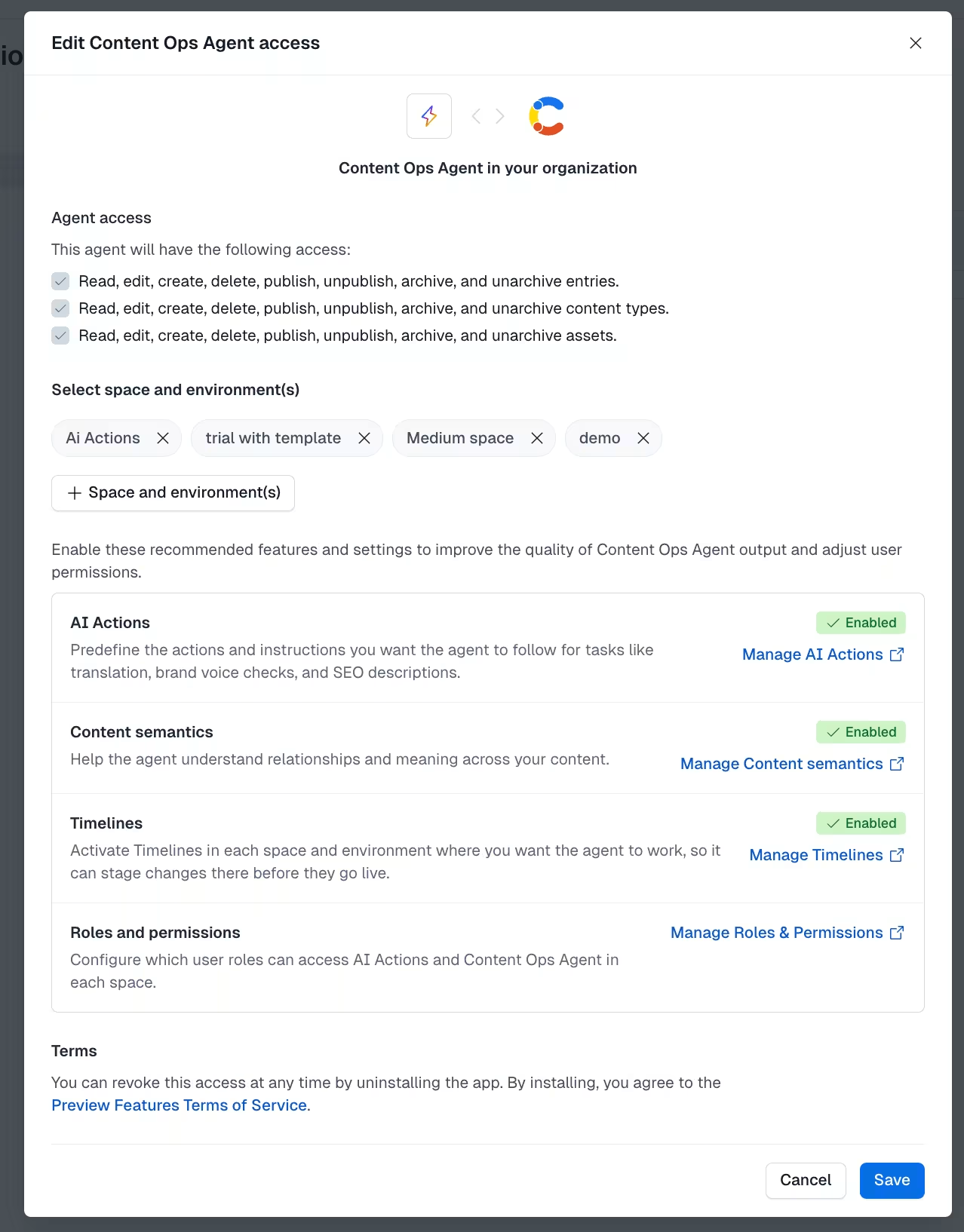
Select the spaces and environments to install the agent into, then select Install and authorize.
Once installed, you'll be prompted to enable additional features that improve the quality of the agent's output: AI Actions, Content semantics and Timelines. Each links directly to its configuration screen, and its status updates live as you turn features on or off.
Update roles and permissions for any users who need access. NOTE: The Content Operations Agent and AI Actions are deactivated by default for individual users, even after the space-level installation above.
To start using the agent, open the side panel in the Contentful web app and select
Permissions are inherited from your existing user role. The agent can only execute actions that you are already permitted to take.
Tip: If you want the agent to follow a specific, pre-defined set of instructions rather than deciding how to approach a task, use an AI Action instead. This ensures a specific request is always handled the same way. If no matching AI Action exists, the agent will use its own judgment to complete the request.
How it integrates with AI Actions
Content Operations Agent can detect when a task matches existing AI Actions, such as translation actions or bulk runs that action automatically rather than generating the output itself. This keeps output consistent with any AI Actions your team has already configured and reviewed.
If you've set up specific AI Actions for common tasks, the agent will prioritize using them over improvising a response.
AI Actions in bulk
When a request applies to multiple entries, the agent runs AI Actions in bulk rather than running the same action one entry at a time. For example, if you ask the agent to translate several newly created entries, it identifies all the relevant entries and submits them as a single bulk run, which requires your approval before it executes.
Limitations
Content Operations Agent is in active beta, and the following limitations currently apply:
Background/async updates - the agent does not yet post ongoing updates about what it's doing or has done outside of the active session. This is planned as an upcoming improvement.
Not connected to Personalization - the agent cannot create personalization variants or experiments.
No autonomous publishing - the agent will always require explicit approval before publishing, archiving, or changing a content type.
Usage limit - Content Operations Agent has a rolling five-hour usage limit during beta, based on tokens consumed in that window. The limit resets automatically once the window ends and applies at the organization level (not per space or per user). It is currently the same across all customer tiers.
Recommended use cases
Content Operations Agent is designed for recurring content operations, including:
Auditing and improving content health - finding outdated, unreferenced, broken or incomplete content across a large content library.
Maintaining and updating content at scale applying metadata, taxonomy, status changes, or validations across many entries as part of campaigns or governance work.
Creating production-ready content building new pages or entries, including reference setup, ahead of a launch.
Content Operations Agent is not a general-purpose AI assistant. It's built for content operations inside Contentful and is not intended as a chat assistant for unrelated tasks.
FAQs
What is the Content Operations Agent? It's a chat-based copilot inside the Contentful web app that carries out content operations for you. Allowing you to create, update, and archive entries, manage references and tags, run AI Actions, create and schedule releases. It works on the entries and content types in your space, guided by your instructions and the permissions your admin sets.
What's the difference between Content Operations Agent and AI Actions? AI Actions run a specific, pre-configured task the same way every time. The agent interprets an open-ended, natural language request, decides how to approach it (including using AI Actions where relevant), and carries out multi-step work such as creating pages, running audits, or managing releases.
What controls do space admins have? Admins must accept the AI Terms of Service before install and review the agent's full access (entries, content types and assets) on the authorization screen. Admins can add one or more policies with Allow or Deny rules, scoped to specific actions (read, create, update, publish, unpublish, delete, archive, unarchive) and optionally limited to specific content types. The agent can only do what both its configured permissions and the installing user's role allow.
Will the agent ever publish, archive, or change a content type without asking me first? No. These actions always require your explicit approval before the agent executes them.
Can the agent invent field content on its own? No. If you don't provide values for a field, the agent leaves it blank rather than generating content, unless you specifically ask it to fill the field in.
Does the agent work with Personalization? Not currently. The agent cannot create personalization variants or experiments.
Is there a usage limit during beta? Yes. Usage is capped on a rolling five-hour window based on tokens consumed, reset automatically, and applied at the org level. If you're regularly hitting this limit, contact your CSM.
Does the agent publish or change content automatically? No. Publishing always requires your explicit confirmation. The agent runs pre-publish validation first, and if any content type rule fails it reports the failure and does not publish.
How does the agent decide what to create, link, or tag? For references, it uses semantic search across your space, falling back to full-text search, and links the most relevant entry for each field. For tags and taxonomy, it matches on the content. You can reject a suggested link and the agent searches again.
Can it fill in an entry from the content I paste? Yes. Paste a draft or outline into one field and the agent completes the remaining fields from it. If an AI Action is configured for a field, the agent uses it; if not, it does a best-effort generation from your text and relevant existing content.
What happens to my data and content? Content you send to the agent is processed to carry out your request and is never used to train models. For details on how content is handled by our AI providers, see the Terms of Service.